High Level Design
Design a News Feed System
Designing a scalable news feed system requires balancing: Write efficiency vs read latency Cache size vs data freshness Push vs pull models Throughput vs storage cost
If you've ever wondered how platforms like Facebook, Instagram, or Twitter show you a constantly updating feed of posts, photos, and videos — this deep dive is for you.
In this blog, we'll walk through the system design of a News Feed, covering requirements, architecture, and detailed components including caching, fanout strategies, and optimizations for scale.
What Are We Building, Really?#
A news feed is the heart of any social media platform — a continuously updating list of content including:
- Status updates
- Photos & videos
- Likes & comments
- Activity from friends, groups, and pages
In this blog, we design a feed similar to Facebook News Feed, Instagram Feed, and Twitter Timeline. We'll cover both web and mobile needs.
Step 1: Understanding the Requirements#
| Question | Answer |
|---|---|
| Mobile or Web? | Both |
| Core features? | Users can publish posts & view friends' posts |
| Feed sorting? | Reverse chronological order |
| Max friends per user? | 5,000 |
| Traffic? | 10M Daily Active Users |
| Content types? | Images, videos, text |
These constraints help us understand scale and performance expectations.
Step 2: High-Level Design#
We split the system into two major flows.
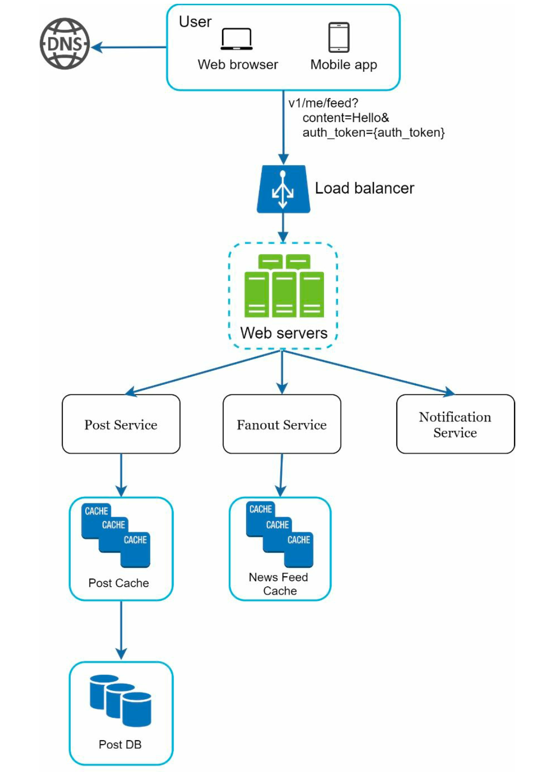
1. Feed Publishing Flow#
When a user makes a post:
- It is stored in the database & cache
- It's delivered (or "fanned out") to friends' feeds
- Friends receive notifications
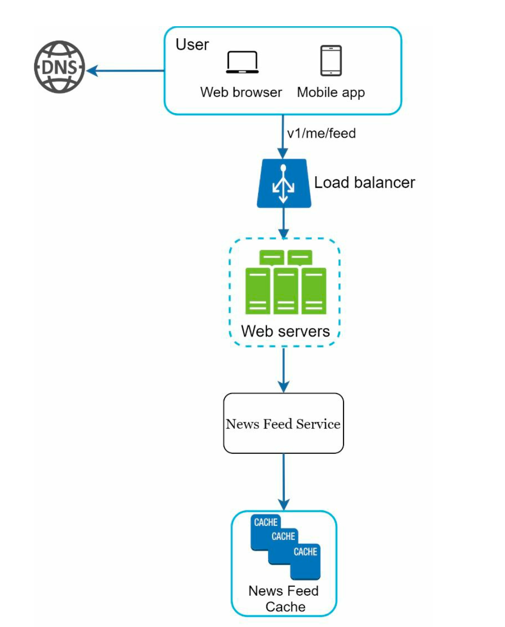
2. Feed Retrieval Flow#
When a user opens the app:
- Their feed is fetched from the news feed cache
- Posts are assembled with metadata (user info, content, images, etc.)
News Feed APIs#
1. Publish Post API
POST /v1/feed
| Param | Description |
|---|---|
| content | Text or media of the post |
| auth_token | Authenticates the request |
2. Retrieve Feed API
GET /v1/feed
| Param | Description |
|---|---|
| auth_token | Authenticates the request |
Step 3: Design Deep Dive#
Two systems need deeper exploration: Web Servers and the Fanout Service.
Feed Publishing — Deep Dive#
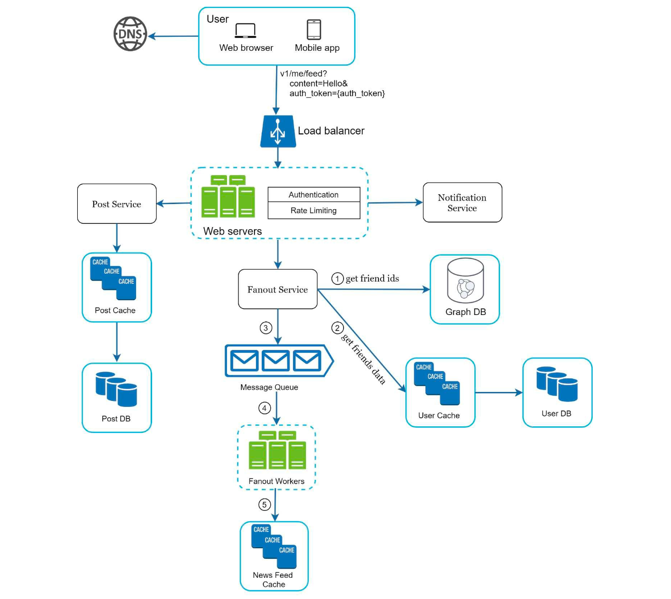
Web Servers#
| Concern | Detail |
|---|---|
| Authentication | Only users signed in with a valid auth_token are allowed to make posts. |
| Rate Limiting | Limits the number of posts per user within a time window to prevent spam and abuse. |
The Fanout Service#
Fanout = distributing a user's post to all their friends. There are two models:
Fanout on Write (Push Model)#
The system precomputes the feed during the write operation.
When Alice posts → her post is immediately pushed into all her friends' feed caches.
| ✅ Pros | Super-fast read performance; very low latency for feed retrieval |
| ❌ Cons | High write amplification; causes hotkey problems; large memory usage |
Hotkey Problem: A key that gets disproportionately high reads/writes compared to others. A celebrity with 10M followers posts → the system must update 10M feed caches, overwhelming the cluster.
Fanout on Read (Pull Model)#
The system computes the feed during read, not write.
When a user opens their feed → posts are pulled from all friends' timelines on demand.
| ✅ Pros | Less storage; no hotkey issue; good for inactive users |
| ❌ Cons | Slower reads; expensive during peak traffic; high read amplification |
Hybrid Approach (Used by Instagram, Twitter)#
| User Type | Strategy | Reason |
|---|---|---|
| Regular users | Fanout on Write | Fast reads for active, well-connected users |
| Celebrity users | Fanout on Read | Avoids hotkey issues with consistent hashing |
This approach provides the best balance between write efficiency and read performance.
Fanout Service — Closer Look#
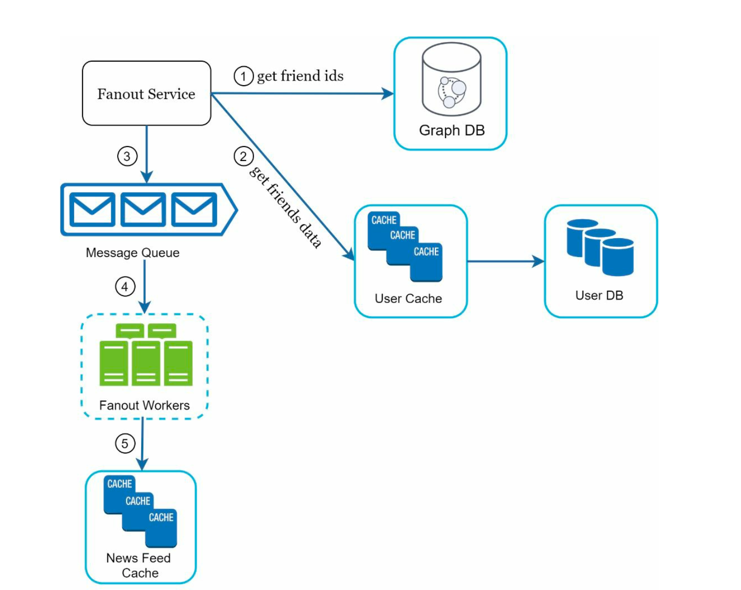
Here's exactly what happens inside the fanout service when a post is published:
-
Fetch friend IDs from the graph database. Graph databases are purpose-built for managing friend relationships and friend recommendations — they make traversals over social graphs fast.
-
Get friends' info from the user cache. The system then filters out friends based on user settings. For example, if you've muted someone, their posts won't show up on your feed even though you're still friends. Similarly, a user can selectively share a post with specific friends or hide it from others.
-
Send the friends list and new post ID to the message queue. This decouples the fanout work from the write path — the post is persisted immediately, and the distribution happens asynchronously.
-
Fanout workers consume from the message queue and store news feed data in the news feed cache. Think of the news feed cache as a <post_id, user_id> mapping table. Only IDs are stored (not full objects) to keep memory consumption manageable. A configurable limit caps how many entries are kept per user — most users only care about the latest content, so the cache miss rate stays low.
-
Store <post_id, user_id> pairs in the news feed cache.
NewsFeed Retrieval — Deep Dive#
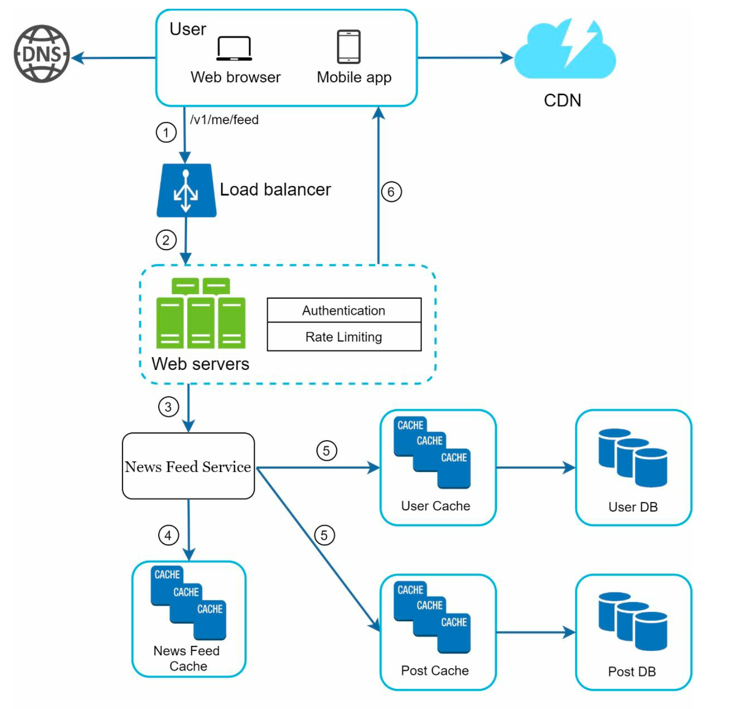
When a user opens their app and the feed loads, here's the full journey:
- The user sends a request to retrieve their news feed: GET /v1/me/feed
- The load balancer redistributes the request to an available web server.
- The web server calls the news feed service to fetch the feed.
- The news feed service retrieves a list of post IDs from the news feed cache (the <post_id, user_id> store built by the fanout workers).
- A user's feed is more than just IDs — it contains usernames, profile pictures, post content, images, etc. So the news feed service fetches the complete user and post objects from the user cache and post cache to construct a fully hydrated feed.
- The fully hydrated feed is returned as JSON to the client for rendering.
This two-step approach (IDs first, then hydration) keeps the cache lean while still serving rich responses.
Cache Architecture#
The system heavily relies on caching to achieve low latency.
| Cache Type | Purpose |
|---|---|
| News Feed Cache | Stores <post_id, user_id> pairs for each user's feed |
| Content Cache | Full post data; popular content stored in hot cache |
| Social Graph Cache | Friend/follow relationships |
| Action Cache | Likes, replies, and other user interactions on posts |
| Counters Cache | Like count, follower count, reply count, etc. |
Database Design#
Different components in the news feed system have very different access patterns — choosing the right database per use case is critical for performance at scale.
| Component | Database | Why |
|---|---|---|
| Post data | MySQL / PostgreSQL | Structured schema; relational queries on post metadata (author, timestamp, content) |
| User profiles | MySQL / PostgreSQL | Relational data; fast indexed lookups by user ID |
| Social graph (friendships) | Neo4j / Amazon Neptune | Graph traversals (friends-of-friends, mutual connections) are natively efficient — far cheaper than SQL joins at scale |
| News feed cache | Redis (Sorted Set) | O(1) reads/writes; sorted sets map cleanly to chronological feed IDs keyed by timestamp |
| Post & user cache | Redis | Low-latency key-value lookups for hydrating feed responses |
| Counters (likes, followers) | Redis | Atomic INCR / DECR operations avoid race conditions at high write throughput |
| Media (images, videos) | S3 / Blob Storage | Cheap, durable object storage; CDN sits in front for fast global delivery |
| Message queue (fanout) | Kafka / RabbitMQ | Durable, high-throughput pub/sub; decouples the write path from fan-out workers |
Why separate SQL from cache? SQL is the source of truth — durable, consistent, queryable. Redis is the fast path — it serves the hot read traffic so the database never gets hammered on every feed load.
Why not store full posts in the news feed cache? The feed cache only holds <post_id, user_id> pairs. Full post objects live in the Content Cache (Redis) and the Post DB. This keeps the feed cache small and lets post data be updated in one place without invalidating every user's feed.
Summary#
Designing a scalable news feed system requires balancing:
| Trade-off | Options |
|---|---|
| Write efficiency vs read latency | Push (fast reads) vs Pull (fast writes) |
| Cache size vs data freshness | Bounded ID caches + hydration on read |
| Push vs pull models | Hybrid fanout based on user type |
| Throughput vs storage cost | Store IDs only, not full objects |
The hybrid fanout model stands out as the most practical for real-world social platforms. This architecture ensures fast feed loading, efficient handling of celebrity users, and scalable performance at millions of DAU.