High Level Design
Design a Video Streaming Service
End-to-end design of a YouTube-like video platform — uploading flow, adaptive streaming, DAG-based transcoding pipeline, CDN cost optimizations, pre-signed URLs, DRM, and fault-tolerant error handling.
A video streaming service (YouTube, Netflix, Vimeo, Udemy) lets users upload, transcode, and watch videos across devices, at massive scale. The scope is wide — this design focuses on uploading and streaming, the two core workflows.
Before jumping to design, always clarify scope with the interviewer.
Step 1: Requirements#
Clarifying Questions#
| Question | Answer |
|---|---|
| Features needed? | Upload a video and watch a video |
| Clients? | Mobile apps, web browsers, smart TV |
| Daily active users? | 5 million |
| Daily uploads | 10% of users |
| Average daily time spent? | 30 minutes |
| International users? | Yes, large percentage |
| Supported video resolutions? | Most formats and resolutions |
| Encryption required? | Yes |
| Max video file size? | 1 GB |
| Use existing cloud infrastructure? | Yes — strongly recommended |
Functional Requirements#
| # | Requirement |
|---|---|
| 1 | Users can upload videos (max 1 GB) in most formats and resolutions |
| 2 | Users can stream/watch videos smoothly across devices |
| 3 | Users can change video quality during playback |
| 4 | System supports mobile apps, web browsers, and smart TVs |
| 5 | Videos are transcoded into multiple formats and resolutions after upload |
| 6 | International users are supported |
Non-Functional Requirements#
| # | Requirement | Detail |
|---|---|---|
| 1 | High availability | Video streaming must stay available even during partial failures |
| 2 | Scalability | Handle 5M DAU; 500K video uploads/day; 150 TB new storage/day |
| 3 | Low latency | Smooth playback with minimal buffering; fast upload starts |
| 4 | Reliability | Uploads must be resumable; no data loss on failures |
| 5 | Security | Videos encrypted; only authorized uploads via pre-signed URLs; DRM for piracy protection |
| 6 | Low infrastructure cost | CDN costs ~$150K/day at scale — cost optimization is a first-class concern |
| 7 | Adaptive streaming | Serve high resolution on good bandwidth; auto-downgrade on poor connections |
Estimations#
| Metric | Calculation | Result |
|---|---|---|
| Daily active users | — | 5 million |
| Daily video uploads | 5M × 10% | 500,000 videos/day |
| Daily storage needed | 500K × 300 MB | 150 TB/day |
| Videos watched per user/day | — | 5 videos |
| CDN data served/day | 5M × 5 × 0.3 GB | 7.5 PB |
| CDN cost/day (AWS CloudFront @ $0.02/GB) | 7.5 PB × $0.02 | ~$150,000/day |
CDN serving costs are extremely high. A key design goal is to reduce CDN usage without sacrificing performance.
Step 2: APIs#
Video Upload#
| Step | Method | Endpoint | Description |
|---|---|---|---|
| 1 | POST | /v1/videos | Initiate upload — creates the video record, returns video_id and a pre-signed URL |
| 2 | PUT | {pre_signed_url} | Upload the video file directly to blob storage using the pre-signed URL (goes to S3/blob, not the API server) |
| 3 | PUT | /v1/videos/{video_id}/metadata | Send title, description, tags, thumbnail — runs in parallel with step 2 |
| 4 | GET | /v1/videos/{video_id}/status | Poll transcoding status — uploading / processing / ready / failed |
Steps 2 and 3 run in parallel — the client uploads the file and sends metadata simultaneously. Step 2 bypasses the API server entirely; large binary data goes straight to blob storage via the pre-signed URL.
Video Streaming#
| Method | Endpoint | Description |
|---|---|---|
| GET | /v1/videos/{video_id} | Fetch video metadata — title, description, available resolutions, thumbnail URL |
| GET | /v1/videos/{video_id}/stream | Returns the ABR manifest URL (HLS .m3u8 or DASH .mpd) |
What /stream actually does: This call goes to the API server, which checks the video's metadata (is it ready? what resolutions exist?) and returns the ABR manifest URL pointing at the CDN. The API server never talks to the CDN — it just tells the client where to go.
What happens next (separate from this API): The client's video player fetches the manifest — a small text file listing all quality variants and the CDN locations of their segments. The player requests video segments directly from CDN edge servers, measuring bandwidth and switching quality chunk by chunk. This is where the CDN cache hit/miss check actually happens — entirely outside the API server.
Interview phrasing: "The /stream endpoint returns the ABR manifest URL. The API server never touches the CDN on the read path — it just tells the client where to go. All subsequent video traffic flows player → CDN, bypassing your infrastructure entirely."
Step 3: High Level Design#
Three main components:
| Component | Role |
|---|---|
| Client | Mobile apps, web browsers, smart TV apps |
| CDN | Caches and serves videos close to users globally |
| API Servers | Everything else — feed, recommendations, user management, upload management |
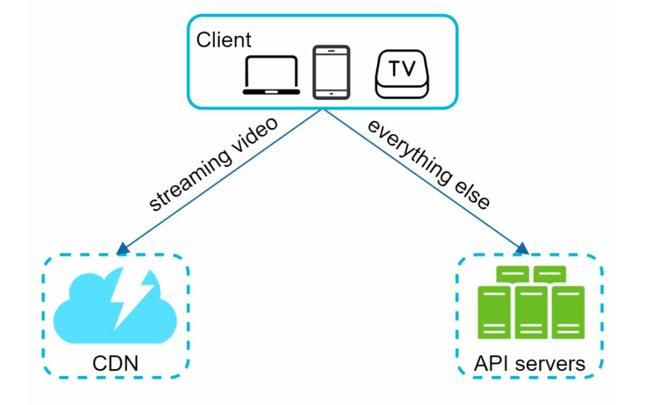
Two main workflows: video uploading and video streaming.
1. Video Uploading Flow#
| Component | Responsibility |
|---|---|
| Load Balancer | Evenly distributes requests among API servers |
| API Servers | Handles all user requests except video streaming |
| Metadata DB | Stores video metadata; sharded and replicated for performance and HA |
| Metadata Cache | Caches video metadata and user objects for faster reads |
| Original Storage | Blob storage for raw, unprocessed video uploads |
| Transcoding Servers | Convert video into multiple formats/bitrates for device compatibility |
| Transcoded Storage | Blob storage for processed video files |
| CDN | Caches and serves transcoded videos globally |
| Completion Queue | Message queue for transcoding completion events |
| Completion Handler | Workers that consume completion events and update metadata |
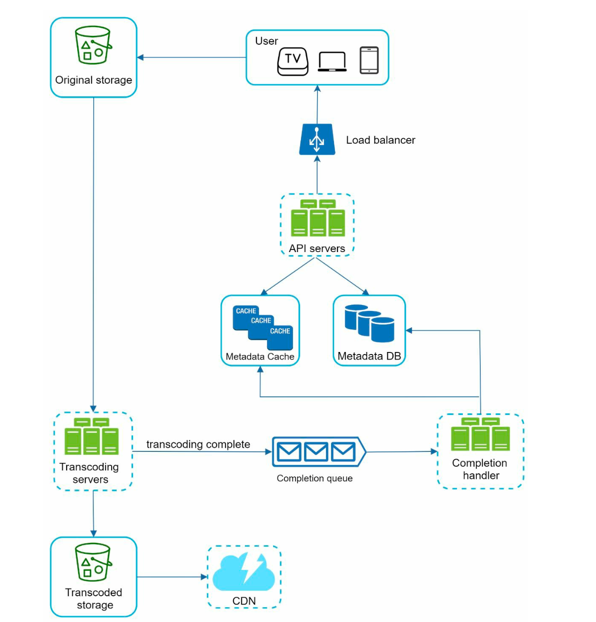
The upload happens in two parallel steps:
A. Upload Actual Video#
- Video is uploaded to Original Storage.
- Transcoding Servers fetch the video and begin transcoding.
- On completion (parallel):
- Transcoded video pushed to Transcoded Storage → distributed to CDN.
- transcoding completion event queued in the Completion Queue.
- Completion Handler workers pull events and update Metadata DB and Cache.
- API Server notifies the client that the video is ready for streaming.
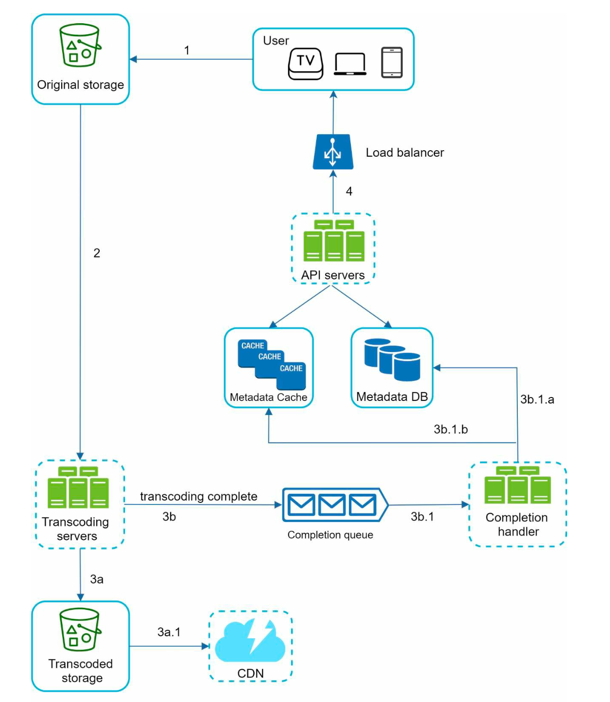
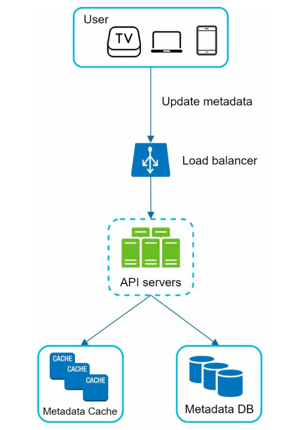
B. Update Video Metadata (Parallel with A)#
While the video file uploads, the client simultaneously sends metadata to the API servers. API servers update the Metadata Cache and Metadata DB.
2. Video Streaming Flow#
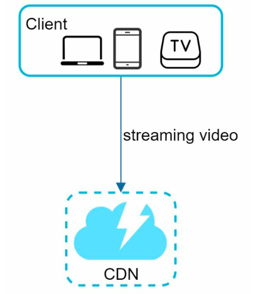
Downloading = the full video file is downloaded before playback starts. Streaming = playback begins while the file is still downloading — only a small buffer is needed.
- Videos stream directly from the CDN to clients.
- The edge server closest to the user serves the video.
- Cache miss → fetched from Transcoded Storage (origin), cached at edge for future requests.
Streaming Protocols#
| Protocol | Latency | Compatibility | Best For |
|---|---|---|---|
| HLS | Medium–High (low with LL-HLS ~2s) | Excellent (iOS, browsers, TVs) | Live & VOD — max device reach |
| MPEG-DASH | Medium–High | Excellent (except iOS) | Codec flexibility, adaptive bitrate |
| WebRTC | Ultra-low (<0.5s) | Excellent (browsers, mobile) | Interactive live video, calls |
| RTMP | Low (~2–5s) | Strong ingest | Live stream ingest to platforms |
| SRT | Very low (~1–2s) | Growing | Secure contribution over unreliable networks |
| RTSP | Low (~2–10s) | Good (cameras, devices) | Surveillance / closed-network streaming |
Step 4: Detailed Design#
Video Transcoding#
Video transcoding converts a video into multiple formats and bitrates for different devices and network conditions.
Why transcoding is needed:
| Reason | Explanation |
|---|---|
| Storage optimization | Raw videos are huge — transcoding compresses them |
| Device compatibility | Different devices support different formats |
| Adaptive quality delivery | Serve HD to fast networks, lower res to slow networks |
| Smooth playback | Enable auto/manual quality switching on variable networks |
Common formats and codecs:
| Type | Options |
|---|---|
| Video containers | MP4, AVI, MOV, MKV, WebM |
| Video codecs | H.264, H.265 (HEVC), VP9, AV1 |
DAG-Based Transcoding Pipeline#
Challenges:
- Transcoding is CPU/GPU intensive and time-consuming.
- Different creators need different processing (watermarks, thumbnails, HD/SD variants).
- A single fixed pipeline can't cover all use cases.
Solution: Model transcoding tasks as a Directed Acyclic Graph (DAG) — tasks run sequentially where required and in parallel where possible.
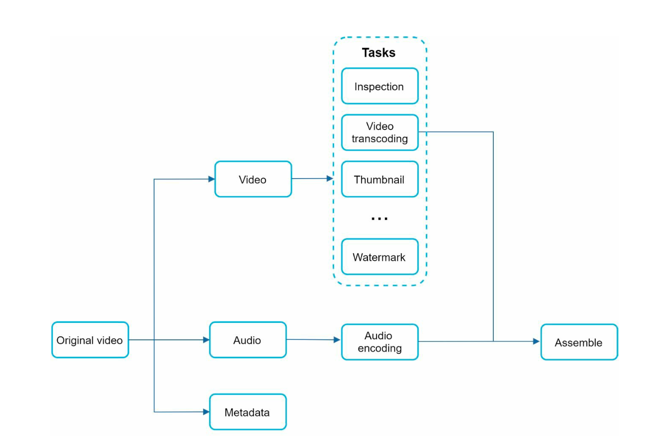
Fetch original video
        │
Split into [video stream, audio stream, metadata]
        │
    ┌───┴──────────────────────┐
    ▼                          ▼
Inspection                Audio encoding
    │                          │
    ▼                          │
┌───┼────┬────┬────┐           │
▼   ▼    ▼    ▼    ▼           │
360 480 720 1080 Thumbnail     │
 │   │    │   │                │
 ▼   ▼    ▼   ▼                │
Watermark (on each resolution) │
    │                          │
    └──────────┬───────────────┘
               ▼
        Mux audio + video → final output per resolution
What this structure buys you concretely:
- Inspection gates everything — if the file is corrupt, the DAG fails fast before wasting CPU on 4 parallel encodes.
- Encoding and thumbnail generation fan out in parallel from a single inspected source — no artificial serialization between them.
- Audio encoding runs completely independently, in parallel with the entire video branch. It only needs to rejoin at the very end (muxing).
- Watermarking is per-resolution — 4 independent parallel tasks, not one sequential bottleneck applied to each resolution one at a time.
- The final mux is a join point — it waits for both the watermarked video variant AND the encoded audio before it can run. The DAG enforces this dependency explicitly.
DAG stages:
| Stage | Purpose |
|---|---|
| Inspection | Validate video quality, detect corruption or malformed files |
| Video Encoding | Transcode to multiple resolutions: 360p, 480p, 720p, 1080p, 4K |
| Thumbnails | Use uploader's image or auto-generate from video frames |
| Watermarking | Overlay branding or ownership identifiers per resolution |
Transcoding Architecture#
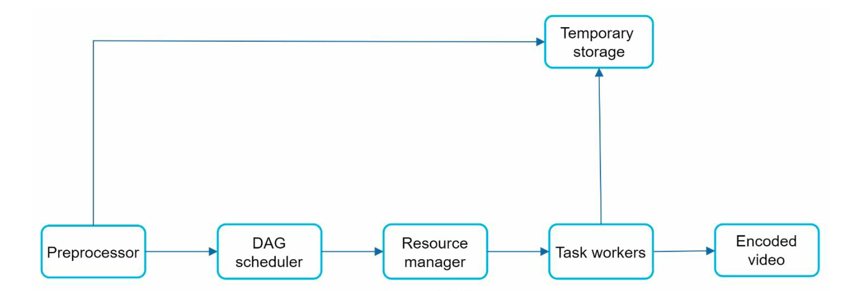
1. Preprocessor
- Splits video into GOPs (Groups of Pictures) — independently playable chunks (a few seconds each).
- Handles backward compatibility for older devices via GOP-based splitting.
- Generates the DAG from client-defined configuration files.
- Caches GOPs and metadata for retry/recovery if encoding fails.
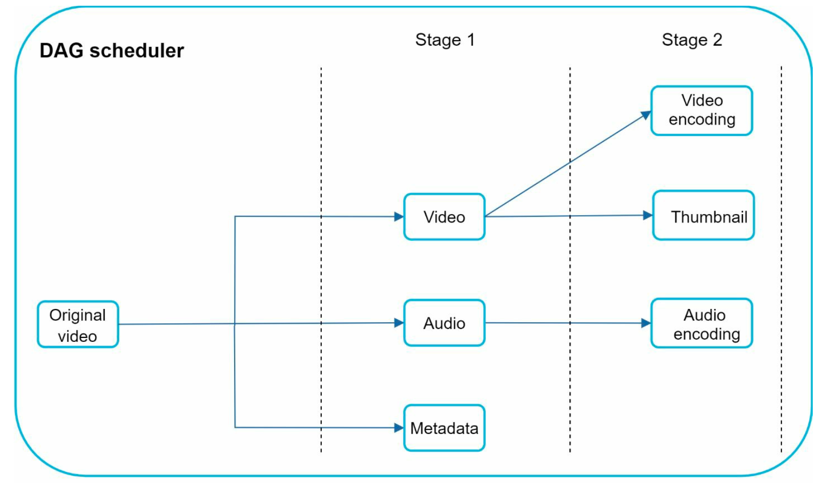
2. DAG Scheduler
- Divides the DAG into execution stages based on task dependencies.
- Places each stage's tasks into the Resource Manager's task queue.
Example stages:
- Stage 1: Split original video into video stream, audio stream, metadata.
- Stage 2 (parallel): Video → encoding + thumbnail | Audio → encoding
3. Resource Manager
- Manages a task queue (priority queue of pending tasks), worker queue (worker availability), and running queue (active task–worker bindings).
- Workflow: fetch highest-priority task → pick optimal worker → assign → track → remove on completion.
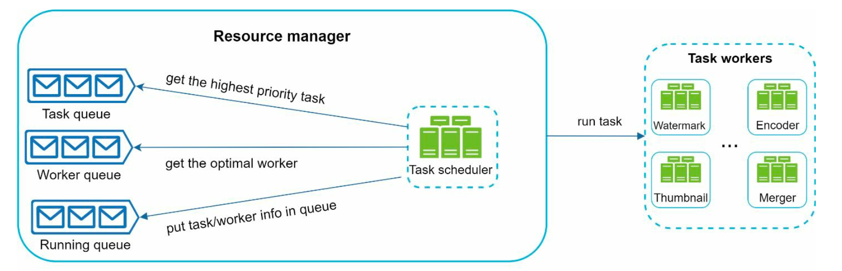
4. Task Workers
- Execute assigned tasks (encoding, thumbnail generation, etc.).
- Report completion status back to the Resource Manager.
5. Temporary Storage
Temporary storage is the scratch space between pipeline stages — it holds intermediate data produced during processing, not the original upload and not the final output.
| What | Where | Why |
|---|---|---|
| GOP chunks (video split into segments by Preprocessor) | Blob storage | Lets encoding workers each grab a chunk and encode in parallel instead of one worker processing the whole file |
| Split streams (video, audio, metadata separated) | Blob storage | Specialist workers can process each stream simultaneously |
| DAG task state and metadata | In-memory | Tiny, frequently read by workers — memory keeps access sub-millisecond |
| Active encoding buffers | Local worker disk | Holds intermediate output while a worker is mid-task |
Everything here is auto-cleaned once the pipeline completes. Encoded output goes to Transcoded Storage; the original upload stays untouched in Original Storage.
Step 5: System Optimizations#
Speed Optimizations#
1. Parallelize video uploads via GOP-aligned chunking
- Instead of uploading the full video at once, split it into small GOP-aligned chunks.
- Enables resumable uploads on failure and faster parallel uploads.
- GOP splitting can be done client-side to reduce server load.

2. Upload centers close to users
- Deploy multiple global upload centers.
- Users upload to the nearest region (US → NA servers, China → Asia servers).
- Implemented using CDNs as upload endpoints.
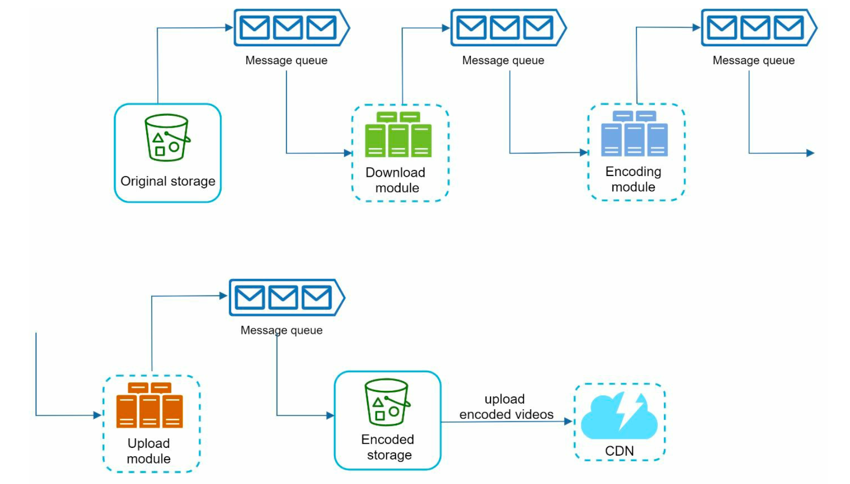
3. Parallelism everywhere with message queues
- Without queues: encoding waits for full download to finish (sequential bottleneck).
- With queues: encoding starts as chunks arrive (parallel throughput).
Safety Optimizations#
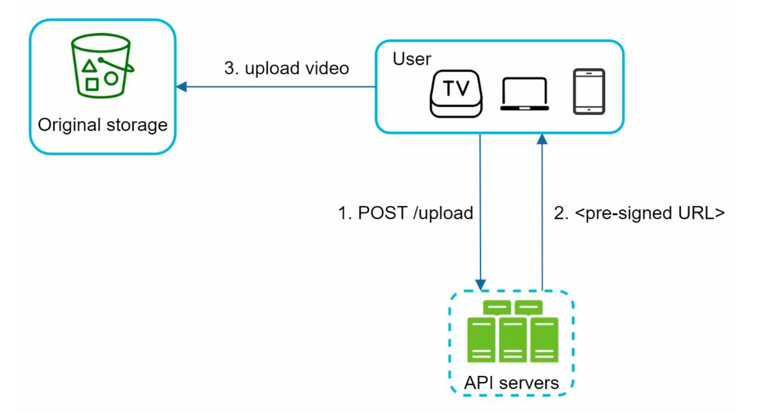
1. Pre-signed upload URLs
Flow:
- Client requests a pre-signed URL from the API server.
- API server returns a time-bound, permission-scoped URL.
- Client uploads video directly using that URL — bypasses the API server for large data.
2. Protecting videos from piracy
| Mechanism | How it works |
|---|---|
| DRM (FairPlay, Widevine, PlayReady) | Enforces playback restrictions at the device level |
| AES encryption | Encrypts stored videos; decrypts only for authorized viewers |
| Visual watermarking | Overlays logos or identifiers to deter theft and trace leaks |
Cost-Saving Optimizations#
Core observation: Video traffic follows a long-tail distribution — a small number of popular videos account for most views; the majority have low or zero traffic.
| Strategy | Description |
|---|---|
| Selective CDN usage | Serve only popular videos via CDN; deliver long-tail videos from cheaper origin servers |
| On-demand encoding | Skip pre-encoding all variants for low-traffic videos; encode on demand instead — trade-off: slower first-viewer experience |
| Region-aware distribution | Push content only to the regions where it's popular, not globally |
| Build or partner for CDN | At Netflix-scale, build your own CDN or partner with ISPs (Comcast, AT&T, Verizon) to cut bandwidth costs |
Step 6: Error Handling#
Types of Errors#
| Type | Example | Strategy |
|---|---|---|
| Recoverable | Video segment fails to transcode | Retry a few times; return error code if retries exhaust |
| Non-recoverable | Malformed video format | Stop all tasks for that video; return error to client |
Component-Level Error Playbook#
| Component | Failure Scenario | Handling Strategy |
|---|---|---|
| Upload | Upload fails | Retry upload a few times |
| Video splitting | Client can't split video by GOP | Upload full video; perform GOP splitting server-side |
| Transcoding | Video/segment fails to transcode | Retry transcoding task |
| Preprocessor | Preprocessor failure | Regenerate DAG |
| DAG Scheduler | Task scheduling failure | Reschedule the task |
| Resource Manager Queue | Queue service down | Switch to replica queue |
| Task Worker | Worker crashes | Retry task on another worker |
| API Server | Server down | Route request to another stateless API server |
| Metadata Cache | Cache node failure | Read from replicas; spin up replacement node |
| Metadata DB – Master | Master node down | Promote a replica to master |
| Metadata DB – Slave | Slave node down | Read from another slave; add new slave node |
Step 7: DB Choices#
| Component | Database | Why |
|---|---|---|
| Video metadata (title, description, tags, status) | MySQL / PostgreSQL (sharded) | Structured data; sharded + replicated for performance and HA at scale |
| User data (profiles, subscriptions) | MySQL / PostgreSQL | Relational; standard indexed lookups |
| Metadata cache | Redis | Fast reads for video info on every page/player load; avoids DB round-trips |
| Original video storage (raw uploads) | S3 / Blob Storage | Large binary files; supports direct upload via pre-signed URLs — no API server in the path |
| Transcoded video storage (processed variants) | S3 / Blob Storage | Stores multiple encoded versions (360p, 480p, 720p, 1080p) per video; origin for CDN |
| CDN | CloudFront / Akamai | Edge caching; serves transcoded video directly to clients globally |
| Completion queue (transcoding events) | Kafka | Durable, high-throughput event stream; decouples transcoding servers from completion handlers |
| Temporary transcoding storage (GOPs, intermediate chunks) | In-memory / local disk | Short-lived; auto-cleaned after processing completes |
Why blob storage for both video tiers? Binary files don't belong in a database. S3 is cheap, durable, scales infinitely, and integrates natively with CDNs — purpose-built for exactly this.
Why sharded MySQL? Video metadata at scale (800M+ videos on YouTube) can't fit on a single node. Sharding by video_id distributes load while keeping structured query support.
Why Redis over DB for metadata? Every video play starts with a metadata fetch. At 5M DAU watching 5 videos/day, that's 25M reads/day on metadata alone — Redis keeps this sub-millisecond.
FAQs#
If watermarking fails after exhausting retries, should the whole upload be marked as failed?
It depends on why the watermark exists and who owns the content.
For most videos, watermarking is cosmetic branding — an overlay logo or channel name. Shipping without it is a reasonable degradation: mark the video as published with a warning, log the failure, and let the creator re-trigger watermarking later.
But watermarking also serves as a piracy/anti-theft protection mechanism — for premium or licensed content, it makes a leaked copy traceable. For those videos, shipping without a watermark is not safe; a leak becomes untraceable, which may violate licensing agreements or expose the platform to legal liability.
The right model is to treat watermarking as configurable criticality at the video or creator level:
| Content type | Watermark criticality | On failure |
|---|---|---|
| Regular user-generated content | Non-critical | Publish without watermark; flag for retry |
| Premium / licensed content | Critical | Block publish; surface hard failure to creator |
| Paid course or DRM-protected content | Critical | Block publish; do not stream until resolved |
The DAG node for watermarking can be tagged with a required: true/false flag per job — the completion handler respects that when deciding whether a partial success counts as a publishable state.
Why a DAG for the transcoding pipeline rather than a flat list of parallel tasks?
A flat parallel task list assumes all tasks are independent — fire everything at once and collect results. A DAG gives you explicit dependencies: some tasks can only start after specific others finish.
For video transcoding, the tasks aren't all independent:
- You can't encode video until inspection confirms the file isn't corrupted.
- You can't generate a thumbnail until at least one video frame exists.
- Audio encoding can only run in parallel with video encoding after the audio stream has been split out from the raw file.
- Watermarking must happen after encoding, not before.
With a flat parallel list, you'd either artificially sequence everything (losing parallelism) or fire dependent tasks prematurely (causing failures). The DAG gives you both at once: maximum parallelism within each stage, strict ordering across stages.
The DAG also enables granular retries — if thumbnail generation fails, re-run only that node, not the entire pipeline. A flat task list has no way to express that.
How does adaptive bitrate streaming actually work?
The manifest (.m3u8 / .mpd) lists multiple bitrate variants of the same video — rungs on a quality ladder (360p, 480p, 720p, 1080p). Each variant is broken into small chunks, typically a few seconds each.
The player doesn't fetch a whole video file — it fetches one chunk at a time. Before requesting the next chunk, it checks buffer health and current download speed, then picks which rung to use for that chunk. The switch happens chunk by chunk, seamlessly, with no server-side decision-making. The server just serves whichever chunk the player asks for.
This is why the manifest approach makes ABR possible: all the intelligence lives in the client player. The CDN is just a dumb file server — it doesn't know or care which quality the player is on.
If not all videos are cached on CDN, where does the video come from?
The serving path has three tiers depending on the video's popularity:
| Path | Latency | Cost | Used for |
|---|---|---|---|
| CDN edge hit | Lowest | Highest | Popular videos already cached |
| CDN miss → Transcoded Storage | Medium | Medium | Less popular videos; CDN fetches from origin, caches, then serves |
| On-demand transcode → Transcoded Storage | Highest | Lowest | Rarely accessed resolutions not yet encoded |
The Original Storage (raw uploads) is never in the serving path — it only exists for the transcoding pipeline. "Not caching on CDN" doesn't mean a video is unavailable — it means the request goes directly to Transcoded Storage via an origin server instead of a CDN edge.
Why use cloud services instead of building from scratch?
System design interviews focus on architecture, not low-level implementation. Building from scratch is unrealistic — Netflix uses AWS, Facebook uses Akamai CDN, YouTube uses Google Cloud Storage and Google CDN.
What is blob storage?
A Binary Large Object (BLOB) store holds binary data as a single entity. Examples: AWS S3, Azure Blob Storage, Google Cloud Storage.
How to handle live streaming?
Live streaming shares similarities with VOD (upload → encode → stream) but has key differences:
| Concern | VOD | Live |
|---|---|---|
| Latency | Flexible | Strict — specialized protocols (WebRTC, LL-HLS) required |
| Parallelism | High — batch encoding | Low — small real-time chunks |
| Error handling | Long retries acceptable | Must be lightweight; graceful degradation over recovery |
How to handle video takedowns?
Videos violating copyright, policy, or law are removed. Detection happens:
- At upload — automated scanning during processing.
- Post-upload — through user flagging and moderation pipelines.
Glossary#
Bitrate — the rate at which bits are processed per unit of time. Higher bitrate = better quality but more bandwidth required.
GOP (Group of Pictures) — a sequence of video frames that can be decoded independently. Splitting videos into GOPs enables parallel encoding and resumable uploads.
Adaptive Bitrate Streaming (ABR) — automatically adjusts video quality based on available network bandwidth. Protocols like HLS and MPEG-DASH implement ABR.