High Level Design
Designing an Email Service
End-to-end design of a scalable email service — service registration, 2FA authentication, global cache with sidecar pattern, API contracts, tagging, spam detection, full-text search with inverted index, and contacts/groups management.
An email service enables users to register, authenticate, send and receive emails (with attachments), search their inbox, tag messages, and manage contacts and groups — all while operating at scale across millions of users.
Features Overview#
The email service covers the following key capabilities:
- Registering a user
- Login (2-factor authentication)
- Profile creation
- User preference management
- Sending/receiving emails (with attachments)
- Searching emails
- Tagging emails (automatic & manual)
- Spam and virus detection
- Contacts and groups
Step 1: Service Registration and Proxies#
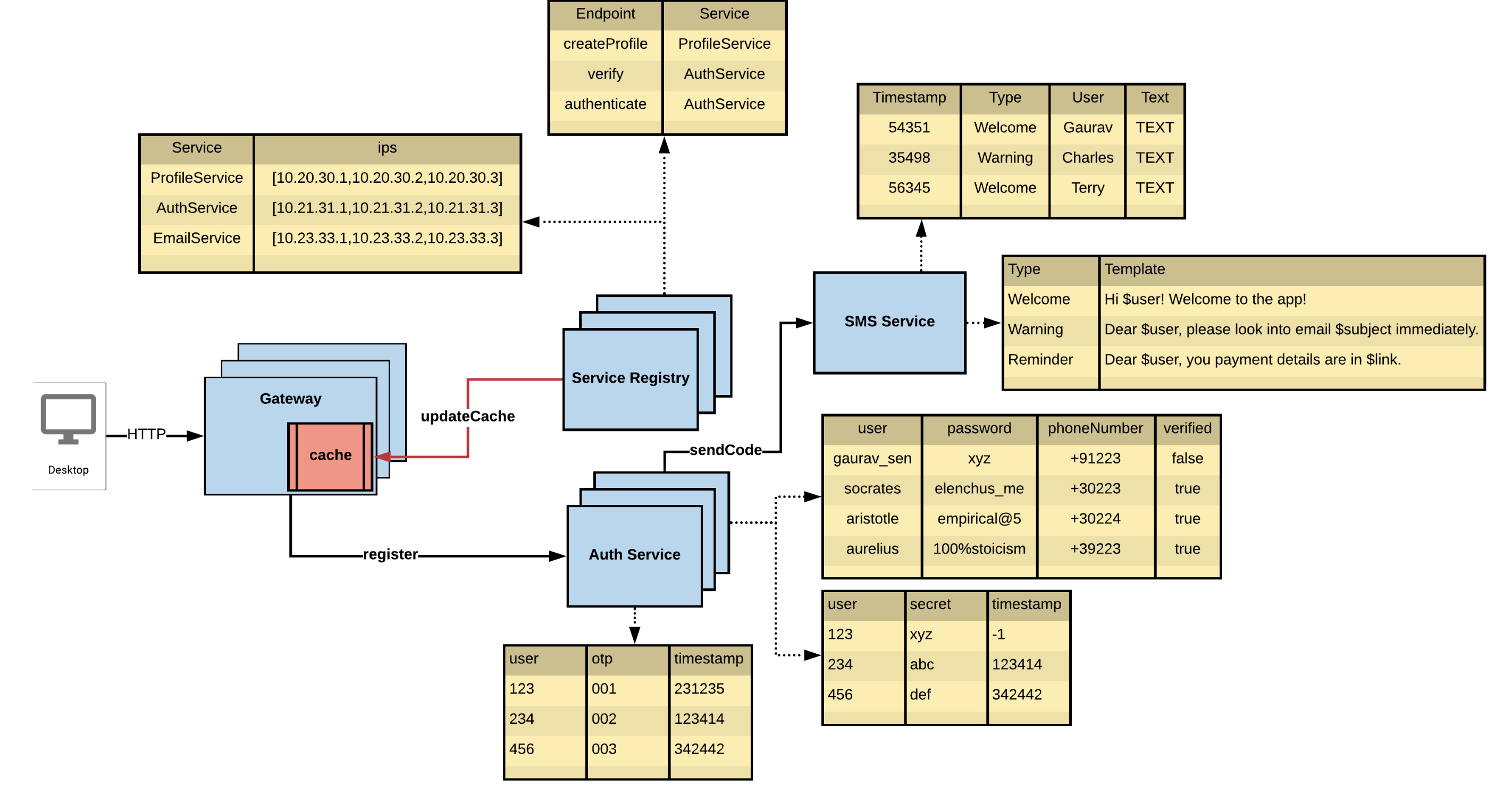
Desktop to Gateway#
- Client uses HTTP with DNS resolution to locate the Gateway.
- Desktop → DNS (www.xyz.com) → Gateway IP
Gateway (Proxy)#
- Maintains a local cache of service mappings fetched from the Service Registry.
- Routes requests to the correct service IP based on the endpoint.
- Reduces repeated registry lookups on each request.
Service Registry#
- Stores service mappings (e.g., createProfile → ProfileService).
- Contains IPs for: ProfileService, AuthService, EmailService.
- Uses server-side service discovery — the Gateway queries the registry on behalf of clients.
Auth Service#
- Handles user authentication and OTP verification.
- Sends OTP via sendCode to the SMS Service.
- Stores OTPs with timestamps in the Session Table.
- On success, generates a secret token stored per user for stateless session management.
SMS Service#
- Sends templated messages: Welcome, Warning, Reminder, OTP.
- Stores all sent messages (timestamp, type, user, text).
Service Discovery Comparison#
| Aspect | Client-Side Discovery | Server-Side Discovery |
|---|---|---|
| Who discovers? | Client (e.g., Gateway) queries the registry directly | Server (e.g., Load Balancer) queries on behalf of client |
| Registry awareness | Client must know the registry interface | Clients are unaware; discovery is abstracted |
| Routing logic | Handled by the client | Handled by the server |
| Example tooling | Netflix Eureka | AWS ELB, NGINX + Consul |
| Pros | Fine-grained control, lower server load | Centralized logic, simpler client |
| Cons | Client complexity, tight coupling to registry | Possible bottleneck, slightly higher latency |
Step 2: Authentication and Global Cache#
Secure Authentication for API Calls#
- All API calls require authorization — unauthorized access is denied.
- Passwords in cookies are not recommended due to security risks.
- Instead, use JWT tokens or auth secrets stored in localStorage or HttpOnly cookies.
- Tokens are sent with each API request for authentication.
Auth Flow (Single Session)#
- User logs in → request goes to Auth Service.
- Auth Service generates and sends a verification code (2FA).
- User enters code for 2-step authentication.
- On success, Auth Service:
- Stores a new auth secret/token.
- Returns the token to the client for future API calls.
Problem: Gateway → Auth Service on Every Request#
- Validating tokens on every request causes frequent network calls from Gateway to Auth Service.
- This adds latency, load on auth service, and network overhead.
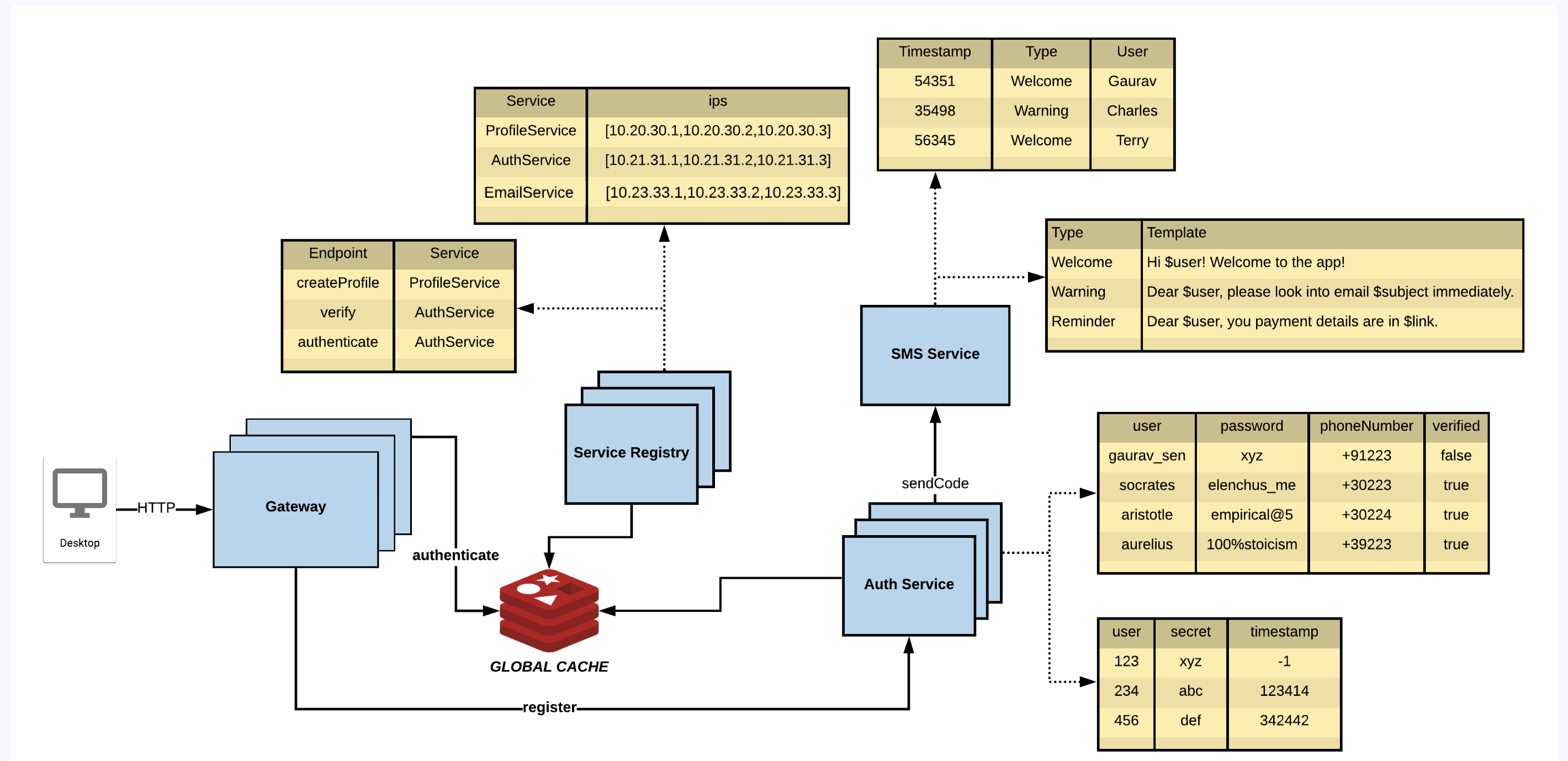
Solution: Cache Auth Secrets in Gateway#
- Gateway maintains a local cache of user tokens/secrets for quick validation.
- Reduces dependency on Auth Service for every request.
Keeping the Cache Updated#
- A Message Queue (MQ) pushes auth updates (token revocations, refreshes) to the Gateway.
- Ensures real-time sync across all gateway instances.
Challenges with Local Cache at Gateway#
- Gateway becomes responsible for memory allocation, cleanup, event handling (token expiry), and update fanout across all instances.
- Higher complexity and resource consumption per gateway.
Alternative: Global Cache#
- Use a centralized cache like Redis or Memcached.
- Pros: Centralized control, less per-gateway memory use.
- Cons: Requires a network call on every auth check.
Best-of-Both: Sidecar Pattern#
Deploy a sidecar proxy alongside each gateway instance:
- Handles authentication, local caching, and syncing with the global cache.
- Reduces gateway responsibilities — keeps the system modular and scalable.
- A sidecar is a helper component running alongside the main service in the same pod or host, without modifying the main service code.
Auth Strategy Summary#
| Step | Action |
|---|---|
| 1 | User logs in via Auth Service |
| 2 | Code is generated and verified (2FA) |
| 3 | Auth token/secret returned to user |
| 4 | Token is used for all subsequent API calls |
| 5 | Gateway caches the token for performance |
| 6 | Cache updates via MQ or global cache with sidecar |
Step 3: API Contracts and Versioning#
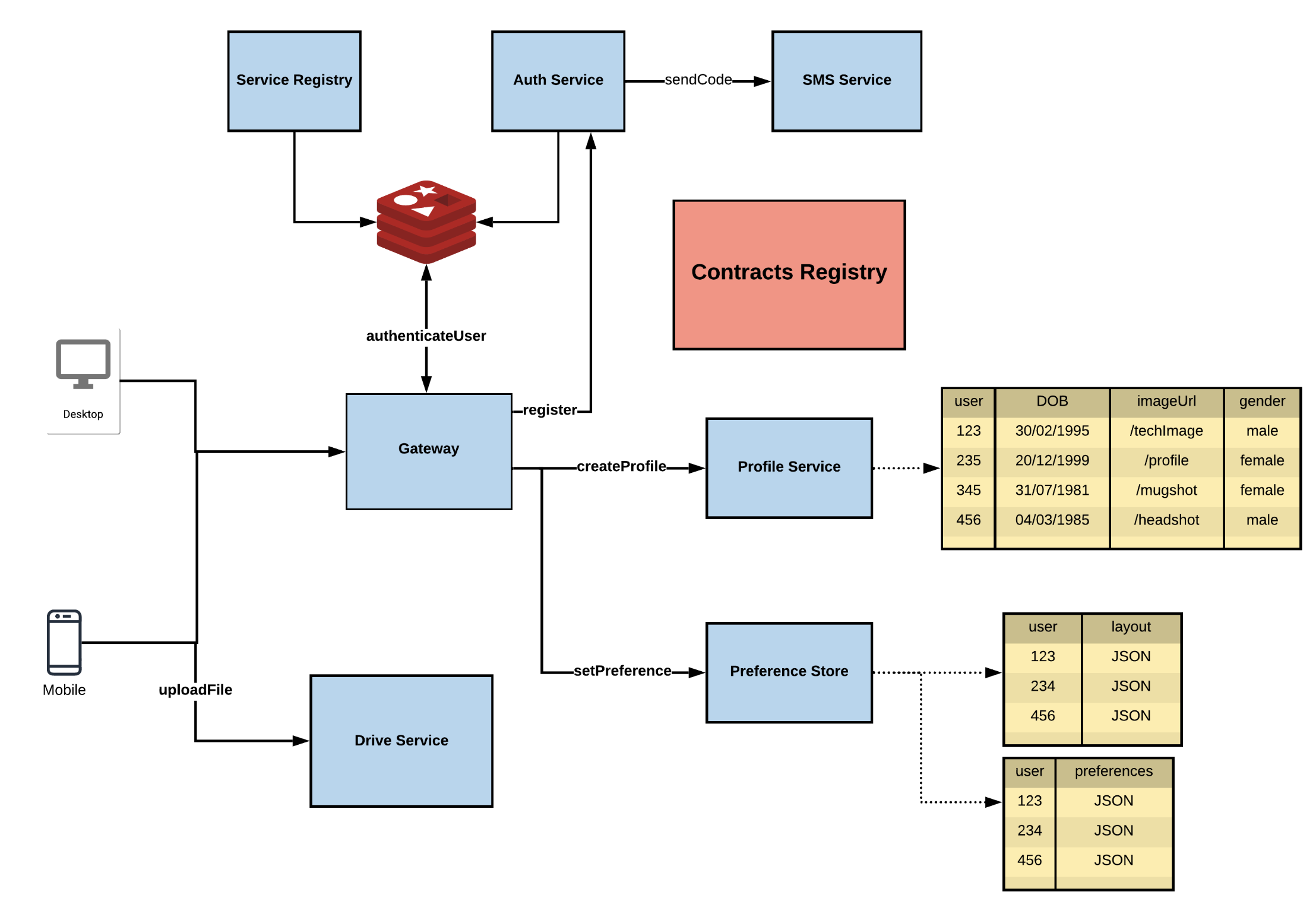
What Are API Contracts?#
- API Contracts define the structure and format of JSON data exchanged between services.
- They ensure all services speak the same language, enabling interoperability.
Contract Ownership and Usage#
- The Service defines and maintains its contract.
- The Gateway uses the contract to construct/parse request and response objects.
- Contracts are not gateway-specific — they are common to all interacting services.
Where Are Contracts Stored?#
- Contracts are stored in a Contract Registry (separate from the Service Registry).
- Mixing contract responsibilities into the Service Registry makes it heavy and less modular.
Push vs Pull for Contract Updates#
| Approach | Characteristics |
|---|---|
| Push-based | Service pushes updates to all consumers — fragile, risk of downtime and inconsistency |
| Pull-based | Gateway fetches latest contracts — safer, version-controlled, less tightly coupled |
Contract Best Practices#
- Contracts should be language agnostic and backward compatible.
- Use versioning (v1, v2, …) to maintain multiple versions concurrently without breaking old clients.
User Preference Store#
Stores user-specific data:
- UI layout preferences: { userId: layoutJSON }
- Email handling preferences: default folder, spam handling logic, custom filters.
Step 4: Sending, Tagging, and Searching Emails#
Sending Emails#
Flow:
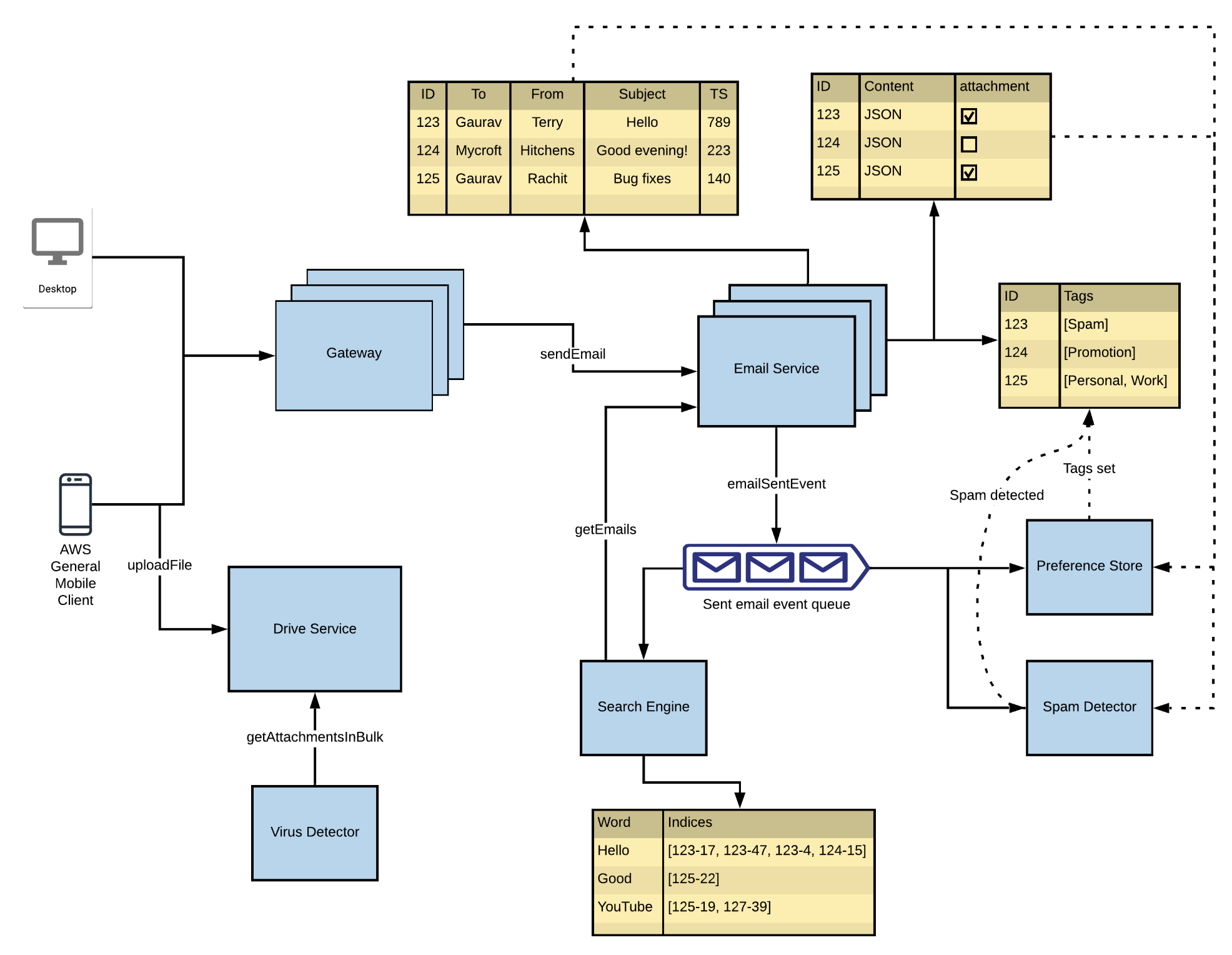
- User (Desktop/Mobile) initiates a sendEmail request via the Gateway.
- Gateway forwards the request to the Email Service.
- Email Service stores:
- Email metadata: ID, To, From, Subject, Timestamp.
- Email content: Content, Attachments.
- If attachments exist, files are uploaded through the Drive Service and scanned by the Virus Detector.
- After processing, an emailSentEvent is pushed into the Sent Email Event Queue (e.g., Kafka).
Tagging Emails#
Automatic Tagging (triggered by emailSentEvent):
- Spam Detector scans email content and sets tags: [Spam], [Promotion], [Work], etc.
- Tags are stored in the Preference Store mapped to the Email ID.
Manual Tagging:
- Users tag emails via UI.
- Tags are updated in the Preference Store.
Searching Emails#
Flow:
- User triggers getEmails via the Gateway.
- Request goes to the Search Engine.
- Search Engine maintains an inverted index — maps words to email ID + position:
json
{ "Hello": ["123-17", "123-47", "124-15"], "YouTube": ["125-19", "127-39"] } - Email Service fetches metadata and content for the retrieved IDs.
- Attachments (if needed) are fetched using getAttachmentsInBulk from the Drive Service.
Email Operations Summary#
| Function | Flow |
|---|---|
| Send Email | Gateway → Email Service → Drive Service + Event Queue |
| Auto Tagging | emailSentEvent → Spam Detector → Tags → Preference Store |
| Manual Tagging | User UI → Gateway → Preference Store |
| Search Email | Gateway → Search Engine → Email Service + Drive (if attachments) |
Preference Store#
The Preference Store is a central service/database storing user-specific settings and preferences in JSON format.
Example flows:
- User sends email → Email Service emits emailSentEvent → Spam Detector scans → tags stored in Preference Store.
- User logs in on mobile → Gateway fetches UI layout from Preference Store → app renders accordingly.
Step 5: Contacts and Groups#
Refined Queue Consumers#
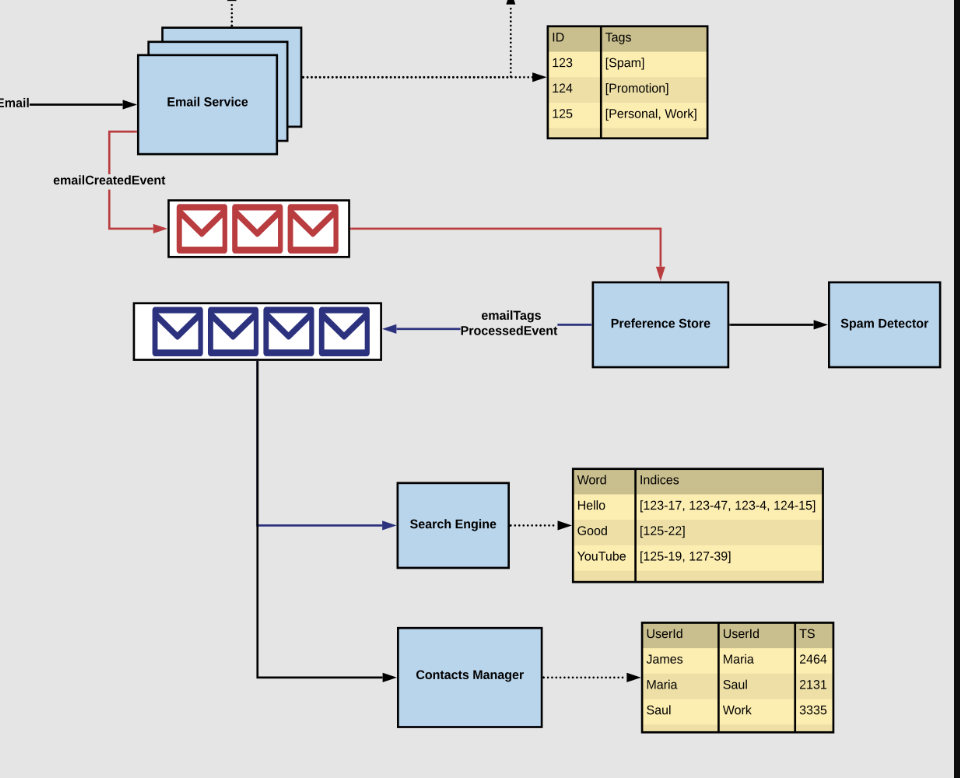
After emails flow through the event queue, three consumers process them:
A. Search Engine
- Consumes from the Refined Queue.
- Builds and maintains the inverted index for full-text search.
B. Contacts Manager
- Parses sender/receiver fields and builds a contact graph:
James → Maria (TS: 2464)
Maria → Saul (TS: 2131)
Saul → Work (TS: 3335)
C. Groups Manager
- Maintains group-to-user-ID mappings:
json
{ "workTeam": ["James", "Maria", "Saul"], "friends": ["Divya", "Terry", "Rachit"] } - Enables group-based sending, group tagging, and auto-suggestions.
External Email Integration#
To support cross-platform communication (e.g., Gmail ↔ Yahoo):
| Protocol | Purpose |
|---|---|
| SMTP (Simple Mail Transfer Protocol) | Sending emails externally — Email Service connects to an SMTP server to deliver the message |
| IMAP (Internet Message Access Protocol) | Receiving external emails — IMAP Adapter syncs inbox folders and metadata from external accounts |
Step 6: Final Architecture#
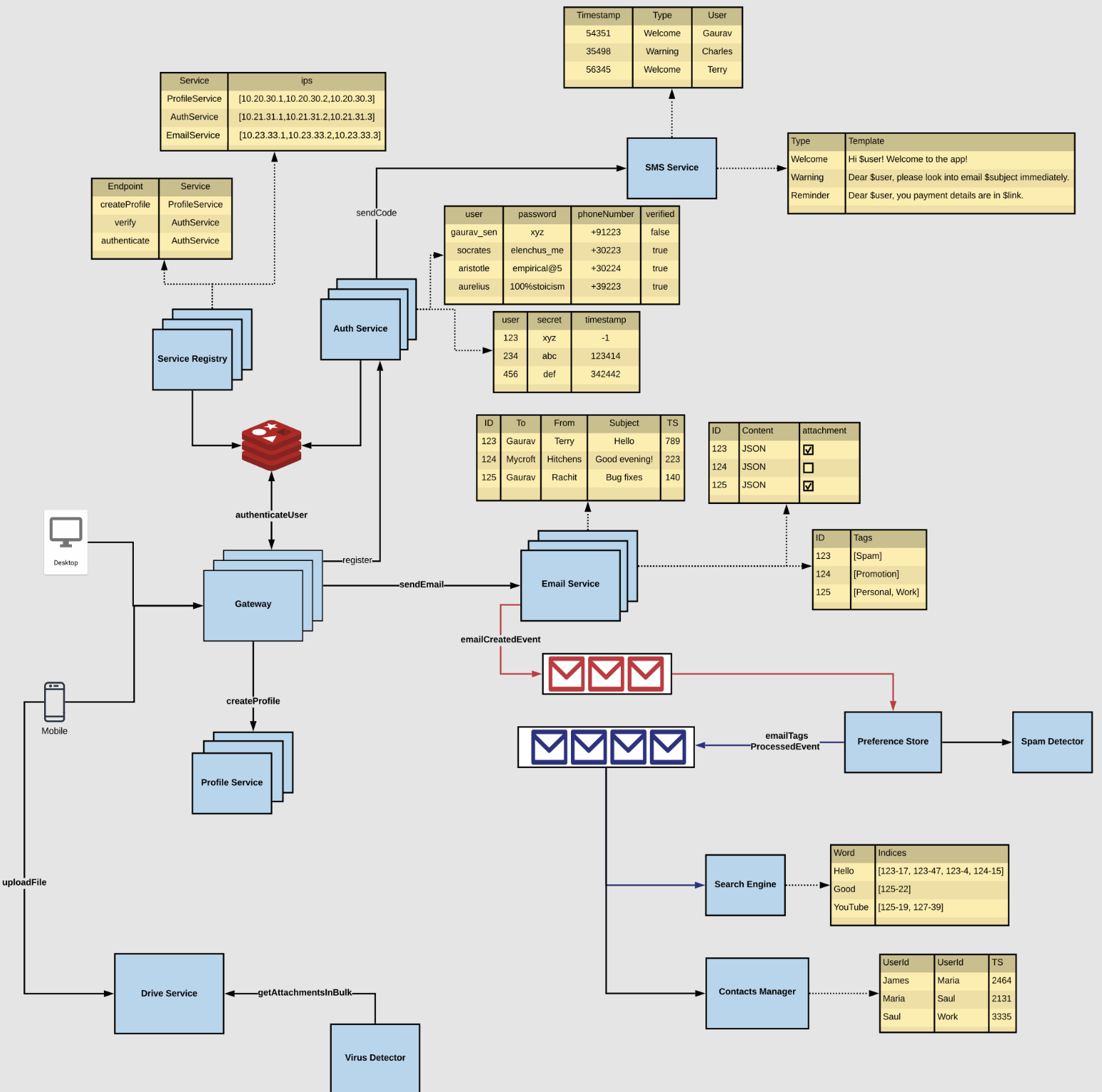
Core Services and Components#
| Service | Responsibility |
|---|---|
| Gateway | Entry point for all user requests; routes to appropriate service |
| Auth Service | Authenticates users via 2FA; registers services in Service Registry |
| Service Registry | Maintains service IPs; enables service discovery |
| Profile Service | Creates and manages user profiles |
| Email Service | Sends emails; stores metadata; emits emailCreatedEvent |
| Drive Service | Handles file uploads; exposes getAttachmentsInBulk |
| Virus Detector | Scans attachments for malware before sending |
| SMS Service | Sends Welcome, Reminder, and OTP messages using templates |
| Spam Detector | Analyzes email content; tags as [Spam], [Promotion], etc. |
| Preference Store | Stores email tags and user personalization settings |
| Search Engine | Indexes email content for fast keyword-based search |
| Contacts Manager | Stores/retrieves user contacts; builds contact graph |
| Groups Manager | Maintains group memberships; enables group-based operations |
Data Flow Summary#
1. User → Gateway → Auth/Profile Services
2. Auth Service → SMS Service (OTP for verification)
3. Email Service → stores email → emits emailCreatedEvent
4. emailCreatedEvent consumed by:
   - Spam Detector → tags → Preference Store
   - Search Engine → inverted index
   - Contacts Manager → contact graph
5. File attachments → Drive Service → Virus Detector
6. External emails ↔ SMTP (outbound) / IMAP Adapter (inbound)