High Level Design
Domain Name System (DNS)
How DNS translates domain names to IP addresses — the nameserver hierarchy, resolvers, lookup flow, caching and TTL, common records, and DNS in system design.
DNS is the phone book of the internet. It translates human-readable domain names (www.google.com) into machine-readable IP addresses (93.184.216.34) that computers use to reach each other.
What is DNS?#
- Humans remember names, machines route on IP addresses. DNS bridges the two.
- It is a distributed, hierarchical database. No single server knows every mapping; each level knows only who to ask next.
- This design makes DNS:
- Scalable: load is spread across millions of servers.
- Fault tolerant: no single point of failure, every level is replicated.
- Decentralised: each organisation manages records for its own domain.
- Runs mostly over UDP port 53 (small, fast queries). Falls back to TCP port 53 for large responses and zone transfers.
DNS Hierarchy#
Domain names are read right to left, and each part maps to a level in the hierarchy:
www.google.com.
 │     │    │  └── Root (the implicit trailing ".")
 │     │    └───── TLD (.com)
 │     └────────── Second-level domain (google)
 └──────────────── Subdomain (www)
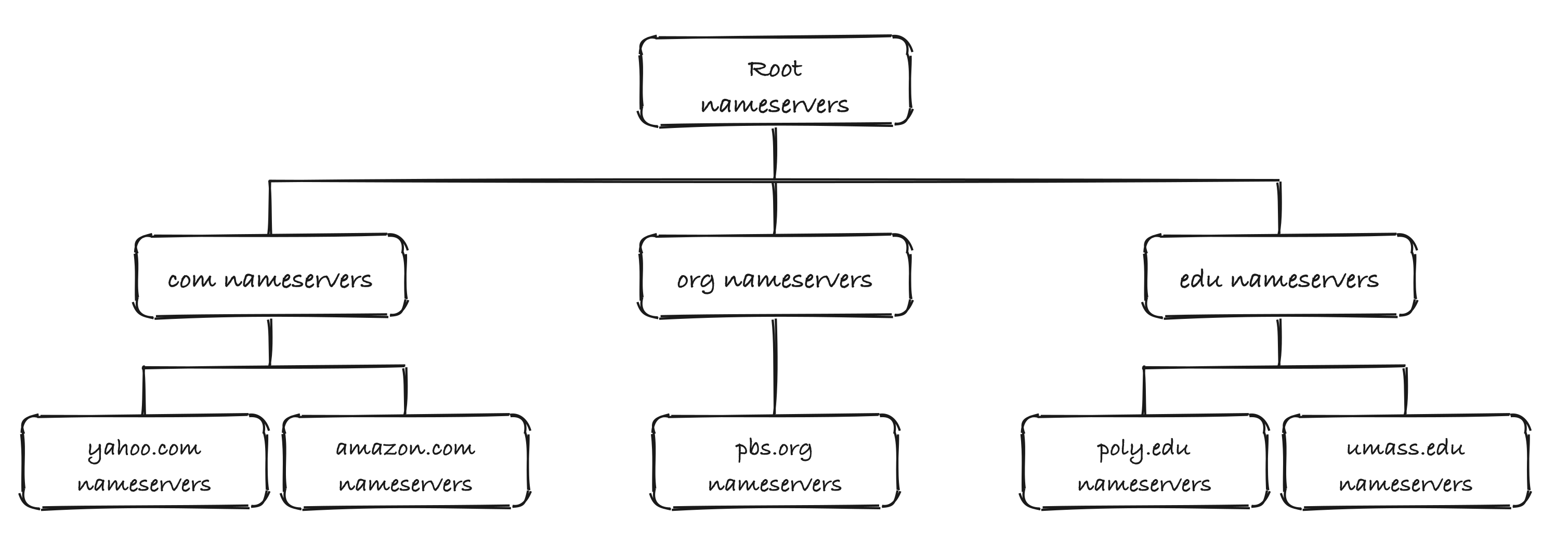 DNS is a tree of nameservers
There are three levels of nameservers:
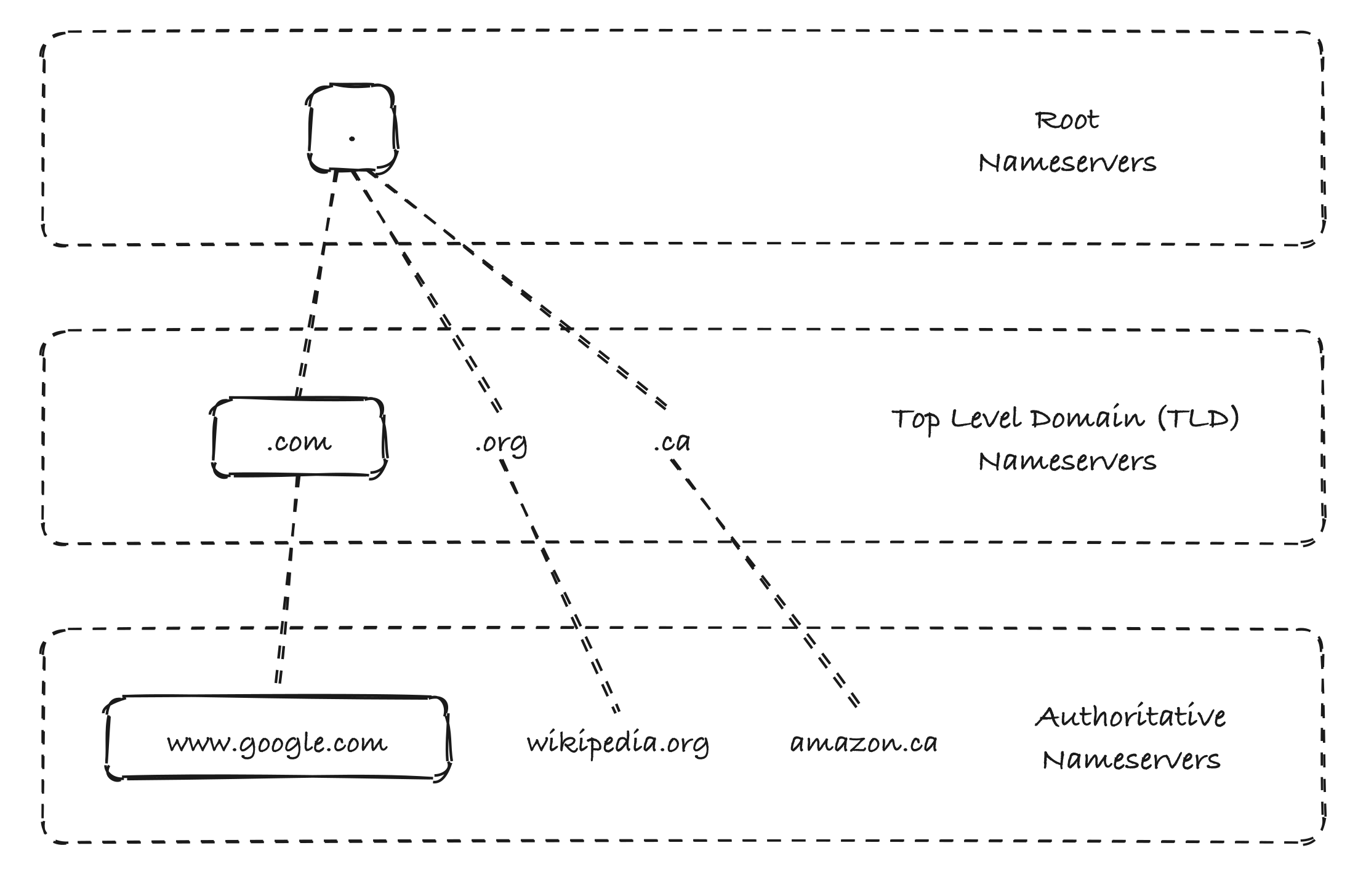 Root → TLD → Authoritative
Root Nameservers#
- Top of the hierarchy, represented by the trailing . in a domain name.
- They do not know the IP of www.google.com. They only know which TLD nameservers to ask (e.g., where the .com servers are).
- There are 13 logical root nameservers, named a through m.
- Each logical server is backed by many physical machines spread across the world using anycast (same IP announced from many locations, traffic goes to the nearest one). In total there are well over a thousand physical instances.
- Managed under the coordination of ICANN/IANA, operated by organisations like Verisign, NASA, the US Army, RIPE NCC, etc.
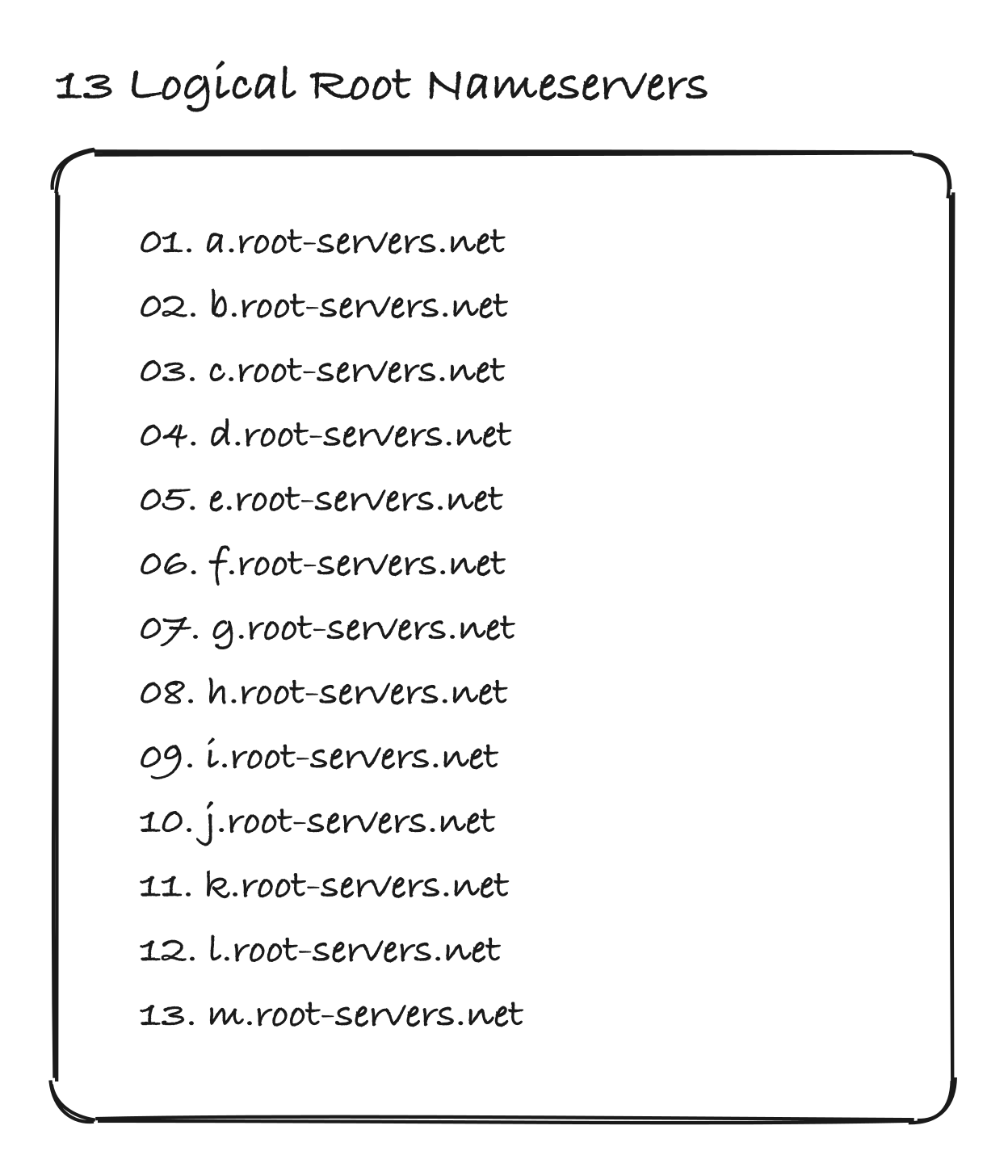 13 logical root nameservers
TLD Nameservers#
- Store information for every domain under a given top-level domain.
- They point to the authoritative nameservers of a specific domain (e.g., .com TLD knows where google.com's nameservers are).
- Types of TLDs:
- Generic TLDs (gTLD): .com, .org, .net, .edu, .io
- Country code TLDs (ccTLD): .in, .uk, .de, .ca, .au
- Managed by registries (e.g., Verisign runs .com and .net).
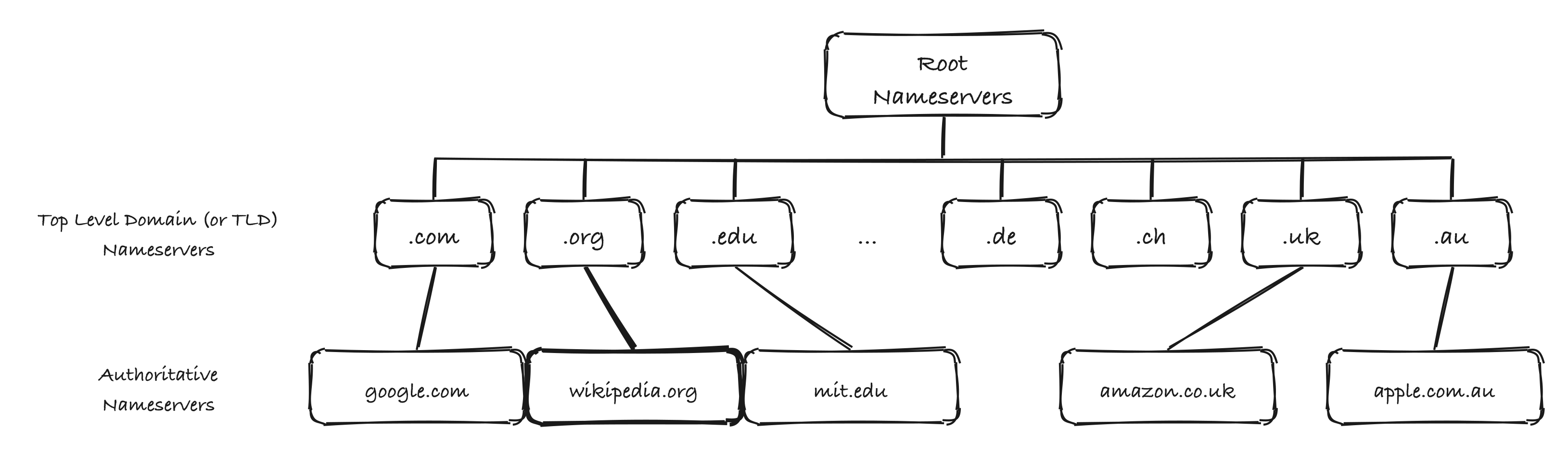 Root → TLD → Authoritative nameservers
Authoritative Nameservers#
- The final source of truth for a domain. They hold the actual DNS records (A, AAAA, CNAME, MX, ...).
- When you buy a domain from a registrar (GoDaddy, Namecheap, Route 53), the registrar tells the TLD registry which authoritative nameservers serve your domain.
- Usually run by DNS providers such as AWS Route 53, Cloudflare, Google Cloud DNS.
DNS Resolver#
- The browser does not talk to root/TLD/authoritative servers directly. It asks a DNS resolver (also called a recursive resolver).
- The resolver does the legwork of walking the hierarchy and returns the final IP to the client.
- Typically provided by the ISP, or a public resolver like Google (8.8.8.8) or Cloudflare (1.1.1.1).
- The resolver caches answers, so most queries never go beyond it.
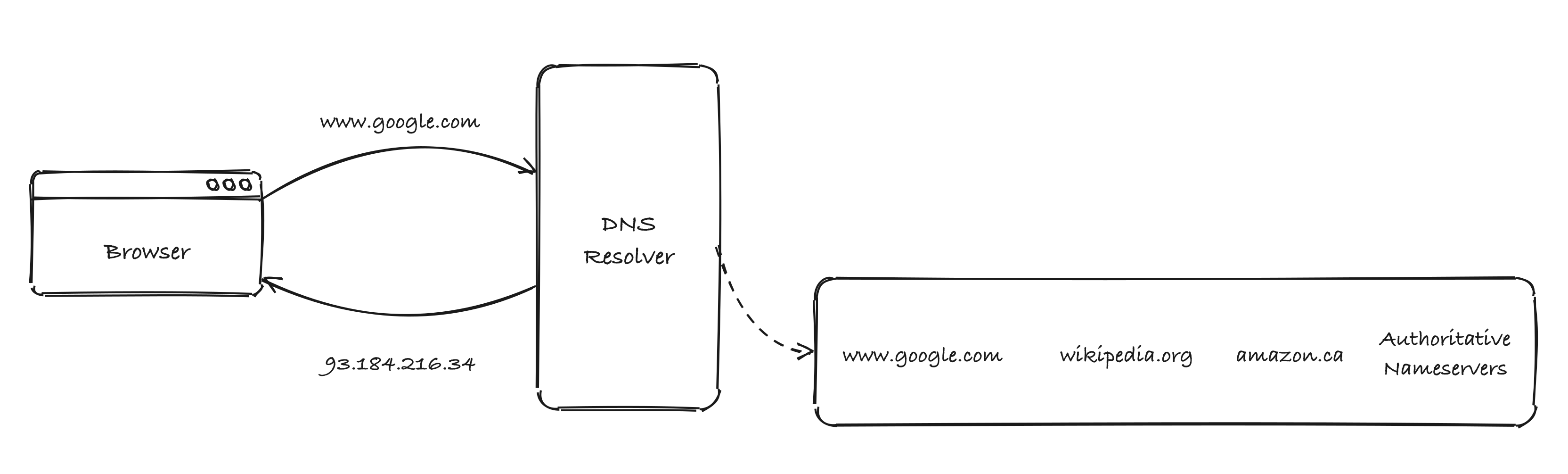 Browser asks the resolver, the resolver finds the answer
How a DNS Lookup Works#
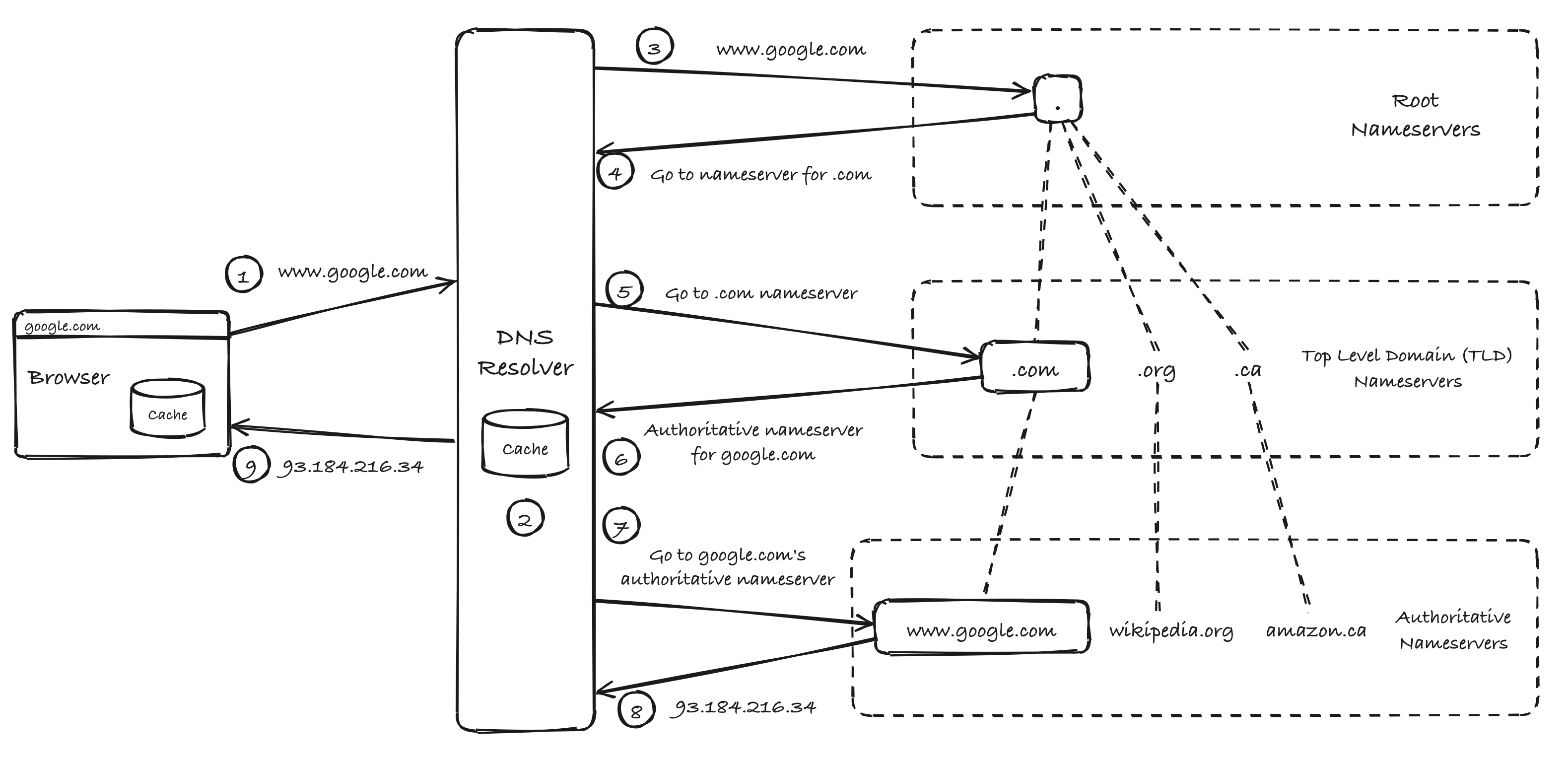 End-to-end resolution of www.google.com
- User types www.google.com. The browser checks its own cache (and then the OS cache). On a miss, it sends the query to the DNS resolver.
- The resolver checks its cache. If the answer is there, it returns it right away (skip to step 9).
- On a miss, the resolver asks a root nameserver for www.google.com.
- Root replies: "I don't know, but here are the nameservers for .com."
- The resolver asks the .com TLD nameserver.
- TLD replies: "Here are the authoritative nameservers for google.com."
- The resolver asks google.com's authoritative nameserver.
- Authoritative nameserver returns the IP: 93.184.216.34.
- The resolver caches the answer and returns the IP to the browser. The browser caches it too and opens a connection to that IP.
A cold lookup takes several round trips. Thanks to caching at every layer (browser, OS, resolver), most lookups resolve in a few milliseconds.
Recursive vs Iterative Queries#
| Aspect | Recursive Query | Iterative Query |
|---|---|---|
| Who does work | Server finds the full answer for the client | Server returns the best referral it has ("ask X next") |
| Used between | Client ↔ DNS resolver | DNS resolver ↔ Root / TLD / Authoritative nameservers |
| Response | Final IP address (or error) | Referral to the next nameserver, or the final answer |
DNS Caching and TTL#
- Every DNS record has a TTL (Time To Live) in seconds, set by the domain owner.
- Caches (browser, OS, resolver) keep the record until the TTL expires, then fetch it again.
- Trade-off:
- High TTL (hours/days): fewer lookups, faster, less load, but changes take longer to spread.
- Low TTL (seconds/minutes): changes spread quickly (good for failover), but more queries and higher latency on misses.
- DNS propagation is the time it takes for a change to be seen everywhere, which is bounded by the old TTL.
- Tip: before a planned migration, lower the TTL in advance, make the change, then raise it again.
Common DNS Records#
| Record | Purpose | Example |
|---|---|---|
| A | Maps a name to an IPv4 address | google.com → 142.250.183.14 |
| AAAA | Maps a name to an IPv6 address | google.com → 2404:6800:4009::200e |
| CNAME | Alias from one name to another name | www.example.com → example.com |
| MX | Mail server for the domain | example.com → mail.example.com |
| NS | Authoritative nameservers for the domain | example.com → ns1.provider.com |
| TXT | Arbitrary text (domain verification, SPF, DKIM) | "v=spf1 include:_spf.google.com ~all" |
| SOA | Start of authority: primary NS, admin, serial, timers | One per zone |
| PTR | Reverse lookup, IP to name | 34.216.184.93.in-addr.arpa → host |
DNS in System Design#
- DNS-based load balancing: return multiple A records (round robin) so clients spread across servers. It is coarse-grained, because clients cache and DNS has no health awareness by default.
- GeoDNS / latency-based routing: return the IP of the nearest data center based on the client's location (e.g., Route 53 latency/geo routing). CDNs rely on this heavily. See CDN.
- Failover: health checks plus a low TTL let DNS stop returning IPs of unhealthy regions.
- Single point of failure risk: if your authoritative DNS provider goes down, your service is unreachable even when servers are healthy (e.g., the 2016 Dyn DDoS outage). Mitigate with multiple DNS providers.
- Security:
- DNS spoofing / cache poisoning: an attacker injects fake records into a resolver cache. Mitigated by DNSSEC (cryptographically signed records).
- Privacy: plain DNS is unencrypted. DoH (DNS over HTTPS) and DoT (DNS over TLS) encrypt queries.
Related: Networks: DNS section, Load Balancing