High Level Design
Design a Rate Limiter
A comprehensive study guide to designing a production-grade rate limiter. Covers placement strategies, five core algorithms with trade-offs, high-level and detailed design, and distributed system challenges like race conditions and synchronization.
Rate limiters are one of those components that every large-scale system quietly depends on. They stop a single bad actor from taking down your API, enforce fair usage across thousands of clients, and protect your backend from cascading overload. This guide walks through the full design — from scoping requirements all the way to handling race conditions in a distributed setup.
Why Do We Need a Rate Limiter?#
- Prevent resource starvation from Denial of Service (DoS) / DDoS attacks
- Ensure fair usage across multiple clients — no single user hogs capacity
- Reduce costs — limit expensive downstream calls (third-party APIs, ML inference, etc.)
- Protect backend stability — prevent servers from being overwhelmed
Step 1: Requirements#
Clarifying Questions#
Functional#
- What should the rate limiter protect — a single API endpoint, multiple endpoints, or the entire service?
- What is the limiting dimension — per user, per IP, per API key, or globally?
- What granularity of time window — per second, per minute, per hour, or sliding windows?
- What happens when the limit is exceeded — reject immediately (HTTP 429), queue the request, or throttle (slow it down)?
- Should different clients or tiers have different limits (e.g., free = 100/min, paid = 1000/min)?
- Should multiple rules be composable — e.g., 10/sec AND 500/min on the same endpoint?
- Which algorithms are acceptable — Fixed Window, Sliding Window, Token Bucket, Leaky Bucket?
Non-Functional#
- Is this in-process (single server, single JVM) or distributed (shared state across multiple servers)?
- Expected throughput — how many requests per second must the rate limiter handle?
- Strict accuracy or approximate is acceptable (e.g., are small boundary-burst overruns OK)?
- Should the rate limiter be transparent middleware (every request passes through it) or explicitly called per handler?
- Persistence — does the counter need to survive a server restart?
- Should the response include headers like X-RateLimit-Remaining and Retry-After for clients to self-throttle?
Functional Requirements#
| # | Requirement |
|---|---|
| 1 | Limit the number of requests a client (user / IP / API key) can make within a defined time window |
| 2 | Support configurable limits per endpoint, per user tier, and globally |
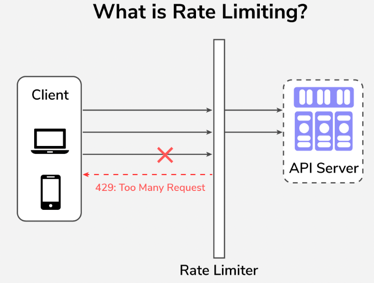
| 3 | Return HTTP 429 Too Many Requests when the limit is exceeded |
| 4 | Expose rate limit state via response headers (X-RateLimit-Limit, X-RateLimit-Remaining, Retry-After) |
| 5 | Support composable rules — e.g., 10/sec AND 500/min on the same client |
| 6 | Allow different limits per client tier (free = 100/min, paid = 1000/min) |
Non-Functional Requirements#
| # | Requirement | Detail |
|---|---|---|
| 1 | Low latency | Rate limiting check adds < 1 ms overhead on the hot request path |
| 2 | High availability | Must not become a single point of failure; fail-open or fail-closed policy on backing store outage |
| 3 | Distributed | Counters stay consistent across multiple servers and regions |
| 4 | Scalable | Must handle millions of requests per second without becoming a bottleneck |
| 5 | Accurate | Should not allow significantly more requests than the configured limit (< 0.1% over-allowance acceptable) |
| 6 | Fault tolerant | Degrades gracefully when Redis is unavailable — choose between fail-open (allow all) or fail-closed (block all) based on risk tolerance |
Design Scope#
Before jumping into algorithms, clarify constraints with your interviewer:
| Requirement | Details |
|---|---|
| Correctness | Accurately limit excessive requests. Support multiple throttling policies. |
| Low Latency | Rate limiting must add minimal overhead to the request path. |
| Server-side | Enforce limits on the server, not on the client. |
| Scalability | Must handle large volumes of requests across many clients. |
| Distributed | Rate limiter state shared across multiple servers. |
| Fault Tolerance | System continues operating even if rate limiter nodes fail. |
| Exception Handling | Gracefully handle edge cases (Redis down, clock skew, etc.). |
Step 2: High-Level Design#
Where to Place the Rate Limiter?#
This is the first architectural decision. There are four placements to discuss:
| Placement | Pros | Cons | Best For |
|---|---|---|---|
| Client-Side | No server changes needed | Clients can bypass it; unreliable | Well-behaved internal clients only |
| Server-Side (in microservice) | Fine-grained control (per user, per plan, per endpoint) | Wasted server resources — request already reached the backend | Domain-specific rate limits |
| API Gateway / Middleware | Blocks traffic before backend; centralized enforcement | Limited app-level logic (mostly IP or header based) | Most common real-world placement |
| Distributed Cache (Redis) | Works across multiple servers; global consistency | Extra network hop to Redis on every request | Backing store for any of the above |
For this design: we use a hybrid — an API Gateway as middleware backed by Redis for distributed counters.
Server-Side Rate Limiting#
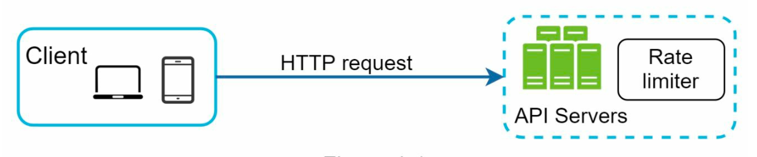
Middleware (API Gateway) Rate Limiting#
More Guidelines#
- Placement depends on your tech stack, existing infrastructure, and traffic patterns — there's no universal answer.
- If you already have a microservice architecture with an API Gateway (Kong, Envoy, AWS API Gateway), placing the rate limiter there is the natural choice.
- Building your own rate limiter is complex. Consider battle-tested solutions: Envoy, NGINX, Kong, or cloud-native throttling.
- The choice of algorithm matters — each has different memory, accuracy, and burst-handling trade-offs (see next section).
Step 3: Rate Limiting Algorithms#
1. Token Bucket 🪣#
Used by Amazon API Gateway and Stripe.
Think of a bucket that holds tokens. Each request consumes one token. Tokens are refilled at a fixed rate. If the bucket is empty, the request is rejected.
| Aspect | Details |
|---|---|
| Parameters | Bucket size (B): max tokens; Refill rate (R): tokens added per second |
| On request | If T > 0 → consume 1 token, allow. If T = 0 → reject (HTTP 429). |
| Refill | Add R tokens/sec until bucket reaches capacity B. |
| Burst support | ✅ Yes — stored tokens allow short bursts. |
| Complexity | O(1) per request |
Example: B=10, R=5/sec. At t=0, 10 requests arrive → all pass (T: 10→0). At t=1s, 5 tokens refilled. 20 more arrive → 5 allowed, 15 rejected.
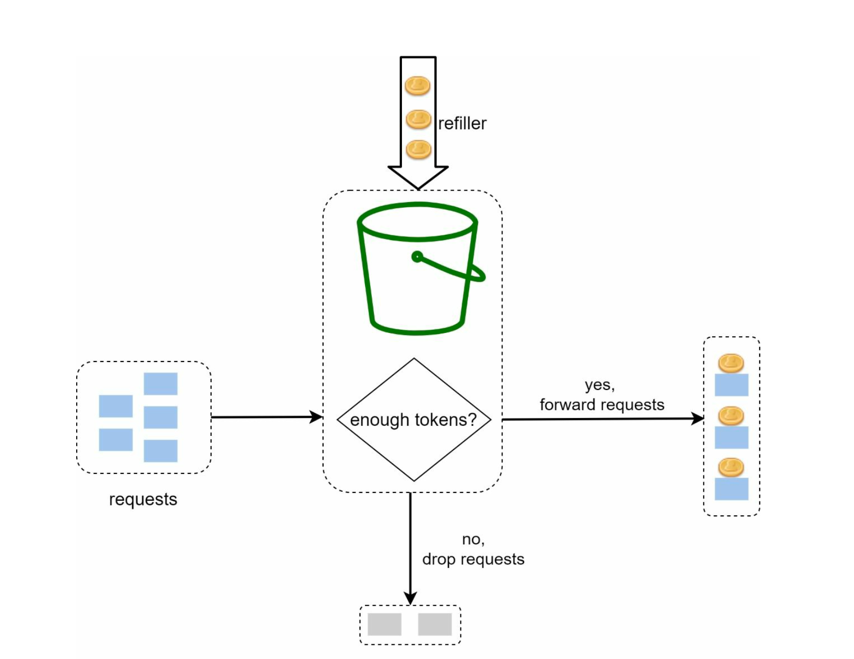
FAQs#
| # | Question | Answer |
|---|---|---|
| 1 | How many buckets? | One per user, IP, or API key — depending on granularity. |
| 2 | Can the bucket overflow? | No. Extra tokens are discarded when the bucket is full. |
| 3 | How to handle distributed systems? | Use Redis with atomic INCR + Lua scripts to avoid race conditions. |
| 4 | Token Bucket vs Leaky Bucket? | Token Bucket allows bursts; Leaky Bucket enforces a strict constant output rate. |
| 5 | What is returned on rejection? | HTTP 429 Too Many Requests, optionally with a Retry-After header. |
Interview Answer: Token Bucket is great for APIs where short bursts are acceptable. Each client has a bucket in Redis; tokens are added at rate R. A request is allowed if tokens > 0, otherwise rejected. Atomic Redis INCR or Lua scripting prevents race conditions.
What Do We Store in Redis?#
Two fields per client key, stored as a Redis hash:
HSET rate_limit:{user_id} tokens 9 last_refill 1726617600000
| Field | Type | Meaning |
|---|---|---|
| tokens | float / int | Current tokens in the bucket |
| last_refill | Unix ms | When tokens were last added |
Why last_refill and not a TTL-based reset?
Tokens aren't refilled on a fixed schedule — they're calculated lazily on each request:
elapsed    = now - last_refill
new_tokens = elapsed × refill_rate
tokens     = min(bucket_capacity, tokens + new_tokens)
No background job needed. Tokens accumulate proportionally to however much time has passed since the last request.
The full check — must be a Lua script (atomic):
local key         = KEYS[1]
local capacity    = tonumber(ARGV[1])
local refill_rate = tonumber(ARGV[2])   -- tokens per ms
local now         = tonumber(ARGV[3])

local data        = redis.call("HMGET", key, "tokens", "last_refill")
local tokens      = tonumber(data[1]) or capacity
local last_refill = tonumber(data[2]) or now

local elapsed = now - last_refill
tokens = math.min(capacity, tokens + elapsed * refill_rate)

if tokens >= 1 then
    tokens = tokens - 1
    redis.call("HMSET", key, "tokens", tokens, "last_refill", now)
    return 1   -- allowed
else
    redis.call("HMSET", key, "tokens", tokens, "last_refill", now)
    return 0   -- rejected
end
Why Lua and not a plain GET + SET? Two concurrent requests could both read tokens = 1, both decide to allow, and both write back tokens = 0 — letting two requests through when only one token existed. The Lua script runs atomically on the Redis server, so the read-modify-write is never interrupted.
Cleanup — set EXPIRE rate_limit:{user_id} <window> so stale keys for inactive clients are automatically evicted.
2. Leaky Bucket 🚰#
Used by Shopify.
Requests enter a bucket (queue) and are processed at a fixed constant rate. If the bucket overflows, new requests are dropped.
| Aspect | Details |
|---|---|
| Parameters | Bucket capacity (B): max queued requests; Leak rate (R): requests processed per second |
| On request | If bucket not full → enqueue. If full → drop request. |
| Output | Always processes at fixed rate R (smooth flow). |
| Burst support | ❌ No — strict constant rate only. |
| Complexity | O(1) per request |
Example: B=10, R=2/sec. 12 requests arrive — first 10 queued, 2 dropped. Requests exit at 2/sec.
Analogy: A funnel with a small hole. Pour water fast, it drips out at a constant rate. Overflow = dropped requests.
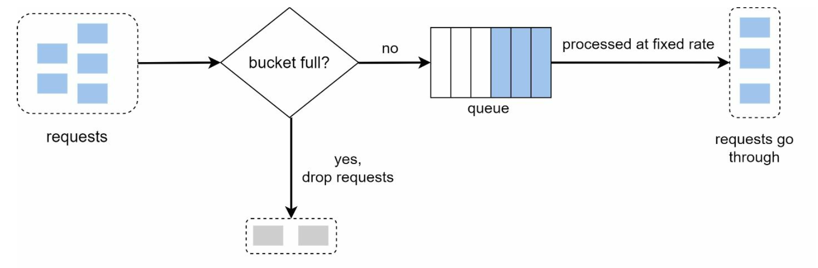
FAQs#
| # | Question | Answer |
|---|---|---|
| 1 | Does it allow bursts? | No. All requests are processed at a strict constant rate (unlike Token Bucket). |
| 2 | What if bucket is full? | New requests are dropped until space frees up. |
| 3 | Best use cases? | Network bandwidth shaping, VoIP/video streaming, systems prioritizing smooth output over bursts. |
| 4 | Is it suitable for distributed API limiting? | Not ideal — better for network traffic shaping. |
What Do We Store in Redis?#
Two implementation options with different state:
Option A — True Queue (stores actual requests)
LPUSH  rate_limit:{user_id}  {timestamp}   ← enqueue
LLEN   rate_limit:{user_id}                ← check if full
A separate worker pops from the other end at rate R and processes requests. State = the queue itself. Problem: requires a background worker per client — doesn't scale well in a distributed system.
Option B — Counter-based (lazy drain) — preferred in practice
Same lazy approach as Token Bucket but draining instead of filling:
HSET rate_limit:{user_id} queue_size 3 last_leak 1726617600000
| Field | Type | Meaning |
|---|---|---|
| queue_size | int | How many requests are currently "queued" |
| last_leak | Unix ms | When we last drained |
On each request:
elapsed    = now - last_leak
leaked_out = elapsed × leak_rate
queue_size = max(0, queue_size - leaked_out)

if queue_size < capacity → accept (queue_size++)
else                     → drop (HTTP 429)
Lua script (atomic — same reason as Token Bucket):
local key       = KEYS[1]
local capacity  = tonumber(ARGV[1])
local leak_rate = tonumber(ARGV[2])   -- requests per ms
local now       = tonumber(ARGV[3])

local data       = redis.call("HMGET", key, "queue_size", "last_leak")
local queue_size = tonumber(data[1]) or 0
local last_leak  = tonumber(data[2]) or now

local elapsed  = now - last_leak
queue_size = math.max(0, queue_size - elapsed * leak_rate)

if queue_size < capacity then
    queue_size = queue_size + 1
    redis.call("HMSET", key, "queue_size", queue_size, "last_leak", now)
    return 1   -- accepted
else
    redis.call("HMSET", key, "queue_size", queue_size, "last_leak", now)
    return 0   -- dropped
end
Comparison with Token Bucket:
| Token Bucket | Leaky Bucket | |
|---|---|---|
| Field 1 | tokens (fills up) | queue_size (drains out) |
| Field 2 | last_refill | last_leak |
| Direction | accumulate → spend | fill → drain |
| Burst | ✅ stored tokens allow burst | ❌ queue fills, excess dropped |
3. Fixed Window Counter 🗓️#
Time is divided into fixed intervals. A counter tracks requests in the current window. Requests are allowed until the counter hits the limit.
| Aspect | Details |
|---|---|
| Parameters | Window size (W): e.g., 1 minute; Limit (L): max requests per window |
| On request | If count < L → allow and increment. If count ≥ L → reject. |
| Reset | Counter resets at the start of each new window. |
| Burst support | ⚠️ Technically no, but boundary bursts are possible (see below). |
| Complexity | O(1) per request |
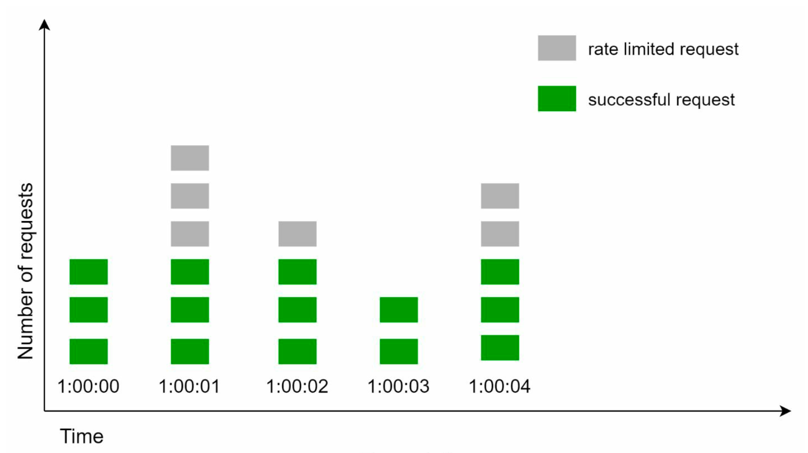
Critical flaw — boundary burst problem: If limit = 5/min, a user can send 5 requests at 12:00:59 and 5 more at 12:01:00 → 10 requests pass in just 2 seconds.
W = 1 second, L = 3 requests/second
FAQs#
| # | Question | Answer |
|---|---|---|
| 1 | Main weakness? | Boundary burst: 2× the limit can pass near window edges. |
| 2 | How to fix it? | Use Sliding Window Counter or Sliding Window Log. |
| 3 | Still worth using? | Yes — for simple APIs or prototyping where approximate fairness is acceptable. |
| 4 | Works in distributed systems? | Yes, with a shared Redis counter. |
What Do We Store in Redis?#
Just one key per client per window — the key itself encodes the window:
SET rate_limit:{user_id}:{window_id} 3 EX 60
| Field | Type | Meaning |
|---|---|---|
| key suffix {window_id} | floor(now / window_size) | Identifies which window we're in |
| value | int | Request count in this window |
| TTL | = window size | Auto-deletes the key when the window expires |
No last_refill or last_leak needed — when the window rolls over, {window_id} changes and a brand new key starts at 0.
On each request (INCR is atomic — no Lua script needed):
window_id = floor(now_seconds / window_size_seconds)
key       = rate_limit:{user_id}:{window_id}

count = INCR key
if count == 1: EXPIRE key window_size   ← set TTL only on first request
if count <= limit: allow
else: reject (HTTP 429)
Why EXPIRE only when count == 1? Setting TTL on every INCR would keep resetting the expiry — the window would never close while traffic is active. Setting it once on the first request is enough.
The boundary burst flaw — visualised:
window_id=100 (12:00:00–12:00:59)   window_id=101 (12:01:00–12:01:59)
      [limit=5]                             [limit=5]

  ... 5 requests at 12:00:59  |  5 requests at 12:01:00 ...
                               ↑
               10 requests in 1 second — both windows allow them
Two windows, two fresh counters — neither sees more than 5, but 10 slip through in a 1-second span. This is the core weakness Sliding Window Counter fixes.
4. Sliding Window Log 📋#
Instead of resetting counters, the system logs timestamps of each request. A request is allowed if the count of timestamps within the last W seconds is below the limit.
| Aspect | Details |
|---|---|
| Parameters | Window size (W); Limit (L) |
| On request | 1. Remove timestamps older than now - W. 2. If log size < L → allow + add timestamp. 3. Else → reject (but still log the timestamp). |
| Burst support | ✅ No boundary burst — sliding window eliminates the edge problem. |
| Complexity | O(N) worst case (pruning old timestamps); amortized O(1) |
| Memory | O(N) — stores one timestamp per request in the window |
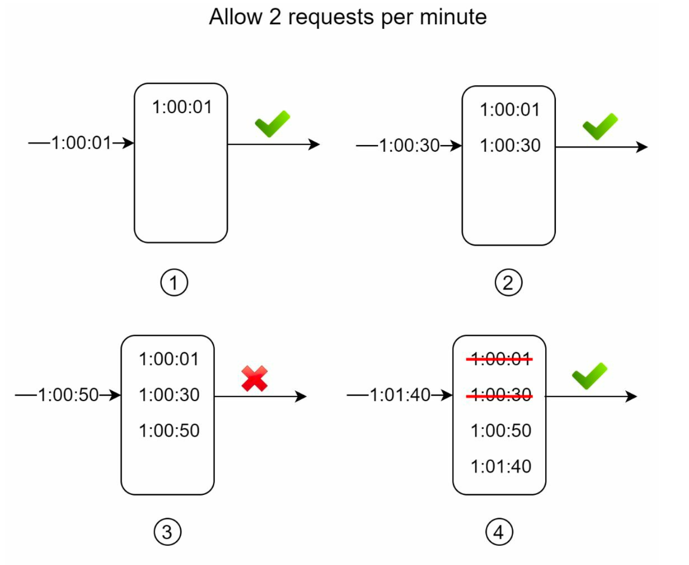
Example: W=1min, L=2. Requests at 1:00:01 and 1:00:30 → both allowed (2 in window). Request at 1:00:50 → rejected (3rd in window). At 1:01:40 → first two timestamps expire → next request allowed again.
W = 1 min, L = 2
Analogy: A movie theatre allows only 100 people per hour. Security checks the log of entries in the last 60 minutes — if < 100, you can enter.
FAQs#
| # | Question | Answer |
|---|---|---|
| 1 | vs Fixed Window? | Sliding Log has no boundary burst; Fixed Window is bursty at edges. |
| 2 | Memory cost? | O(N) — all timestamps for the past W must be stored. |
| 3 | When to prefer this? | Strict APIs (payments, auth) where fairness and accuracy are critical. |
| 4 | Distributed? | Timestamps stored in Redis. Central store ensures global consistency. |
What Do We Store in Redis?#
A Sorted Set per client — score = timestamp, member = timestamp (or a unique request ID):
ZADD rate_limit:{user_id}  1726617600100  1726617600100
ZADD rate_limit:{user_id}  1726617600300  1726617600300
| Operation | Redis Command | Purpose |
|---|---|---|
| Prune old entries | ZREMRANGEBYSCORE key 0 (now - window_ms) | Remove timestamps outside the window |
| Count in window | ZCARD key | How many requests in the last W ms |
| Add new request | ZADD key now_ms now_ms | Log this request's timestamp |
| Auto-cleanup | EXPIRE key window_seconds | Evict key when client goes inactive |
On each request (Lua script for atomicity):
local key        = KEYS[1]
local now        = tonumber(ARGV[1])
local window_ms  = tonumber(ARGV[2])
local limit      = tonumber(ARGV[3])

-- prune timestamps older than the window
redis.call("ZREMRANGEBYSCORE", key, 0, now - window_ms)

local count = redis.call("ZCARD", key)

if count < limit then
    redis.call("ZADD", key, now, now)
    redis.call("EXPIRE", key, math.ceil(window_ms / 1000))
    return 1   -- allowed
else
    return 0   -- rejected
end
Why a Sorted Set and not a List? The score (timestamp) lets Redis prune old entries with a single range-delete command (ZREMRANGEBYSCORE). A List has no index on value — you'd have to scan from the front manually.
Memory cost: one entry per request in the window — O(N). This is the trade-off for eliminating boundary bursts entirely.
5. Sliding Window Counter 🔢#
A practical improvement over Fixed Window. Uses two windows (current + previous) and calculates an effective count proportionally based on how far into the current window we are.
| Aspect | Details |
|---|---|
| Parameters | Window size (W); Limit (L) |
| Formula | effective_count = current_count + (previous_count × time_remaining_in_window / W) |
| On request | If effective_count ≤ L → allow. Else → reject. |
| Burst support | ⚠️ Approximate — significantly reduces (not eliminates) boundary bursts |
| Complexity | O(1) — just two counter lookups and a weighted calculation |
| Memory | O(1) — stores only two counters |
Example: W=1min, L=5. At 12:00:30 (30s into window), previous window had 4 requests, current has 2.
effective_count = 2 + (4 × 0.5) = 4 → request allowed (≤5).
FAQs#
| # | Question | Answer |
|---|---|---|
| 1 | vs Fixed Window? | Sliding Counter is smoother — uses a weighted blend of two windows instead of abrupt reset. |
| 2 | vs Sliding Log? | Log is more accurate (exact timestamps). Counter is more memory-efficient (only 2 counters) but approximate. |
| 3 | Is it widely used? | Yes — popular in distributed APIs backed by Redis (good balance of accuracy and performance). |
| 4 | Time complexity? | O(1) — just counter updates and a weighted calculation. |
What Do We Store in Redis?#
Two keys — one for the current window, one for the previous — same shape as Fixed Window Counter:
rate_limit:{user_id}:{window_id}       ← current window count
rate_limit:{user_id}:{window_id - 1}   ← previous window count
| State | How to get it | Meaning |
|---|---|---|
| curr_count | GET rate_limit:{user_id}:{window_id} | Requests in current window |
| prev_count | GET rate_limit:{user_id}:{window_id - 1} | Requests in previous window |
| window_id | floor(now_seconds / window_size_seconds) | Derived — not stored |
| elapsed_fraction | (now % window_size) / window_size | How far into the current window |
On each request:
window_id        = floor(now / W)
elapsed_fraction = (now % W) / W

curr_count = GET rate_limit:{user_id}:{window_id}       or 0
prev_count = GET rate_limit:{user_id}:{window_id - 1}   or 0

effective_count = curr_count + prev_count × (1 - elapsed_fraction)

if effective_count < limit:
    INCR rate_limit:{user_id}:{window_id}
    EXPIRE rate_limit:{user_id}:{window_id}  2*W   ← keep for one extra window
    allow
else:
    reject (HTTP 429)
Why EXPIRE = 2×W? The previous window's key must still be readable during the entire next window. Setting TTL to 2×W ensures it survives long enough to be used in the weighted formula, then auto-expires.
Comparison across all algorithms:
| Algorithm | Redis structure | Keys per client | Memory |
|---|---|---|---|
| Token Bucket | Hash (tokens, last_refill) | 1 | O(1) |
| Leaky Bucket | Hash (queue_size, last_leak) | 1 | O(1) |
| Fixed Window Counter | String with TTL | 1 per window | O(1) |
| Sliding Window Log | Sorted Set (timestamps) | 1 | O(N) |
| Sliding Window Counter | Two strings with TTL | 2 (curr + prev) | O(1) |
Algorithm Summary#
| Algorithm | Bursts | Memory | Complexity | Best For |
|---|---|---|---|---|
| Token Bucket | ✅ Yes | Low | O(1) | Most APIs — allows bursts, enforces average rate |
| Leaky Bucket | ❌ No | Low | O(1) | Network shaping, video streaming — strict smooth output |
| Fixed Window Counter | ⚠️ Boundary | Very Low | O(1) | Simple prototyping, approximate limits OK |
| Sliding Window Log | ✅ No boundary burst | High (O(N)) | O(N) | Payments, auth — strict per-second fairness |
| Sliding Window Counter | ⚠️ Approximate | Very Low | O(1) | Distributed APIs — good accuracy/performance trade-off |
Interview tip: When asked which algorithm to use, default to Token Bucket for most APIs. Mention Sliding Window Log for strict accuracy requirements, and Sliding Window Counter when memory efficiency matters in a distributed Redis setup.
Step 4: Deep Dive#
Where to Store Counters?#
| Option | Verdict |
|---|---|
| Database (disk) | ❌ Too slow — disk I/O on every request |
| In-memory (local) | ❌ Not persistent; breaks in distributed multi-server setup |
| Redis / Memcached | ✅ Fast, atomic, sharable across servers — the right choice |
Why Redis specifically?
- INCR — atomically increments a counter (creates it at 0 if missing)
- EXPIRE — sets a TTL so counters auto-reset after the window expires
- Supports Lua scripting for multi-step atomic operations
Request Flow#
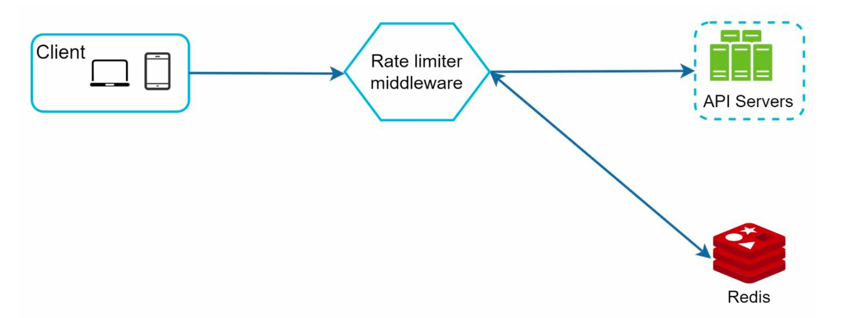
- Client sends a request → hits the Rate Limiter Middleware.
- Middleware fetches the counter from the Redis bucket for this client/IP/endpoint.
- If limit not reached: forward request to API servers, increment counter in Redis.
- If limit reached: return 429 Too Many Requests, drop or queue the request.
Rate Limiting Rules#
Rules define the actual limits. They're stored on disk (config files or a rules database) and cached in memory for fast access. Workers periodically pull updated rules into the cache.
Example rules (YAML config):
# Allow max 5 marketing messages per day
domain: messaging
descriptors:
  - key: message_type
    Value: marketing
    rate_limit:
      unit: day
      requests_per_unit: 5
# Allow max 5 login attempts per minute
domain: auth
descriptors:
  - key: auth_type
    Value: login
    rate_limit:
      unit: minute
      requests_per_unit: 5
Handling Rate-Limited Requests#
When a request is rejected:
- Return HTTP 429 Too Many Requests (or 503 Service Unavailable depending on use case)
- Include these headers to help clients self-regulate:
| Header | Meaning |
|---|---|
| X-RateLimit-Limit | Total requests allowed per window |
| X-RateLimit-Remaining | Requests remaining in the current window |
| X-RateLimit-Retry-After | Seconds until the client can retry |
- Optionally enqueue the rejected request for later processing (soft limit), or drop it (hard limit).
Detailed Design#
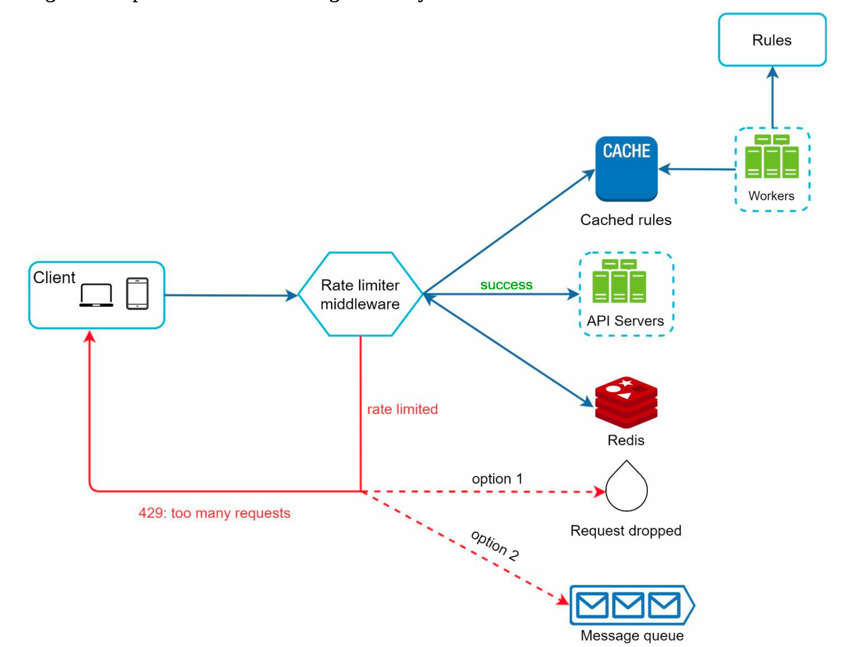
The full flow:
- Rules are stored on disk; worker processes pull and cache them.
- Client request arrives → Rate Limiter Middleware loads rules from cache.
- Middleware fetches counters + last request timestamp from Redis.
- Decision:
- Not rate-limited → forward to API servers, update counter in Redis.
- Rate-limited → return 429 to client; drop or forward to queue.
Step 5: Distributed System Challenges#
Scaling to millions of users means running multiple rate limiter servers. Two challenges emerge:
Race Condition#
The read-modify-write cycle on Redis is not inherently atomic:
Request A reads counter = 4  |  Request B reads counter = 4
Both check: 4 < 5 → OK       |  Both check: 4 < 5 → OK
Both write back: 5            |  Both write back: 5
Both requests pass, but the counter should be 6. One update is silently lost.
Solutions:
- Atomic Redis INCR — increment and get the new value in one command; no separate read step
- Redis Lua scripting — bundle the check + increment into a single atomic server-side script
- Redis sorted sets — store request timestamps; prune and count in a single atomic operation (for Sliding Window Log)
Interview Answer: The race condition stems from non-atomic read-modify-write in a concurrent environment. Fix: use Redis INCR (atomic) or Lua scripting to make check + increment a single step.
Synchronization#
Multiple rate limiter servers, each with their own local counters, will each think the user has only made n requests — allowing up to n × servers requests total.
Load Balancer
    ├── RateLimiter S1 (counter=2) ← User A Request #1
    ├── RateLimiter S2 (counter=2) ← User A Request #2
    └── RateLimiter S3 (counter=2) ← User A Request #3
If limit = 5 but 3 servers each allow 5 requests locally, the user can send 15 requests.
Solutions:
| Approach | Benefit | Trade-off |
|---|---|---|
| Sticky sessions (load balancer routes same user to same server) | Simple | Not scalable — defeats load balancing |
| Centralized Redis store | Globally consistent counters | Single point of potential bottleneck |
| Sharded Redis (by user ID, consistent hashing) | Parallelizes Redis load | Requires consistent hashing strategy |
| Local cache + short TTL | Dramatically reduces Redis load | Short-term inconsistency (a few extra requests may slip through) |
| Redis pipelining | Fewer network round-trips | Slight delay in counter updates (microseconds) |
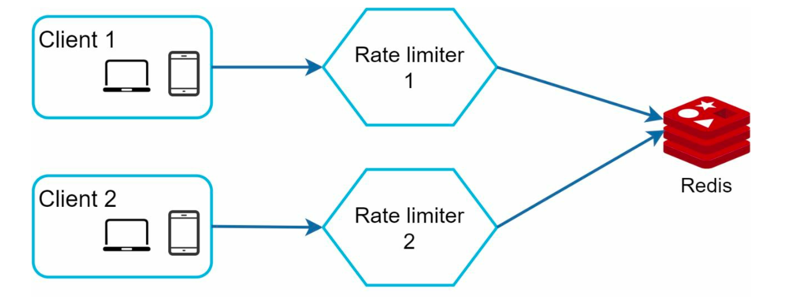
For most systems: centralized Redis with INCR + optional sharding by user ID is the right answer.
Performance Considerations#
- Multi-data center setup: Users far from your data center experience high latency. Deploy rate limiters geographically close to users.
- Eventual consistency: In a multi-region setup, accept that counters may drift slightly across regions. Use eventual consistency rather than strong consistency for non-critical limits.
- Local caching of rules: Rate limiting rules rarely change. Cache them in memory with a short TTL to avoid rule-store lookups on every request.
Monitoring#
After deployment, validate effectiveness:
- Is the algorithm working? Are the right requests getting throttled? Too aggressive / too lenient?
- Are the rules effective? Does throttling actually reduce load on backend services?
- Alert on anomalies: Sudden spikes in 429 responses may indicate a traffic surge or a misconfigured rule.
Follow-Up Design Dimensions#
Limit Strictness#
| Type | Behavior | When to Use |
|---|---|---|
| Hard Limit | Requests over the limit are immediately rejected (HTTP 429) | DoS protection, strict SLA enforcement |
| Soft Limit | Requests are queued/delayed instead of rejected | Better UX for bursty-but-legitimate clients |
Rate Limiting Granularity#
| Level | Description | Trade-off |
|---|---|---|
| User-level | Per authenticated user | Fair; needs user ID (auth required) |
| IP-level | Per source IP address | Easy; breaks behind NAT/shared IPs |
| Endpoint-level | Different limits per route (/login stricter than /search) | Fine-grained; more config overhead |
Rate Limiting Layer#
| Layer | Where | Characteristic |
|---|---|---|
| L7 (Application) | App code / middleware | Most flexible — knows user, plan, endpoint |
| L4 (Transport) | Load balancer / API gateway | Centralized; mostly IP/connection-based |
| L3 (Network) | Firewall | Fastest; only blocks IPs, no user context |
Client-Facing Headers#
Always expose rate limit state to API consumers:
HTTP/1.1 429 Too Many Requests
X-RateLimit-Limit: 100
X-RateLimit-Remaining: 0
X-RateLimit-Retry-After: 30
This lets well-behaved clients self-throttle and reduces retry storms.