High Level Design
Design a Notification System
End-to-end design of a scalable notification system — iOS/Android push, SMS, email, message queues for async delivery, reliability, deduplication, and the improved multi-server architecture.
A notification system sends notifications to users through various channels — push notifications, email, and SMS — triggered by services or scheduled on the server side.
Step 1: Requirements#
Clarifying Questions#
| Question | Answer |
|---|---|
| Notification types | Push (iOS + Android), Email, SMS |
| Real-time or batch? | Soft real-time — deliver ASAP; slight delays acceptable |
| Supported platforms | iOS, Android, web browsers |
| Triggered by | Client applications or server-side schedulers |
| Volume | 10M mobile push/day, 1M SMS/day, 5M emails/day |
Functional Requirements#
| # | Requirement |
|---|---|
| 1 | Send notifications via multiple channels: iOS push, Android push, SMS, email |
| 2 | Notifications triggered by services (e.g. order placed, friend request) or scheduled server-side |
| 3 | Support multiple platforms: iOS, Android, web (desktop/laptop) |
| 4 | Collect and store user contact info: email, phone number, device tokens |
| 5 | Per-user notification preferences: opt-in/opt-out per channel and notification type |
| 6 | Reusable notification templates stored in DB |
| 7 | Event tracking: open rate, click rate, delivery status |
| 8 | Retry failed notifications; alert if problem persists |
Non-Functional Requirements#
| # | Requirement | Detail |
|---|---|---|
| 1 | Soft real-time | Deliver ASAP; small delays acceptable — not strictly real-time |
| 2 | Scale | 10M push/day, 5M emails/day, 1M SMS/day |
| 3 | High availability | No SPOF; notification servers must be horizontally scalable |
| 4 | Reliability | At-least-once delivery — notifications must never be silently lost |
| 5 | Idempotency | Handle duplicates on the client side using unique notification IDs |
| 6 | Extensibility | Easy to add/swap third-party providers (e.g. FCM → Jpush for China) |
| 7 | Security | Only authenticated/verified clients can trigger notifications |
| 8 | Rate limiting | Cap notifications per user to prevent spam and notification fatigue |
Step 2: Entities#
| Entity | Responsibility |
|---|---|
| User | Identity and contact details — email address, phone number |
| Device | A user's registered device; stores device token and platform (iOS / Android / Web) |
| Notification | The notification event itself — type (push/SMS/email), content/payload, status, target user, timestamp |
| NotificationTemplate | Reusable content blueprint for a notification type; reduces errors and keeps formatting consistent |
| NotificationSetting | Per-user, per-channel opt-in/out preferences; checked before every notification is sent |
| NotificationLog | Audit record of every dispatched notification; drives retry logic, deduplication, and event tracking (open rate, click rate) |
Key relationships:
- One User has many Devices (phone + laptop + tablet)
- One User has one NotificationSetting per channel
- Each Notification references a NotificationTemplate and a target User
- Each Notification produces one NotificationLog entry per delivery attempt
Step 3: APIs#
Send Notification#
Internal only — accessible by verified services via appKey + appSecret. Never exposed publicly.
POST /v1/notifications
| Param | Description |
|---|---|
| user_id | Target user |
| channel | push / sms / email |
| template_id | Which template to use |
| data | Key-value pairs to interpolate into the template |
Contact Registration#
POST /v1/users/contact — Register or update a user's contact details (email, phone, device token).
| Param | Description |
|---|---|
| user_id | The user being registered |
| Email address (verified before use) | |
| phone | Phone number with country code (verified before use) |
| device_token | Unique token issued by APNs / FCM |
| platform | ios / android / web |
| auth_token | Authenticates the request |
All three contact fields are optional per call — a client only sends what it has. A web browser sends email but no device token; a mobile app sends all three.
DELETE /v1/devices/{device_token} — Deregister a device on logout or uninstall.
Notification Preferences#
GET /v1/users/{user_id}/settings — Fetch a user's opt-in/out preferences per channel.
PUT /v1/users/{user_id}/settings — Update preferences for a specific channel or notification type.
| Param | Description |
|---|---|
| channel | push / sms / email |
| notification_type | e.g. marketing, transactional, alerts |
| enabled | true / false |
Step 4: High Level Design#
Three main concerns:
- Types of notifications — how each channel works end-to-end
- Contact info gathering — how we collect and store delivery addresses
- Notification sending/receiving flow — the core pipeline
Types of Notifications#
iOS Push Notification#
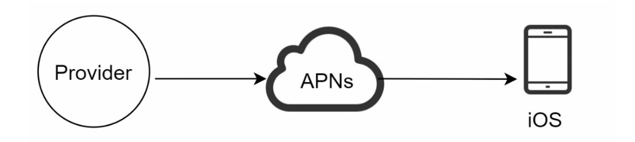
Three components:
| Component | Role |
|---|---|
| Provider | Builds and sends requests to APNs, including device token and payload |
| APNs | Apple's service that routes the notification to the target device |
| Device | Receives and displays the notification |
Android Push Notification#
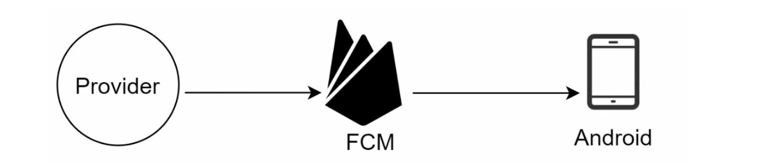
Same flow as iOS, but uses Firebase Cloud Messaging (FCM) instead of APNs.
SMS#
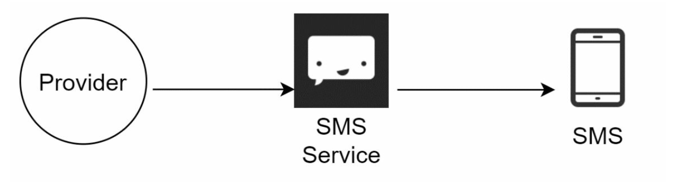
Uses commercial services with global carrier connectivity:
| Service | Architecture |
|---|---|
| Twilio | Microservices on AWS, Kafka for reliability, SIP/PSTN gateways to carriers |
| Nexmo | RESTful APIs, SMPP/SIP carrier connections, message brokers for delivery guarantees |
Email#
Companies typically use commercial email services:
| Service | Architecture |
|---|---|
| SendGrid | Distributed delivery via Kafka/RabbitMQ, global SMTP relays |
| Mailchimp | Marketing automation, async campaign processing |
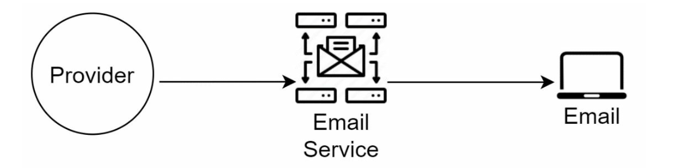
Pattern across all channels: Provider → Third-Party Service (APNs / FCM / Twilio / SendGrid) → Device/Recipient
Contact Info Gathering#
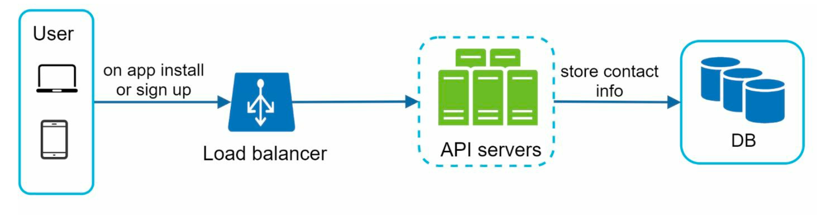
To send notifications, we need to know how to reach each user. This info is collected at registration or profile update and stored securely in the database.
| Data | When collected | API |
|---|---|---|
| Email address | User registration / profile update | POST /v1/users/contact |
| Phone number | User registration / profile update | POST /v1/users/contact |
| Device token | App install / first open | POST /v1/users/contact |
- Email and phone must be verified before use.
- A user can have multiple devices — each device token is stored separately and linked to the user.
- On logout or uninstall, the device token is removed via DELETE /v1/devices/{device_token} to prevent stale-token delivery failures.
Initial Design (Single Server)#
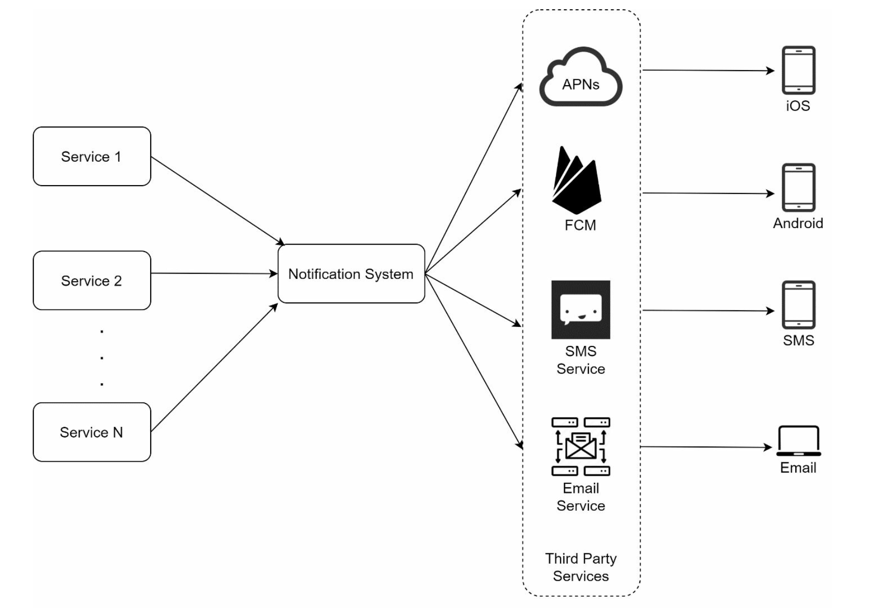
| Component | Role |
|---|---|
| Services 1–N | Trigger notifications (order service, chat service, cron jobs) |
| Notification System | Single server; provides APIs and builds payloads for third-party services |
| Third-Party Services | APNs, FCM, Twilio, SendGrid |
| Users | Receive notifications on their devices |
Problems with the Initial Design#
| Problem | Impact |
|---|---|
| Single point of failure | One notification server = one bottleneck; one crash = no notifications |
| Scalability | Cannot scale DB, cache, and processing components independently |
| Performance bottleneck | Resource-intensive processing on a single server causes delivery delays |
Improved Design#
Three key changes from the initial design:
- DB and Cache moved out of the notification server.
- Multiple notification servers with auto horizontal scaling.
- Message queues added for async processing.
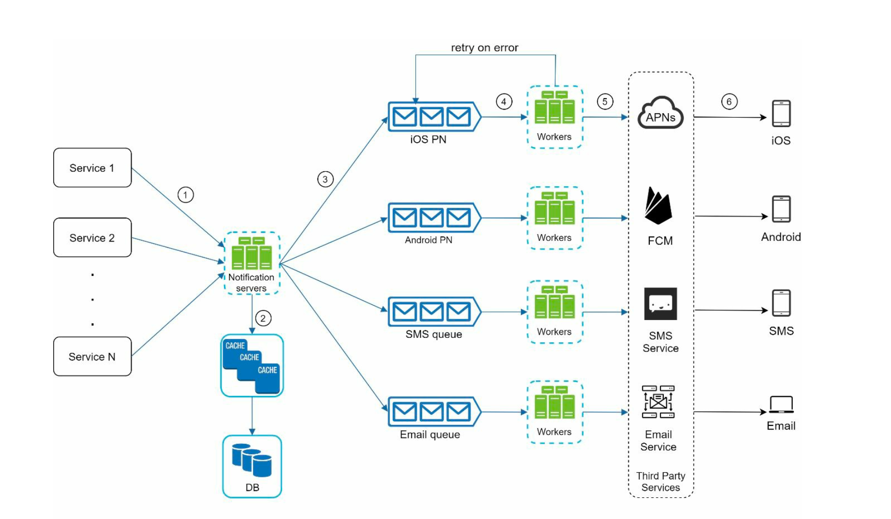
| Component | Role |
|---|---|
| Services 1–N | Trigger notifications via APIs |
| Notification Servers | Validate requests, query DB/Cache for contact info, push events to queues |
| Cache | Stores user info, device info, notification templates for fast access |
| Database | Stores contact info, notification logs, templates |
| Message Queues | Decouples submission from processing; one queue per channel (APNs, FCM, SMS, Email) |
| Workers | Pull events from queues; deliver via third-party services; scale independently |
| Third-Party Services | APNs, FCM, Twilio, SendGrid |
End-to-End Flow#
- A service calls Notification Server APIs.
- Notification servers fetch user metadata (device token, contact info) from cache or DB.
- Event pushed to the appropriate queue (iOS queue → APNs, etc.).
- Workers pull events from queues.
- Workers deliver via third-party services.
- Third-party services push to user devices.
Step 5: Detailed Design#
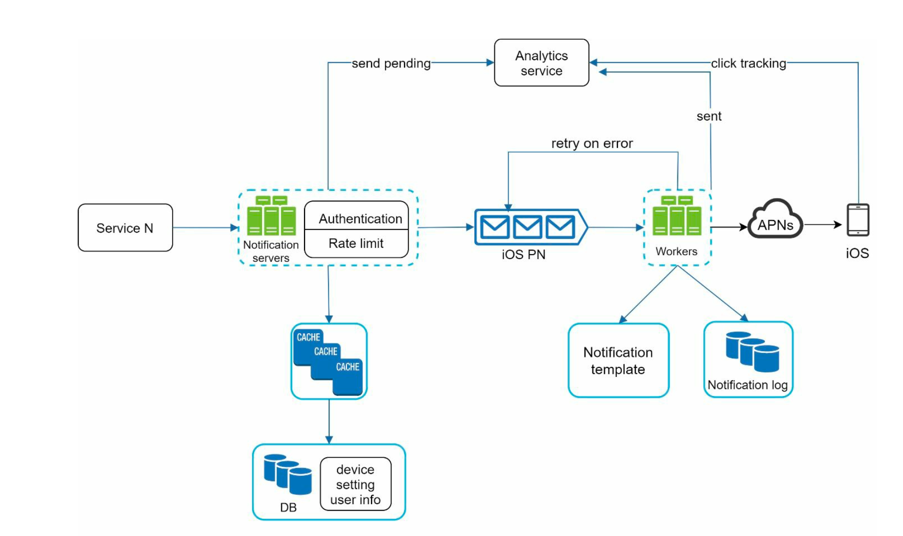
Reliability#
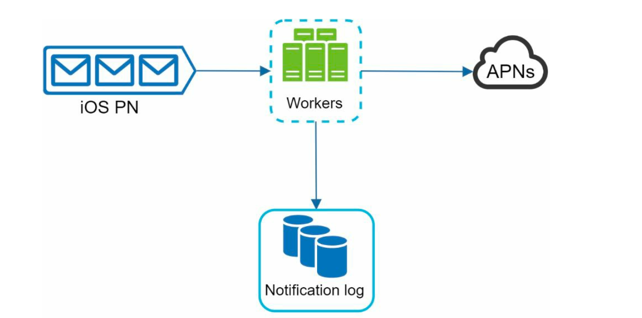
How to prevent data loss?
Notification events can be delayed or reordered — but must never be lost. Notification data is persisted to DB before processing, and a retry mechanism handles failures.
Will users receive duplicate notifications?
Yes — distributed systems cannot guarantee exactly-once delivery. Mitigate on the client side:
- Each notification carries a unique ID.
- On arrival, client checks a local cache for the ID.
- If seen before → discard. Otherwise → display and cache the ID.
Exactly-once delivery is impossible in distributed systems. Network failures, dropped acknowledgments, and crashed nodes make it provably unachievable (Two Generals Problem, FLP impossibility). Design for at-least-once delivery with client-side deduplication.
Additional Components#
| Component | Purpose |
|---|---|
| Notification Templates | Predefined formats stored in DB; consistent, error-free, saves time |
| Notification Settings | Per-user opt-in/opt-out preferences; checked before every notification is sent |
| Rate Limiting | Cap notifications per user to avoid overwhelming them |
| Retry Mechanism | On third-party failure, re-add to queue; alert if problem persists |
| Security (Push) | iOS/Android APIs secured with appKey + appSecret; only verified clients can send |
| Monitoring | Track queue size — large queues indicate slow processing; scale workers up |
| Event Tracking | Open rate, click rate, engagement metrics; add stage tracking to the pipeline |
With all these components in place, the full system looks like this:
Step 6: DB Choices#
| Component | Database | Why |
|---|---|---|
| User contact info (email, phone) | MySQL / PostgreSQL | Structured, relational; ACID guarantees for verified contact data |
| Device tokens | MySQL / PostgreSQL | One-to-many with User; foreign key enforces ownership; indexed lookup by user_id |
| Notification templates | MySQL / PostgreSQL | Small, infrequently updated structured data; easy to query and manage |
| Notification settings (opt-in/out) | MySQL / PostgreSQL | Tight relational coupling to User; checked on every send, so indexed reads matter |
| Notification log (delivery audit, retries) | Cassandra | Write-heavy — every delivery attempt appends a row; high throughput, time-series-like access pattern |
| Event tracking (open rate, click rate) | Cassandra / ClickHouse | Append-only analytics; optimised for time-range aggregation over large volumes |
| Cache (user info, device tokens, templates) | Redis | Sub-millisecond lookups; avoids hitting the DB on every notification dispatch |
| Message queue (worker jobs) | Kafka | Durable, high-throughput pub/sub; one topic per channel (APNs, FCM, SMS, email) |
Why Cassandra for logs? Every notification attempt writes a row — never updates one. At 10M push + 5M email + 1M SMS per day, that's 16M+ appends daily. Cassandra's LSM-tree storage is built for exactly this: high write throughput, append-only, time-ordered queries.
Why Redis in front of Postgres? Device tokens and notification settings are read on every single dispatch. Redis keeps these hot so the relational DB never gets hammered.