High Level Design
Design a Chat System
End-to-end design of a real-time chat system for 50M DAU — covering WebSocket protocol choice, message fanout, multi-device sync, presence management, and media storage.
Step 1: Requirements#
Clarifying Questions#
| Question | Answer |
|---|---|
| What type of chat? | Both 1-on-1 and group chat |
| Mobile or Web? | Both |
| Scale? | 50 million daily active users (DAU) |
| Group member limit? | Maximum of 100 people |
| Core features? | 1-on-1 chat, group chat, online indicator (text only) |
| Message size limit? | Less than 100,000 characters |
| End-to-end encryption? | Not required initially |
| Chat history retention? | Forever |
| Media sharing? | Images and files |
Functional Requirements#
| # | Requirement |
|---|---|
| 1 | Send and receive messages in real time (1-on-1 and group) |
| 2 | Group chats with up to 100 members |
| 3 | Message receipts — sent, delivered, read |
| 4 | Image and media sharing |
| 5 | Online / last seen presence indicators |
| 6 | Push notifications for messages received while offline |
| 7 | Multi-device support (phone + laptop in sync) |
Non-Functional Requirements#
| # | Requirement | Detail |
|---|---|---|
| 1 | Low latency | Message delivery under 500 ms end-to-end |
| 2 | High availability | 99.99% uptime; chat servers can restart without message loss |
| 3 | Durability | Messages must never be lost once acknowledged |
| 4 | Eventual consistency | Read receipts and presence can lag slightly |
| 5 | Horizontal scalability | Must handle 50M DAU; scale chat and presence servers independently |
Estimations#
Assuming 50M DAU, each sending ~40 messages/day:
| Metric | Calculation | Result |
|---|---|---|
| Messages/day | 50M × 40 | 2 billion |
| Peak QPS (3× average) | 2B / 86,400 × 3 | ~70,000 msg/s |
| Avg message size | text + metadata | ~200 bytes |
| Write bandwidth | 70,000 × 200 B | ~14 MB/s |
| Storage/day | 2B × 200 B | ~400 GB/day |
| Storage/year | 400 GB × 365 | ~145 TB/year |
Step 2: Entities#
| Entity | Responsibility |
|---|---|
| User | Profile, auth credentials, device tokens |
| Message | Content, sender, recipient or group, timestamp, message ID |
| Conversation | Logical channel between two users (1-on-1) |
| Group | Metadata (name, owner) and member list |
| Presence | Online status and last_active_at timestamp per user |
| Media | Reference (URL, MIME type, size) to a file in object storage |
Step 3: APIs#
Send a message#
POST /messages
| Param | Type | Description |
|---|---|---|
| conversationId | string | 1-on-1 conversation ID or group ID |
| content | string | Text body (or empty when sending media) |
| mediaUrl | string? | CDN URL of an already-uploaded media file |
Returns the created message with a server-assigned messageId.
Fetch message history#
GET /conversations/{conversationId}/messages?before={messageId}&limit={n}
Returns a page of messages before the given cursor, newest first.
Initiate a media upload#
POST /media/upload/init
| Param | Type | Description |
|---|---|---|
| mimeType | string | e.g. image/jpeg |
| size | number | File size in bytes |
Returns a time-limited pre-signed URL. The client uploads directly to object storage and then sends the resulting CDN URL in a message.
Update presence status#
PUT /presence/status
Body: { "status": "online" | "offline" }
Get user presence#
GET /users/{userId}/presence
Returns { status, lastActiveAt }.
Step 4: Data Flow#
1-on-1 message send#
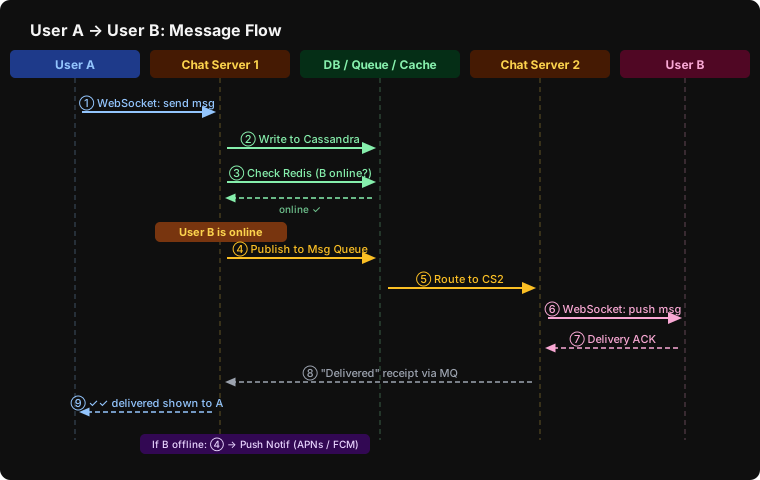
| Step | Actor | Action |
|---|---|---|
| ① | User A → Chat Server 1 | Message frame sent over the existing WebSocket connection |
| ② | CS1 → Cassandra | Assign messageId; persist message to the key-value store |
| ③ | CS1 → Redis | Check presence: is B online? Which Chat Server is B connected to? |
| ④ | CS1 → Message Queue | Publish message event addressed to B (Kafka / Redis Pub-Sub) |
| ⑤ | Queue → Chat Server 2 | CS2 — the server holding B's socket — consumes the event |
| ⑥ | CS2 → User B | Message pushed over B's open WebSocket connection |
| ⑦ | User B → CS2 | Client sends delivery ACK |
| ⑧ | CS2 → CS1 (via MQ) | ACK routed back through the queue to CS1 |
| ⑨ | CS1 → User A | ✓✓ "Delivered" receipt shown on A's screen |
If B is offline at step ③: skip steps ④–⑨ and instead enqueue a push notification to APNs (iOS) or FCM (Android).
Group message send#
- Sender sends to Chat Server 1, same as above.
- Message is persisted once with a (groupId, messageId) primary key.
- A copy is written to each member's sync queue (individual inbox).
- Each member fetches new messages from their inbox independently — their client tracks cur_max_message_id to avoid duplicates.
Step 5: High-Level Design#
Why WebSockets?#
HTTP is request-response; the server cannot push. Polling and long-polling simulate push but waste connections or add latency.
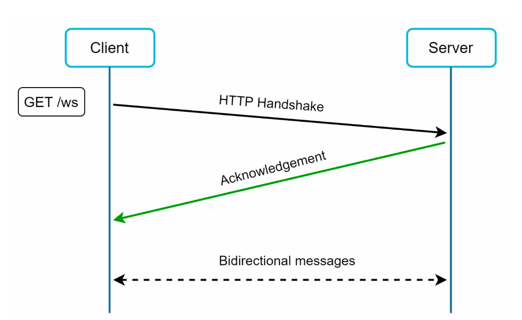
WebSockets start with an HTTP upgrade handshake and then become a full-duplex, persistent channel. Both sides can send at any time with minimal overhead. This is the industry choice (WhatsApp, Slack, Discord).
| HTTP Long Polling | WebSockets | |
|---|---|---|
| Direction | Unidirectional | Bidirectional |
| Latency | Poll interval | Instant |
| Server load | High (constant reconnects) | Low (one persistent connection) |
Architecture overview#
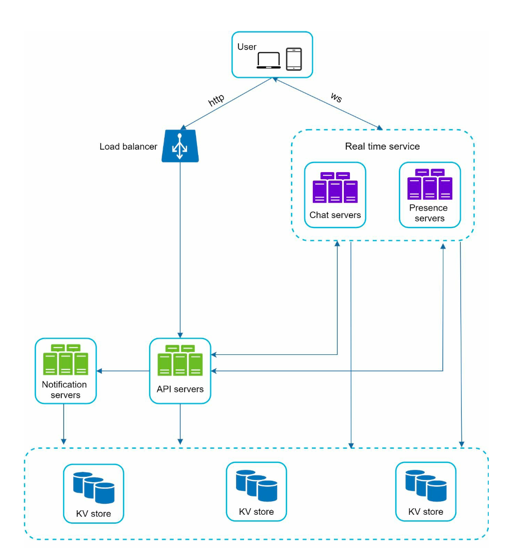
Stateless services (behind a load balancer): auth, user profiles, group management, notification dispatch. These are ordinary REST APIs.
Stateful services: Chat Servers each hold many long-lived WebSocket connections. Clients stay pinned to the same server for the duration of a session. Service discovery (Apache Zookeeper) routes new connections to the least-loaded server geographically close to the client.
Presence Servers: dedicated nodes that track heartbeat events and publish status changes via pub/sub.
Push Notification Service: forwards messages to APNs / FCM for offline users.
Object Storage + CDN: media files live in S3/GCS; the CDN serves reads, keeping bandwidth off the chat servers entirely.
API Server vs Chat Server — when does each handle a request?#
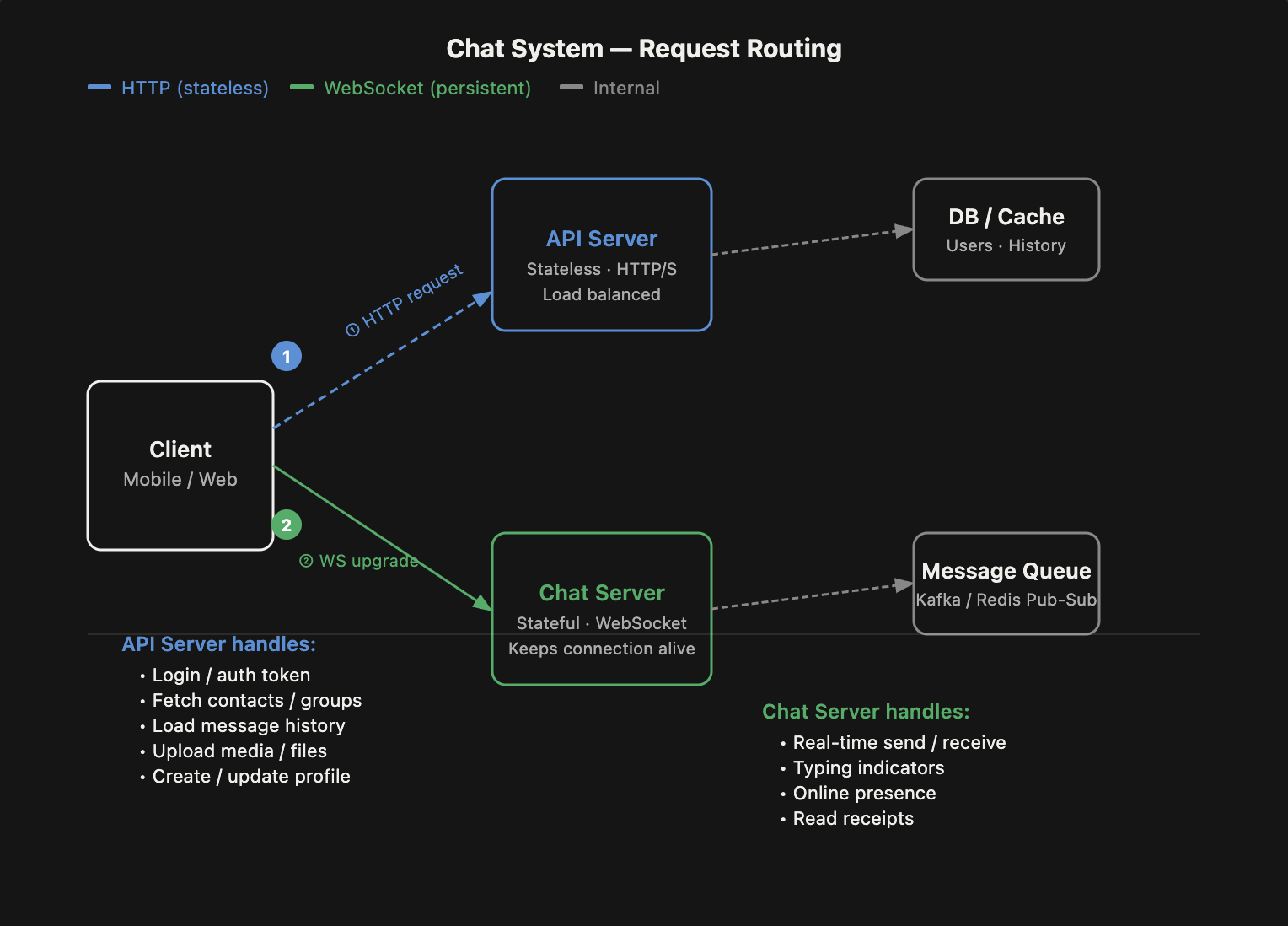 The simplest mental model:
- API Server = stateless HTTP — anything that doesn't need to be live. Client makes a request, gets a response, done.
- Chat Server = stateful WebSocket — anything that needs to be pushed in real time. The connection stays open for the entire session.
The typical flow when a user opens the app:
- POST /login → API Server — authenticate, receive token.
- GET /contacts, GET /chats → API Server — load initial data.
- WebSocket upgrade → Chat Server — one persistent connection is established and stays open.
After the WebSocket is established, all real-time activity travels over it:
| Action | Where it goes | Why |
|---|---|---|
| Send / receive message | Chat Server (WebSocket) | Must be pushed instantly |
| Typing indicator | Chat Server (WebSocket) | Real-time, ephemeral |
| Online / offline presence | Chat Server (WebSocket) | Event-driven, not polled |
| Read receipts | Chat Server (WebSocket) | Real-time acknowledgement |
| Load older messages (scroll up) | API Server (HTTP) | Not real-time; paginated range scan |
| Upload media | API Server (HTTP) → S3 directly | Large payload, not time-critical |
| Create / update profile | API Server (HTTP) | Stateless write |
| Fetch contacts or group info | API Server (HTTP) | Stateless read |
Why can't you just use one server type for everything?
Chat servers are stateful — each one tracks which user IDs are connected to it. A message for User B must be routed to whichever server User B is currently connected to. That's a fundamentally different scaling problem from the stateless API tier, which can be load-balanced freely because no session affinity is needed.
Step 6: Deep Dive#
Service discovery#
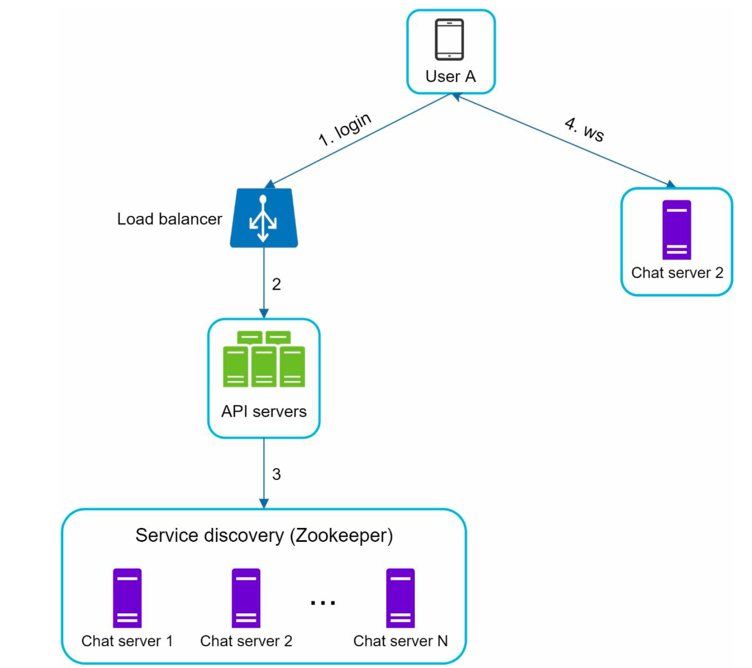
All Chat Servers register with Apache Zookeeper on startup (host, port, current connection count). When a client connects, an API server queries Zookeeper and returns the best server address. The client then opens a WebSocket directly to that address. If the server restarts, the client reconnects and Zookeeper routes it to a healthy node.
Multi-device synchronisation#
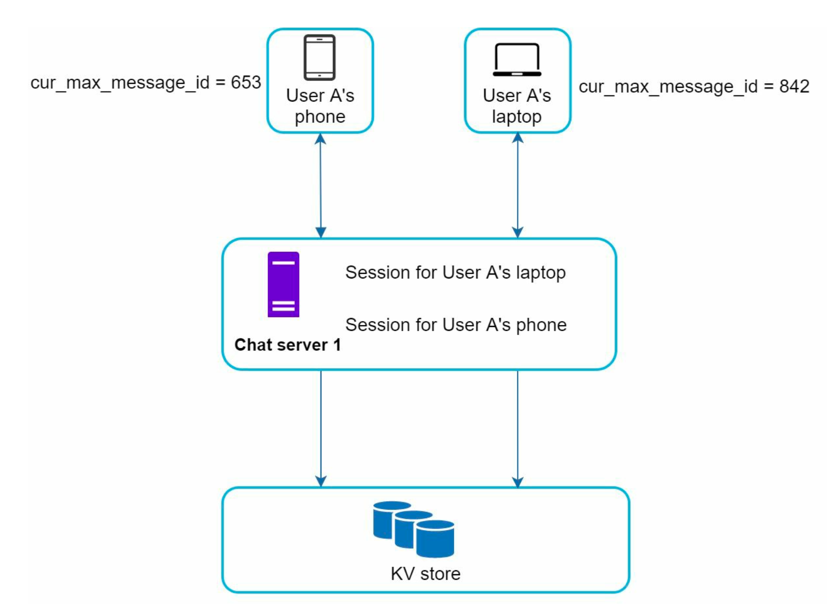
Each device independently tracks cur_max_message_id. On reconnect (or periodically), it pulls all messages with messageId > cur_max_message_id from the key-value store. Because message IDs are monotonically increasing within a conversation, this is a single range scan — no deduplication logic needed.
Online presence management#
Login
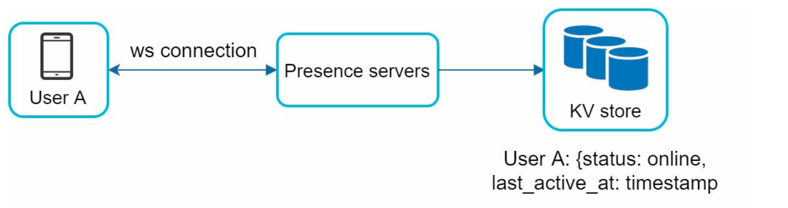
On WebSocket connection: presence server sets status to online and records last_active_at.
Logout

Explicit logout calls the API; status flips to offline and timestamp is preserved.
Disconnection (the tricky case)
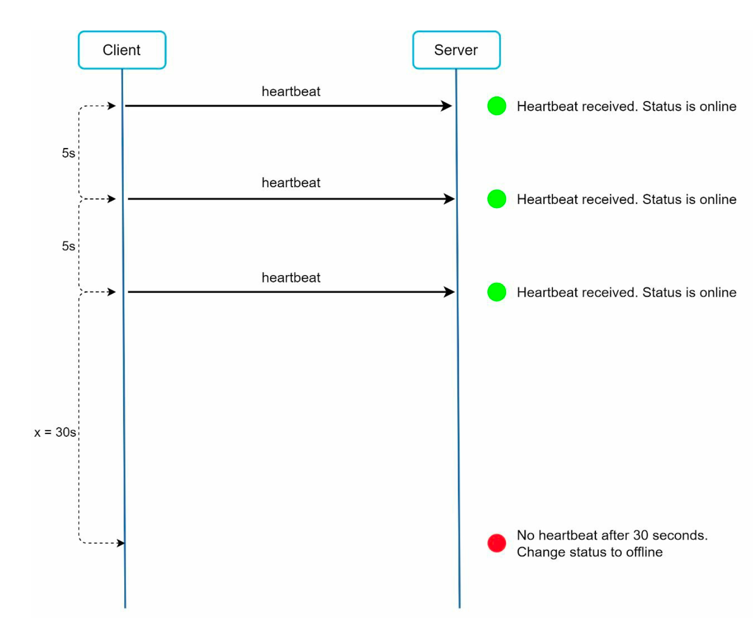
A raw TCP drop looks identical to a flaky network. Marking users offline immediately causes status to flicker. Instead, clients send a heartbeat every 30 seconds. The presence server marks a user offline only after missing several consecutive heartbeats — typically 60–90 seconds of silence.
Status fanout
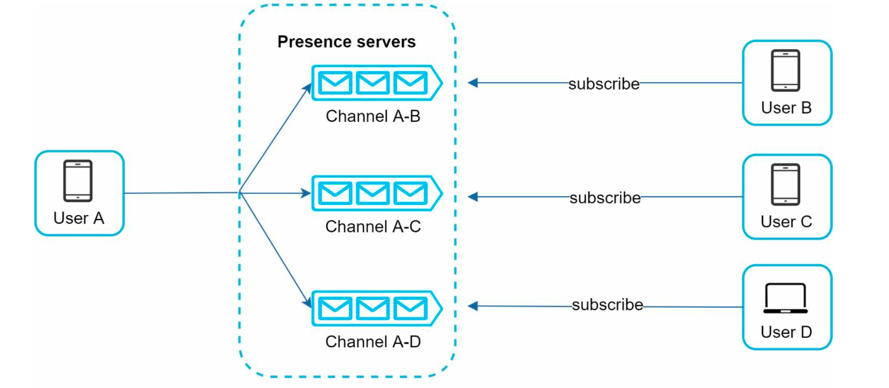
Presence servers use a publish-subscribe model: when User A goes online, an event is published; every friend who has a subscription channel with A receives the update. For large groups (1000+ members) pushing to all subscribers becomes expensive — the optimisation is to deliver presence lazily: fetch status when the user opens a conversation rather than pushing proactively.
Media handling#
Never store media blobs in the chat database.
Upload flow:
- Client requests a pre-signed URL (POST /media/upload/init).
- Server validates the request and returns a time-limited write URL scoped to a single object.
- Client uploads directly to S3/GCS — chat servers are bypassed entirely.
- Client sends a chat message containing the CDN URL.
- Recipients fetch media via CDN edge nodes.
Storage optimisations:
- Deduplication: hash each file (SHA-256); if the hash already exists, reuse the stored object (saves 20–30% for forwarded images).
- Lifecycle policies: move media older than 6 months to cold storage (Glacier); auto-delete media in ephemeral chats.
- Chunked upload: split large files into 5 MB parts, upload in parallel, resume on failure.
End-to-end encryption#
Messages are encrypted on the sender's device before they touch the network. Only the sender and recipient hold the decryption keys. Chat servers relay ciphertext — they cannot read message content. This is the model used by WhatsApp's Signal Protocol.
Performance & resilience#
Graceful degradation: under traffic spikes, disable non-critical features first (read receipts, typing indicators, presence updates) so core message delivery continues uninterrupted.
Rate limiting: cap at 100 messages/minute per user and 1,000 API calls/hour. Reject excess at the gateway — prevents spam without blocking legitimate traffic.
Step 7: DB Choices#
| Component | Database | Why |
|---|---|---|
| Chat messages | Cassandra / HBase | Write-heavy, append-only, horizontal sharding by (conversationId, messageId), proven at WhatsApp / Facebook scale |
| User profiles, groups | PostgreSQL | Relational structure, ACID transactions for membership changes |
| Online presence, session state | Redis | In-memory key-value with TTL; heartbeat writes need sub-millisecond latency |
| Media files | S3 / GCS | Object storage built for large blobs, native CDN integration, independent scaling |
| Service registry | Apache Zookeeper | Distributed coordination, watch notifications for server health |
Step 8: Follow-Ups#
Scaling to millions of concurrent connections#
A single Chat Server can hold ~100K WebSocket connections. At 50M DAU with, say, 20% concurrently online, you need ~100 servers. Use consistent hashing to shard users across servers so the message router can find the right target without broadcasting.
Large groups (1,000+ members)#
Writing one inbox copy per member at 1,000+ members on every message is expensive. Alternatives: store the message once and have each client pull from a shared groupId cursor, or introduce a fanout service that processes writes asynchronously and batches delivery.
Video and audio calls#
WebSockets add unnecessary relay overhead for real-time media. Use WebRTC for peer-to-peer audio/video — it has its own signalling, STUN/TURN servers, and codecs optimised for low-latency streams. The chat server acts only as the signalling channel to initiate the call.
Message search#
Full-text search over billions of messages requires a dedicated index. Write message content to Elasticsearch asynchronously (via Kafka consumer). Apply per-user access control at query time so users can only search their own history.
Compliance and data residency#
Regulated industries (finance, healthcare) require message retention policies and audit logs. Store encrypted message archives in a separate compliant store (e.g. AWS GovCloud), with a retention manager that enforces deletion schedules independently of the live chat database.
FAQs#
Why does logout go through the API Server and not the Chat Server?#
Logout is a stateless write, not a real-time event. When a user logs out, three things need to happen:
- Auth token is invalidated in the DB
- Device tokens are cleaned up (to stop push notifications)
- Presence status is flipped to offline in Redis
These are durable, transactional operations — exactly what API servers are built for. The Chat Server only owns the WebSocket connection; it doesn't own auth tokens or persistent presence records. Mixing that responsibility in would couple stateful and stateless concerns on the same node.
Compare this to a network drop — that has no explicit signal, so it's the Chat Server that detects it via missing heartbeats and then notifies the Presence Server.
| Event | Path | Why |
|---|---|---|
| Explicit logout | Client → API Server → Presence Server | Intentional write; token invalidation needed |
| Network drop / crash | Chat Server → Presence Server (heartbeat timeout) | No explicit signal; only the WS layer knows |
Does the client talk to the Presence Server directly?#
No — the Presence Server is an internal service with no public endpoint. The client only has two channels open: HTTP to API servers and a WebSocket to a Chat Server. The Presence Server is always reached backend-to-backend:
| Event | Path |
|---|---|
| Login / explicit logout | Client → API Server → Presence Server |
| Heartbeat (staying online) | Client → Chat Server → Presence Server |
| Network drop | Chat Server (timeout) → Presence Server |
| Friend reads your status | Client → API Server → Presence Server → Redis |
What happens when a user gets disconnected?#
Unlike logout, a network drop sends no explicit signal — the server has to figure it out on its own via missed heartbeats.
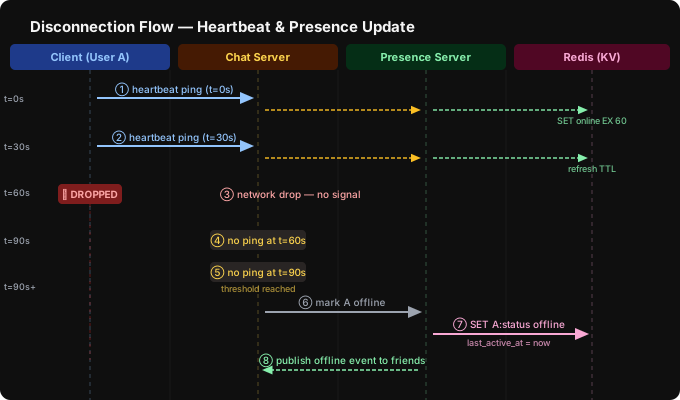
| Step | What happens |
|---|---|
| ① ② | Client sends a heartbeat ping every 30s over the WebSocket. Chat Server forwards it to the Presence Server, which refreshes the Redis TTL (key set to expire in 60s). |
| ③ | Network drops — no logout, no signal. Client is silently gone. |
| ④ ⑤ | Chat Server notices missed heartbeats at t=60s and t=90s. After N consecutive misses (threshold: 2–3), it treats the connection as dead. |
| ⑥ ⑦ | Chat Server notifies Presence Server → Redis: status = offline, last_active_at = now. |
| ⑧ | Presence Server publishes an offline event via pub-sub — friends subscribed to User A's channel are notified. |
Why not mark offline on the first missed heartbeat? A flaky network can drop one ping without the user actually leaving. Marking offline instantly causes presence to flicker. The threshold (2–3 missed beats ≈ 60–90s delay) absorbs transient drops while keeping "last seen" reasonably accurate — the same approach WhatsApp uses.
| Event | Who detects it | How |
|---|---|---|
| Explicit logout | API Server | Client sends PUT /presence/status offline |
| Network drop | Chat Server | Counts consecutive missed heartbeats |
| Server restart | Zookeeper watch | Health check fails; clients reconnect |
What happens when a Chat Server crashes?#
Three things need to be handled: detection, client reconnection, and in-flight message safety.
① Detection — Zookeeper
Every Chat Server maintains a session with Zookeeper on startup. When it crashes, the session expires within seconds. Zookeeper fires a watch event → API Servers and the load balancer remove the dead node from the registry immediately.
② Client reconnection
All clients on that server get a WebSocket connection closed event. Their client-side retry logic kicks in:
WS closed → backoff timer → GET /chat-server (API Server)
           → Zookeeper returns a healthy server
           → new WebSocket connection established
The client reconnects to a different Chat Server — session affinity only lasts for the life of the connection. After reconnect, the client pulls messageId > cur_max_message_id to catch up on anything missed.
③ In-flight messages — the tricky part
This depends on where in the pipeline the crash happened:
| Crash moment | Message fate |
|---|---|
| Before CS wrote to Cassandra | Lost — client never got ACK, so it retries |
| After Cassandra write, before publishing to Queue | Safe in DB; recipient pulls it on reconnect |
| After publishing to Queue | Safe — Kafka holds it durably; recipient's new CS consumes it |
The key protection: CS only sends ACK to the sender after both the DB write and the queue publish succeed. If the client never gets an ACK, it retries. This gives at-least-once delivery.
④ Presence
The crashed server stops sending heartbeats on behalf of its users. The Presence Server detects this the same way as a network drop — Redis TTL expires after 60–90s → users marked offline → friends notified via pub-sub.
Summary:
CS crashes
  → Zookeeper detects (seconds)
  → removes from registry
  → clients get WS disconnect → reconnect to healthy CS
  → unACKed messages retried by client
  → queued messages delivered normally
  → presence marked offline after heartbeat timeout
The Message Queue (Kafka) is the main durability shield — once a message hits the queue, a server crash cannot lose it.