High Level Design
Designing a Load Balancer
End-to-end design of a production-grade load balancer — control and data planes, health checking, session persistence, SSL termination, and high-availability with active-active failover.
A Load Balancer distributes incoming network traffic across multiple servers so no single server becomes overwhelmed. Instead of routing all traffic to one server (which eventually crashes under heavy load), a load balancer acts as a traffic cop — intelligently spreading requests across a pool of healthy servers.
Requirements#
Functional#
- Traffic Distribution — distribute requests across backend servers using configurable algorithms.
- Health Checking — continuously monitor backends and auto-remove unhealthy ones from the pool.
- Session Persistence — support sticky sessions to route requests from the same client to the same server.
- SSL Termination — handle TLS encryption/decryption to offload work from backend servers.
- Layer 4 and Layer 7 — support both transport-level (TCP/UDP) and application-level (HTTP/HTTPS) load balancing.
Non-Functional#
- High Availability — 99.99% uptime, no single point of failure.
- Low Latency — < 1ms added overhead per request.
- High Throughput — up to 1 million requests per second at peak.
- Scalability — horizontal scaling to handle increasing traffic.
- Fault Tolerance — continue operating when individual components fail.
Estimations#
| Category | Metric | Value |
|---|---|---|
| Peak RPS | Max load | 1,000,000 |
| Average RPS | ~⅓ of peak | ~300,000 |
| Concurrent connections | RPS × avg duration (0.5s) | ~500,000 |
| Ingress bandwidth | 1M × 2 KB | 2 GB/s |
| Egress bandwidth | 1M × 10 KB | 10 GB/s |
| Total bandwidth | — | ~12 GB/s (~96 Gbps) |
| Memory per connection | ~500 bytes × 500K connections | ~250 MB |
| Health checks | 1000 servers / 5s interval | 200 checks/sec |
Primary bottleneck: network bandwidth (~96 Gbps) — requires horizontal scaling.
Core APIs (Control Plane)#
The system splits into two planes:
| Plane | Purpose | Characteristics |
|---|---|---|
| Data Plane | Handles actual request traffic | High throughput, low latency |
| Control Plane | Configuration & management | Low traffic, explicit APIs |
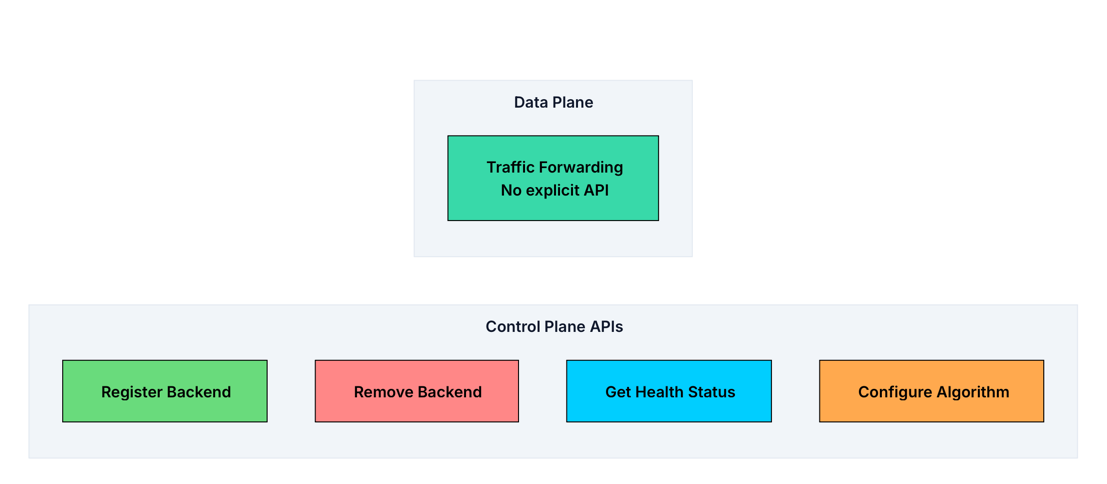
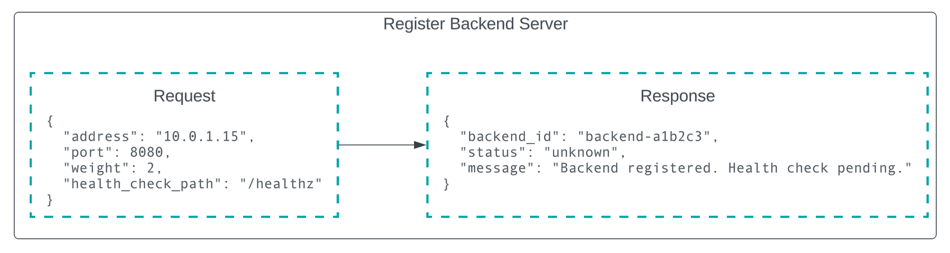
1. Register Backend Server#
POST /backends
Adds a server to the pool and starts health checking it. Initial status is "unknown" — transitions to "healthy" or "unhealthy" after the first health check.
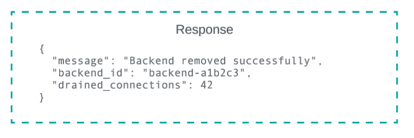
2. Remove Backend Server#
DELETE /backends/{backend_id}
Decommissions a server — stops new traffic immediately, allows existing connections to complete gracefully (connection draining).
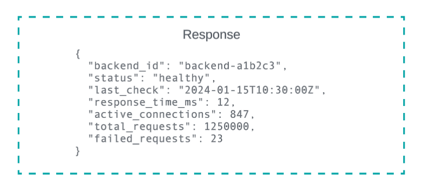
3. Get Backend Health Status#
GET /backends/{backend_id}/health
Returns detailed health info including current state and historical metrics — useful for debugging and monitoring dashboards.
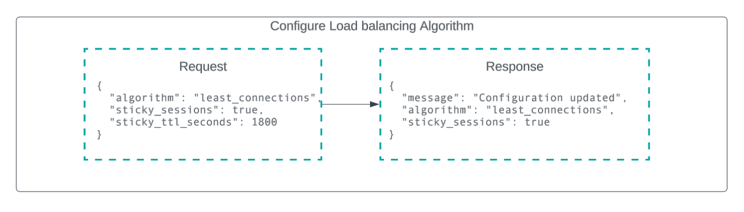
4. Configure Load Balancing Algorithm#
PUT /config/algorithm
Changes traffic distribution algorithm. Takes effect immediately for new connections; existing connections are not affected.
High Level Design#
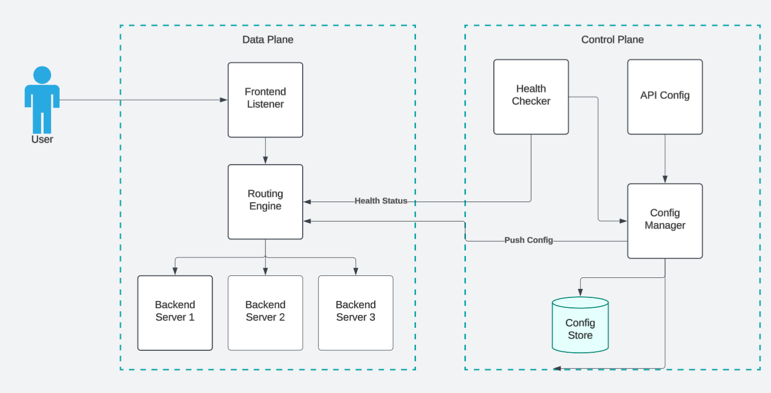
The architecture splits into two parts:
- Data plane — handles actual traffic at high speed; every request flows through it.
- Control plane — manages configuration and health checking (slower pace; changes are infrequent).
1. Traffic Distribution#
Three components handle request routing:
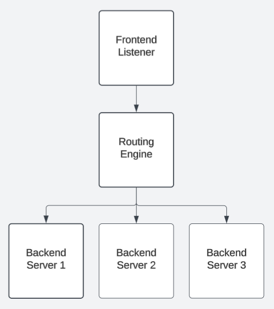
Frontend Listeners — bind to ports (80/443), accept TCP connections, parse enough of the request for routing decisions (headers, URL path for L7), and hand off to the routing engine.
Routing Engine — the brain of the LB. Maintains the backend list, health state, connection counters, and configured algorithm. Selects the target backend for every incoming connection.
Backend Pool — a logical group of interchangeable servers.
- Simple: single pool, all requests routed to one group.
- Complex: multiple pools by service type — API pool, static content pool, auth pool.
Request Flow#
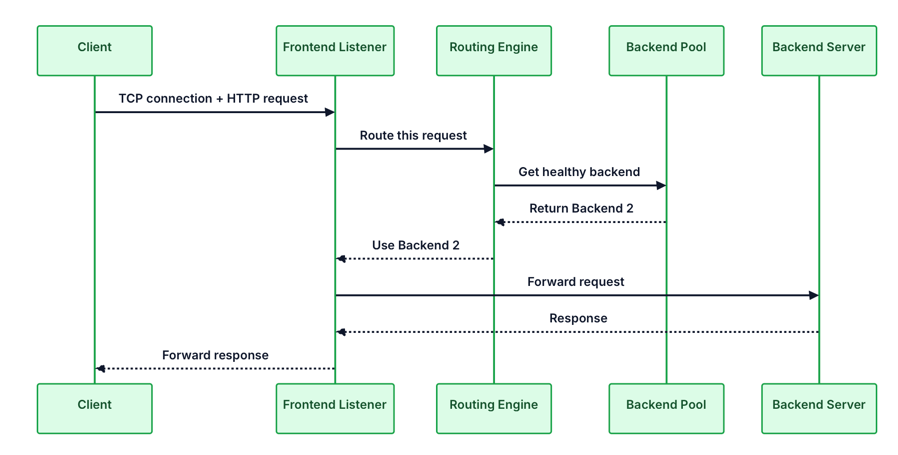
- Client sends a request to the LB's public IP.
- Frontend listener accepts the TCP connection; parses request metadata for L7.
- Routing engine filters unhealthy backends, applies algorithm, selects target.
- Request forwarded to selected backend.
- Backend processes and responds; LB forwards response to client.
- Connection kept alive (HTTP keep-alive) or closed per configuration.
2. Health Monitoring#
Without health checking, the LB blindly sends traffic to dead servers — users see errors. The Health Checker is a background process that:
- Probes each backend every 5–10 seconds.
- Tracks successive successes and failures.
- Marks unhealthy after 2–3 consecutive failures; re-enables after 2–3 consecutive successes.
- Notifies the routing engine on every status change.
| Type | How it works | When to use |
|---|---|---|
| TCP Check | Opens + closes TCP connection | Basic connectivity |
| HTTP Check | GET /health → expects 2xx | Web apps / APIs |
| Custom Script | User-defined script | Complex validation, legacy systems |
Most production deployments use HTTP health checks — the application exposes /health or /healthz that returns 200 OK only when it can actually handle requests.
3. High Availability#
Problem: the LB is now a single point of failure.
Solution: run multiple LB instances.
| Aspect | Active-Passive | Active-Active |
|---|---|---|
| Traffic handling | Only one node serves traffic | All nodes serve simultaneously |
| Client connection | Via VIP (Virtual IP) | Multiple IPs or shared IP |
| Failover | Standby takes over VIP (1–3s) | Other nodes continue, no downtime |
| Resource utilization | ❌ 50% wasted (idle standby) | ✅ Fully utilized |
| State management | No sync needed | Requires shared state store |
| Scalability | Limited | Highly scalable |
Active-active is the better choice for production. Full resource utilization and instant failover outweigh the added complexity of state sync.
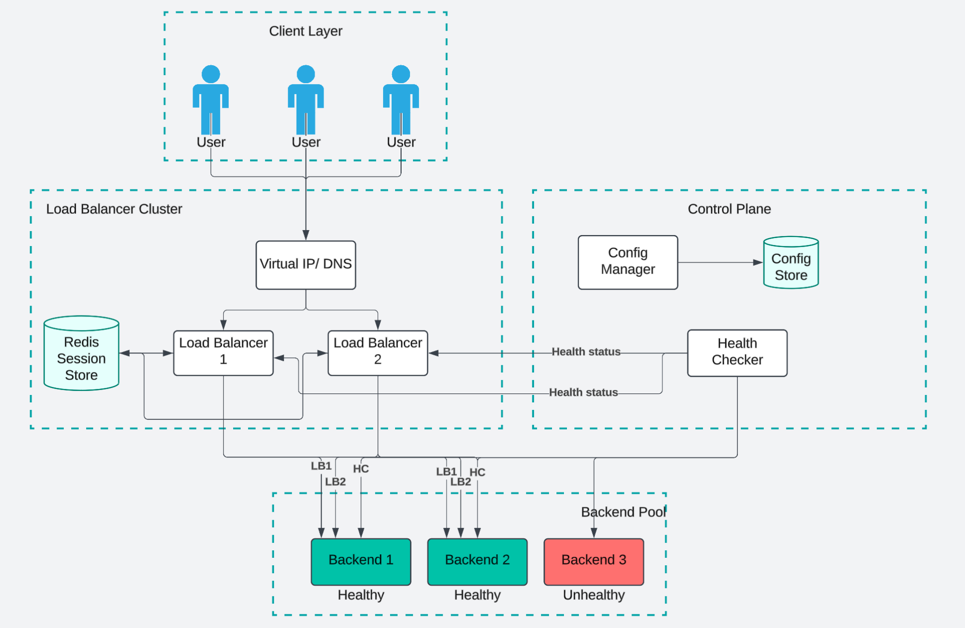
How it works:
- Clients connect to the VIP — they never know which LB node handles them.
- Both LB nodes serve traffic simultaneously (active-active).
- Each LB node routes only to healthy backends (unhealthy ones are excluded).
- Sticky session state stored in Redis — any LB node can look up which backend a user belongs to.
- Health Checker monitors all backends and both LB nodes continuously.
- Config Manager pushes updates to all LB nodes from a central Config Store (etcd/Consul).
Component Summary#
| Component | Role |
|---|---|
| Virtual IP / DNS | Stable entry point; abstracts the LB cluster |
| LB Nodes | Accept requests; route to backends — stateless, horizontally scalable |
| Session Store (Redis) | Shared sticky session mappings across LB nodes |
| Health Checker | Background process; ensures only healthy nodes receive traffic |
| Config Manager | Manages LB config via APIs; handles updates and validation |
| Config Store | Persists config (etcd, Consul, or PostgreSQL) |
| Backend Pool | Application servers; organized by service type |
Database Design#
| Data Type | Storage | Why |
|---|---|---|
| Active connections | In-memory (per LB node) | Microsecond latency; local ownership |
| Backend health status | In-memory (per LB node) | Frequently updated; fast routing access |
| Connection counters | In-memory (per LB node) | Updated every request (least-connections) |
| Session mappings | Redis cluster | Shared across LB nodes for sticky sessions |
| Backend configuration | etcd / Consul / PostgreSQL | Persistent, versioned, survives restarts |
| Metrics & logs | Prometheus / InfluxDB | Historical analysis and alerting |
Hot path must never touch disk or cross a network boundary for core routing. Config is loaded into memory at startup and updated via push notifications.
Deep Dive#
Load Balancing Algorithms#
| Algorithm | Complexity | State | Adaptive | Best For |
|---|---|---|---|---|
| Round Robin | Very simple | Stateless | None | Homogeneous backends, uniform requests |
| Weighted Round Robin | Simple | Stateless | None | Known capacity differences, gradual rollouts |
| Least Connections | Moderate | Per-node state | High | Variable request processing times |
| Weighted Least Connections | Moderate | Per-node state | High | Production systems (default recommendation) |
| IP Hash | Simple | Stateless | None | Basic session persistence, non-HTTP protocols |
| Consistent Hashing | Complex | Stateless | None | Dynamic scaling, cache servers |
Recommendations:
- Default to Weighted Least Connections — handles heterogeneous backends and variable request costs.
- For session persistence, prefer cookie-based stickiness over IP hash (IP hash is fragile due to NAT).
- Use Consistent Hashing when backends scale frequently or when load balancing cache servers.
Session Persistence (Sticky Sessions)#
Problem: stateful applications store session data in a specific backend's memory. A subsequent request routed to a different backend looks like a logout.
Approach 1: Cookie-Based Stickiness (Recommended for HTTP)#
The LB injects a cookie identifying the target backend. Every subsequent request includes the cookie.
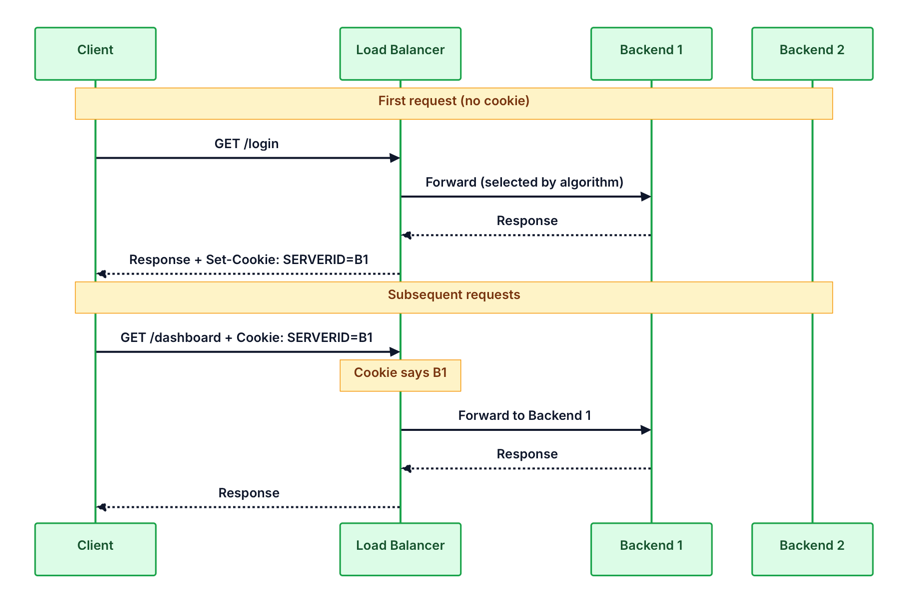
✅ Works regardless of client IP changes (mobile, corporate NAT)
✅ Survives LB restarts
✅ No shared state between LB nodes
Approach 2: Source IP Persistence#
Routes based on hash(client_ip) % n. Use only for non-HTTP protocols or when cookies are not possible. Breaks for mobile users and corporate NAT.
Approach 3: Externalized Session Store (Best Long-Term)#
Store session data in a shared Redis cluster — makes backends fully stateless.
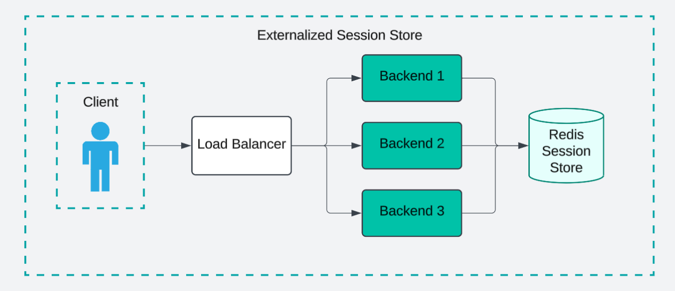
✅ No sticky sessions needed — any LB algorithm works
✅ Backends scale freely
✅ Backend failures don't cause session loss
Always build new applications stateless. Use externalized session store.
Layer 4 vs Layer 7#
| Aspect | Layer 4 (TCP/UDP) | Layer 7 (HTTP/HTTPS) |
|---|---|---|
| Routing basis | IP + Port | URL, headers, cookies, body |
| Performance | ⚡ Very high (packet-level) | Moderate (request inspection) |
| Content awareness | ❌ | ✅ |
| SSL termination | ❌ | ✅ |
| Caching / Auth / Rate Limiting | ❌ | ✅ |
| Examples | AWS NLB, HAProxy | NGINX, AWS ALB |
SSL/TLS Termination#
LB handles all encryption; backends receive plain HTTP.
Benefits:
- One place to install/renew certificates (not on every backend).
- Offloads CPU-intensive cryptography from backends.
- Enables content-based routing (URL/header inspection requires decrypted traffic).
- TLS session caching — repeat visitors skip the full handshake.
Security trade-off: backend ↔ LB connection is unencrypted.
- Inside a private VPC → acceptable.
- For end-to-end encryption → re-encryption (LB decrypts, inspects, re-encrypts) or SSL passthrough (LB routes based on SNI, no content inspection).
Failure Handling#
Detection mechanisms:
- Heartbeat messages — LB nodes exchange "I'm alive" every 1–3 seconds.
- Health checks — same mechanism used for backends, applied to LB nodes.
- Shared storage heartbeats — write timestamps to etcd/Redis to detect liveness.
Balance sensitivity: too sensitive → false positives (brief network hiccup declared dead); too slow → extended outage.
Graceful degradation (Connection Draining):
- Detection — health check fails.
- Draining — stop new traffic; allow existing connections to complete.
- Removal — fully remove backend once in-flight requests finish.
- Recovery — add backend back once it passes the success threshold.