High Level Design
Networks
Network fundamentals for system design — OSI model, DNS, HTTP, TCP vs UDP, REST vs GraphQL, WebSockets, WebRTC, and video streaming protocols.
Network refers to how components of a system communicate with each other — whether on the same machine, different servers, or across the globe.
It involves: data transmission, protocols (HTTP, TCP, gRPC), latency/throughput/bandwidth, load balancing, failover, and security (encryption, firewalls).
Where Networks Are Used#
| Layer | Example |
|---|---|
| Client ↔ Backend | HTTP API calls from browser/mobile app |
| Service ↔ Service | Microservice-to-microservice communication |
| App ↔ DB/Cache | TCP connections to PostgreSQL/Redis |
| App ↔ Message Queue | Kafka, RabbitMQ messaging |
| CDN ↔ Client | Static file delivery via Cloudflare, etc. |
OSI Model#
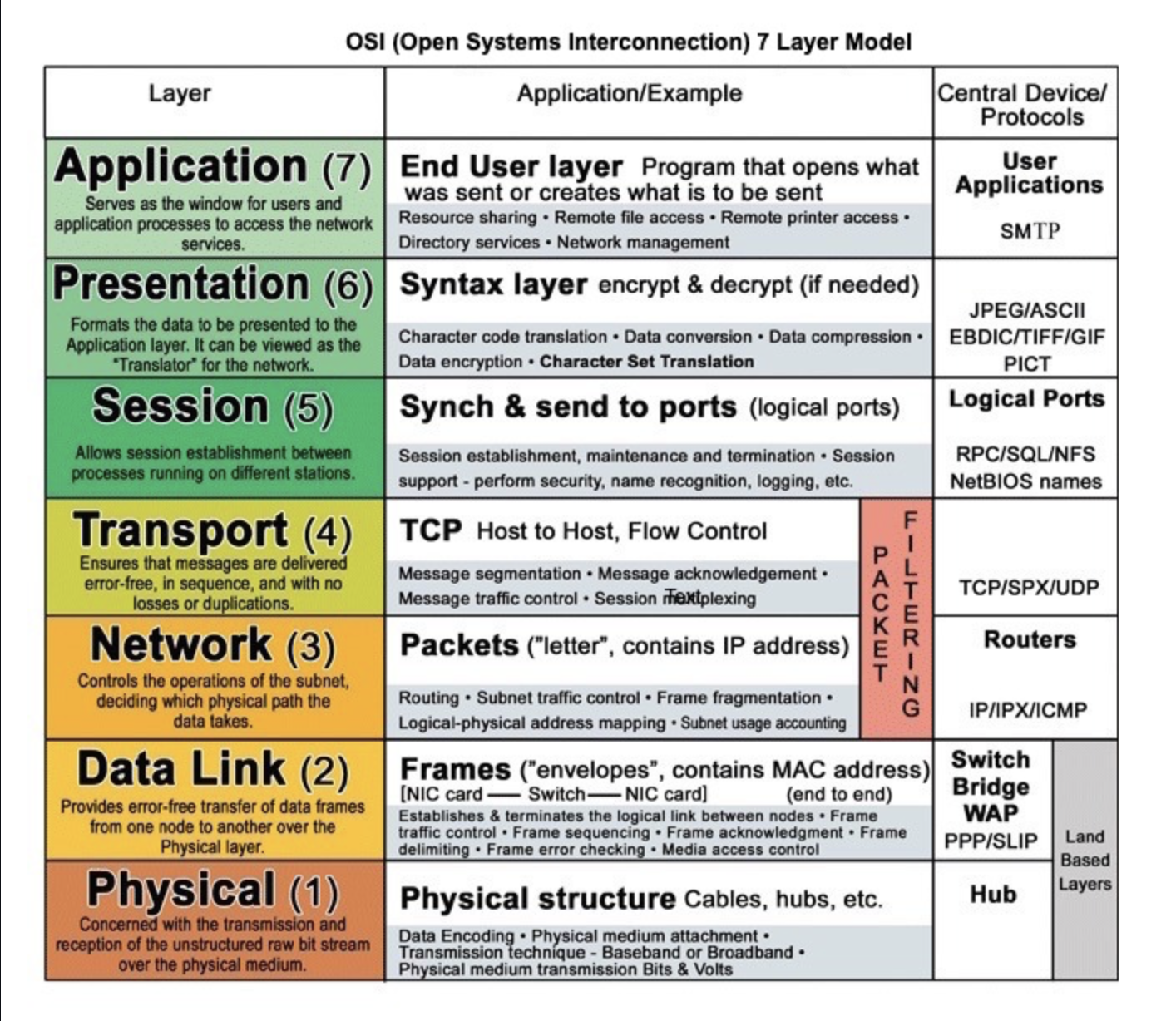
| Layer | Name | Description |
|---|---|---|
| 1 | Physical | Hardware, cables, routers, switches |
| 2 | Data Link | MAC addresses; node-to-node delivery |
| 3 | Network | IP addresses; routing between networks |
| 4 | Transport | TCP/UDP; end-to-end delivery, flow control |
| 5 | Session | Opening/closing sessions between apps |
| 6 | Presentation | Data formatting, encryption/decryption |
| 7 | Application | Protocols like HTTP, DNS, SMTP |
IP Address#
A unique identifier for a device on the internet or local network. Expressed as four numbers from 0–255 (e.g., 192.168.1.38).
MAC Address#
A physical hardware address embedded in a NIC (Network Interface Card). Works at the Data Link Layer (Layer 2). Unique 48-bit identifier per network card.
ISP — Internet Service Provider#
Connects users to the internet via wired (fiber, cable) or wireless (Wi-Fi, mobile data) connections.
DNS — Domain Name System#
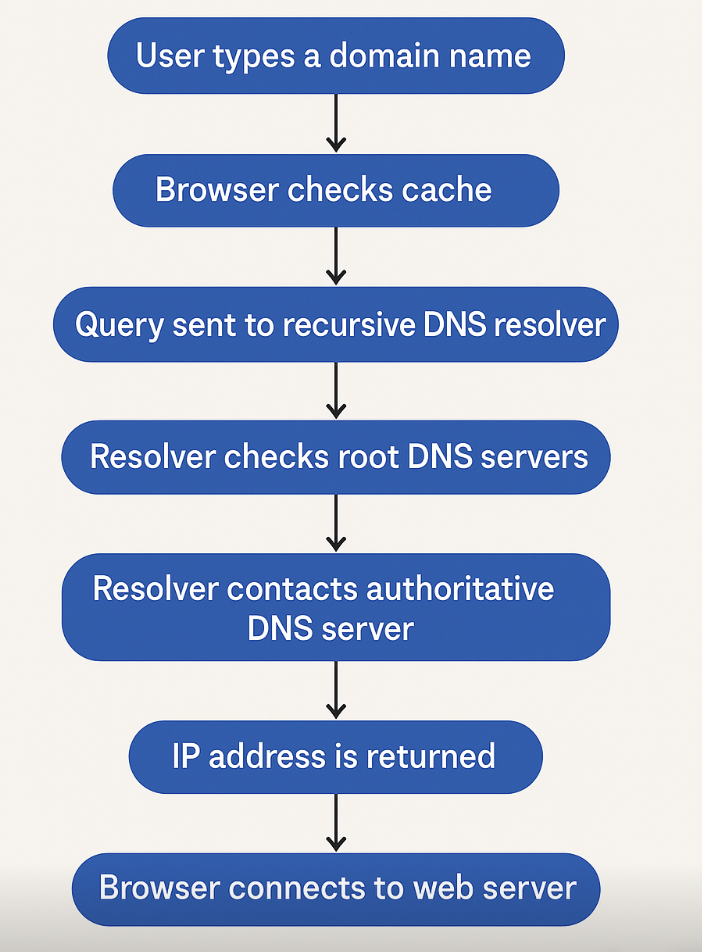
Translates human-readable domain names (www.amazon.com) to machine-readable IP addresses (192.0.2.44).
DNS resolution flow:
- Browser checks its DNS cache
- If not cached → queries recursive DNS resolver (ISP or Google 8.8.8.8)
- Resolver contacts root DNS server
- Root points to TLD server (.com, .org)
- TLD points to authoritative DNS server for the domain
- Authoritative server returns the IP (A record for IPv4, AAAA record for IPv6)
- Browser connects to that IP
HTTP#
The foundation of data exchange on the web. A client-server protocol where clients (browsers) send requests and servers return responses.
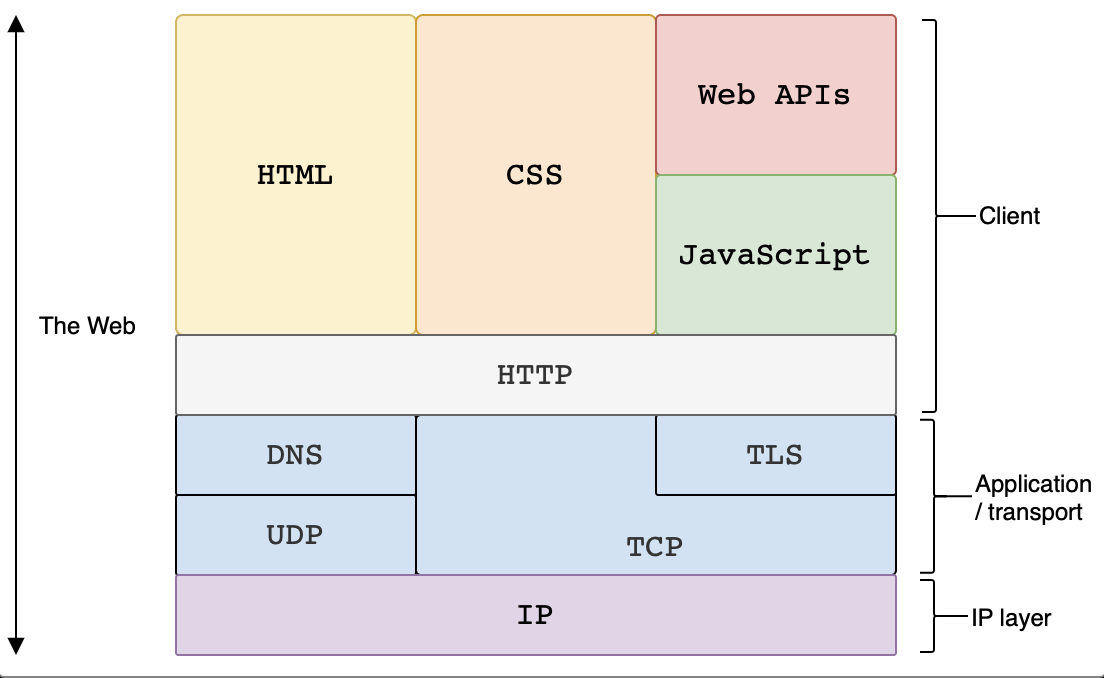
Internet Protocols#
TCP — Transmission Control Protocol#
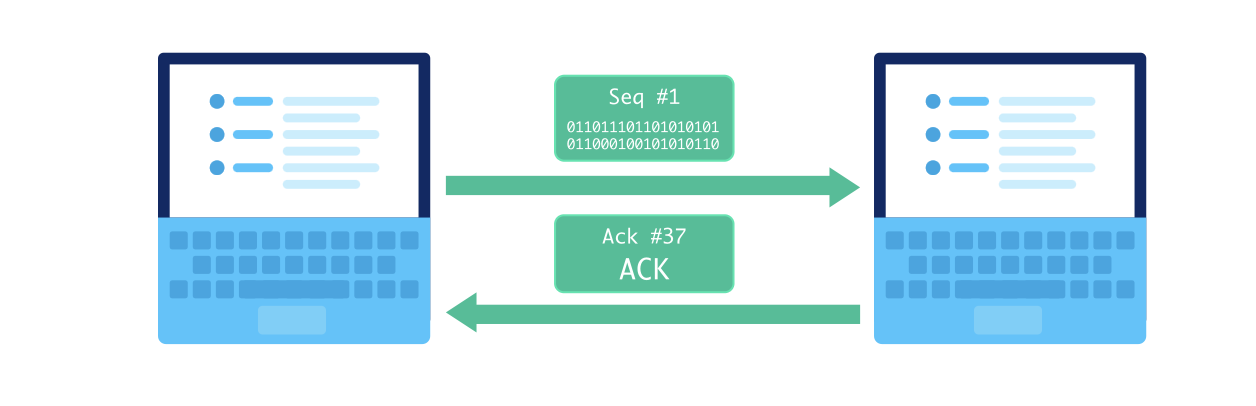
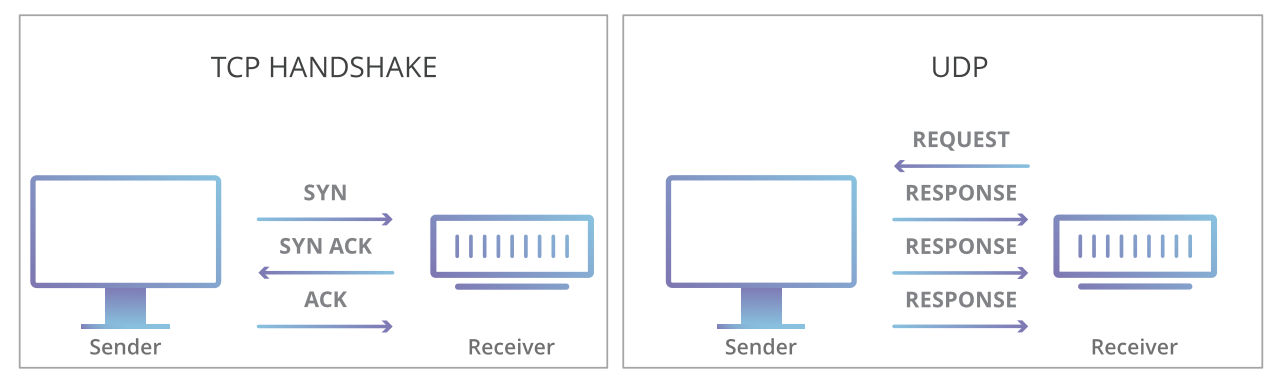
- Connection-oriented; establishes a connection before data transfer
- Reliable: handles lost, out-of-order, duplicate, and corrupted packets
- Used for: web browsing (HTTP/HTTPS), email (SMTP), file transfer (FTP)
UDP — User Datagram Protocol#
- Connectionless; no connection setup overhead
- Unreliable: no guarantee of delivery or ordering
- Fast: minimal overhead
- Used for: video streaming, online gaming, VoIP, DNS
TCP vs UDP#
| Feature | TCP | UDP |
|---|---|---|
| Connection | Connection-oriented | Connectionless |
| Reliability | Reliable | Unreliable |
| Error Recovery | Detection + retransmission | Basic checksum only |
| Speed | Slower (overhead) | Faster (minimal overhead) |
| Use Cases | HTTP/HTTPS, email, FTP | Streaming, gaming, VoIP, DNS |
API Protocols#
REST#
- Architectural style based on resources and HTTP methods
- Multiple endpoints for different resources
- Stateless; easy to cache GET requests
- Best for: simple CRUD-based microservices
GraphQL#
- Query language for APIs; single endpoint
- Client requests exactly the data it needs — no over-fetching or under-fetching
- No versioning needed (schema evolves)
- Best for: complex data relationships, frontend-driven apps
REST vs GraphQL#
| Feature | REST | GraphQL |
|---|---|---|
| Endpoints | Multiple (one per resource) | Single endpoint |
| Data Fetching | Over-fetch or under-fetch | Exactly what's needed |
| Versioning | Needs /v1, /v2 | Schema evolves — no versioning |
| Caching | Easy (HTTP cache for GET) | Custom caching needed |
| Error Handling | HTTP status codes | Errors in response body |
Microservice Communication#
gRPC (Google Remote Procedure Call) is the standard for service-to-service internal communication. Uses Protocol Buffers (binary serialization) — language-agnostic and efficient.
Video Streaming#
Why HTTP Alone Isn't Enough#
- Videos are broken into chunks. HTTP is stateless, so each chunk request must specify which chunk.
- HTTP runs over TCP — for live streaming, if a packet drops, retrying is pointless (the data is already old). UDP is better for live streaming.
HTTP-DASH (Dynamic Adaptive Streaming over HTTP)#
- Client signals its bandwidth capacity to the server
- Server adapts video quality accordingly (720p, 480p, etc.)
- Runs over TCP for guaranteed delivery
- Apple devices use HLS (HTTP Live Streaming) — similar concept
WebRTC#
For video conferencing, routing through a server is inefficient.
- Peer-to-peer protocol — no central server needed for data
- Clients get peer addresses from a signaling server, then connect directly
- Faster; saves bandwidth; more resilient (if server crashes, call continues)
Glossary#
| Term | Definition |
|---|---|
| DDoS | Distributed Denial of Service — flooding a system with malicious traffic |
| NAT | Network Address Translation — maps private IPs to public IPs for internet access |
| WebSocket | Two-way interactive communication session between browser and server |
| XMPP | Extensible Messaging and Presence Protocol for real-time messaging |
| Head-of-Line Blocking | A packet at the front of a queue blocks others even if they're ready |
| HTTP/2 | Solves HOL blocking via multiplexing (breaks messages into independent frames) |
| HTTP/3 (QUIC) | Uses UDP instead of TCP; eliminates TCP-level HOL blocking |
| HLS | HTTP Live Streaming — Apple's video streaming protocol |